


If you need a PC that does everything, the best all-in-one computers are the way to go. These space-saving machines pack an entire PC-worth of components behind a monitor, creating a simple setup. No trailing cables, no mess, no wasted space.
Based on our testing, the Apple iMac (M4) holds the crown as the best AIO you can buy. It's impressively powerful, beautifully engineered, and has a style that's uniquely Apple. Whatever we threw at this all-in-one - from productivity tasks to content creation - it easily handled it. If you want a near-flawless computer that works straight out of the box, this is it.
For those looking for a Windows all-in-one, the best for most people is the Lenovo Yoga AIO 27 - a solid iMac alternative for general use, with a nice design, great display, and impressive ergonomics. The budget Dell 24 All-in-One and the large-screen, creator-driven HP OmniStudio X 31.5 also deserve a shout-out here.
With almost two decades testing and reviewing AIO PCs, I've picked the top-performing models for a range of uses and budgets - with each one expertly tested by our team. These are the most impressive all-in-one computers you can buy right now.

I've been leading TechRadar's computing coverage for over 10 years, and in that time I've reviewed over 100 desktops, all-in-ones and laptops. I have reviewed and used almost every modern iMac, as well as all-in-ones from the likes of Lenovo and Dell. I'm here to use my experience to offer you the best buying advice and recommendations for everyone, no matter what your budget or needs are.
The best all-in-one computer overall
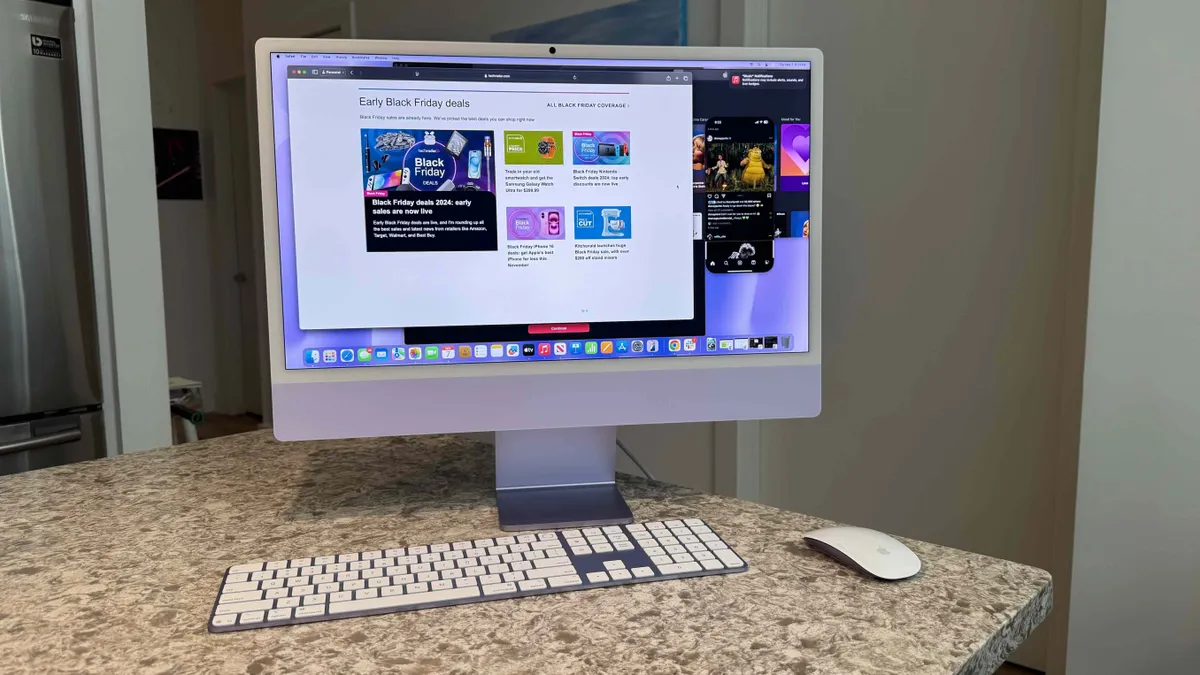


✅ You want the best all-in-one PC: Once again, Apple holds on to the best all-in-one PC crown, this time with the M4 chip and 16GB memory to start.
✅ You’ve got limited space: We still miss the larger-screened iMacs, but the 24-inch model is great for those with limited desktop space to spare.
❌ You need lots of processing power: There aren't any M4 Pro or M4 Max configurations available for this iMac, nor is there an M5 version, so you're limited to just the M4.
❌ You're a serious gamer: While Mac gaming has come a long way, Macs still leave a lot of gamers underwhelmed.
The 2024 iMac stands unmatched as the best all-in-one computer on the market, elevating Apple’s commitment to innovation with significant upgrades. Equipped with the new M4 chip, 16GB of RAM, and 256GB of storage, it offers remarkable performance and value starting at just $1,299.
This iMac retains its iconic 24-inch design, now available in six striking colors - Purple, Blue, Green, Orange, Yellow, and Silver - paired with color-matched peripherals and convenient USB-C ports.
With the powerful M4 chip, the iMac excels at smooth multitasking and fast app loading, making it ideal for both professional and creative use.
Video calls are enhanced with a higher-resolution FaceTime camera and Center Stage, keeping you perfectly framed. The optional nano-texture glass further improves usability, minimizing reflections for any lighting setup.
Running macOS Sequoia with early Apple Intelligence features, the 2024 iMac offers a cutting-edge, seamless experience immediately. While owners of recent models like the M1 or M3 iMac may not feel the urgency to upgrade, those with older models will discover a major leap in performance and functionality.
The iMac redefines what an all-in-one computer can be, combining elegance, power, and flexibility in a comprehensive package that’s perfect for any setting.
Read the full Apple iMac 24-inch M4 (2024) review
The best budget all-in-one computer


The Dell 24 All-in-One desktop is a well-priced machine that, despite the cost, doesn't feel like it's sacrificing quality. We never felt like it was too underpowered for what it's designed to do during our testing.
The AIO breezed through general day-to-day tasks, running office apps, browsing, streaming. If you're not looking for a powerhouse performer or gaming PC, it ticks all the right boxes. For students and hybrid/remote workers, it's a dream - particularly with that compact but 24-inch display.
Here, we found a nice screen with a built-in webcam and decent color coverage that's suitable enough for editing photos for your social media feed or website. A touchscreen version is also available, but it'll push the price up.
Better still, it's available in several configurations, so you can match the build to your budget and workflow.
The only real mark against it is the graphical performance. But then, it's not designed for high-end video editing and playing the latest AAA titles. We did squeeze some light gaming out of it, but even then, it hardly dazzled.
It's a machine built with productivity in mind. Video calls, office software, that sort of thing. And it did all that without skipping a beat.
Read our full Dell 24 All-in-One review
The best Windows 11 all-in-one computer


For a while if you wanted the best all-in-one PC, there was little choice but to get an iMac, and while Apple's iconic AIO machine remains our top pick, the new Lenovo Yoga AIO 27 is a brilliant alternative that runs Windows 11.
It looks fantastic with a sleek and modern design, and the screen is sharp and vibrant. While it doesn't come in a choice of pastel colors like the iMacs do, the Luna Grey colorway looks professional without being boring (something the designs of a lot a previous Windows all-in-ones can be guilty of).
The matching mouse and keyboard feel good to use and add to the overall stylish feel of the Lenovo Yoga AIO 27. One thing that the Lenovo Yoga AIO 27 offers over the iMac, and many of its competitors, is that it features two HDMI ports (one in and one out), so you can connect it up to a second monitor. Meanwhile, the HDMI in port allows you to plug in another device and use the Lenovo Yoga AIO 27 as a monitor - a fantastic feature that we wish more all-in-one PCs offered.
As for performance, the solid specs, including the latest CPUs from Intel, and the ability to configure the machine with an Nvidia RTX 4050 GPU means this is a very strong PC that can handle day-to-day tasks with ease, as well as more demanding creative workloads like video and photo editing. However, the model with a GPU is only available in some markets. That's a shame, and it would be nice to see it made more widely available. The built-in speakers let you enjoy Dolby Atmos, which means it's a great all-in-one for kicking back and watching movies and TV shows.
Read our full Lenovo Yoga AIO 27 review
The best all-in-one computer for content creators


While many creatives looking for an all-in-one PC might by default go for the iMac, the Windows 11-powered HP OmniStudio X 31.5 is well worth considering. It has a fantastic, and large, 4K display, brilliant speakers, and a stylish design that proves Apple isn't the only company that can make an attractive all-in-one PC.
So, creatives won't be missing out by getting the HP OmniStudio X 31.5 over an iMac when it comes to design. And, thanks to some configurations coming with a 4K display and dedicated graphics cards, the HP OmniStudio X 31.5 could actually be a much better choice, especially as Apple hasn't released an iMac Pro for many years now.
Thanks to plenty of RAM, a modern Intel Core Ultra 5 or Ultra 7 processor and up to an Nvidia RTX 4050 GPU, this is a powerful all-in-one PC that is particularly adept at graphic-intensive workloads, and even a spot of gaming. During our review we found that it handled high-resolution creative workflows in Photoshop and Premiere Pro, while also having Chrome running with dozens of tabs open at once. It's also excellent value for the quality on offer here, though we weren't massively impressed with the included mouse (not that Apple's Magic Mouse that comes with the iMac is much better).
It's also good value for money, and there's a cheaper model with a smaller 27.5-inch screen, which is also worth looking into if you want a stylish and professional all-in-one without spending a fortune.
Read our full HP OmniStudio X 31.5 All-in-One review
Find the best deals on HP products with our HP coupon codes.
The best office all-in-one computer


All-in-one PCs are great for offices (including home offices) as their compact designs can save space and result in a much cleaner-looking workspace, and if you're looking for the best all-in-one to work on, then the Dell OptiPlex 7420 is our latest pick.
It offers some very decent specs for a reasonable price, including up to an Intel Core i9-14900 processor, and you can configure it with up to 64GB of DDR5 RAM, which means that pretty much any work task will be handled with ease.
It comes with a built-in webcam that pops out of the top of the screen with a quick push, and offers some advanced features that other built-in webcams in all-in-one PCs lack. You can also gently push the webcam back down when not in use, which is a nice additional feature for privacy.
This is a solid and well built all-in-one PC for work, but we have to admit that the 1080p display is slightly disappointing, as that's quite a low resolution these days, especially when the screen is relatively compact at just under 24-inches.
Port placement isn't the best, but that's a common complaint with a lot of all-in-one PCs because of their unique designs. Despite these complaints, the Dell OptiPlex 7420 is an excellent and affordable all-in-one for business use.
Read our full Dell OptiPlex 7420 AIO review
The best all-in-one computer: FAQs
What is the best all-in-one computer?
The best all-in-one computer right now is Apple's iMac (24-inch, 2024). Although it's now a few years old, it's still the best in terms of design, performance, and value in our opinion.
It boasts that sleek and thin design, powerful performance that's quiet and robust enough for the more demanding creative tasks, and a price that is fairly affordable considering that it is an Apple product. Currently, Apple hasn't released an update to the iMac with its newer M5 chip, but we wouldn't be too surprised if that eventually comes at some point in 2026.
We're also in the process of testing newer releases, however, so who knows? There might be a Windows all-in-one impressive enough to knock it off the first place.
Can all in one computers have dual monitors?
You can't buy an all-in-one PC with two screen, but most will allow you to connect a second external monitor. To do this, the all-in-one computer will need to have an HDMI port, or a USB-C port that supports video.
There are also all-in-one PCs, such as the HP Envy 34, which feature ultrawide screens, so you're essentially getting the workspace of dual monitors, but with a single screen.
Are all-in-one computers good for gaming?
We wouldn't recommend an all-in-one computer for gaming. For a start, due to the fact that their designs mean that their components are packed into slimline screens and stands means there's rarely any space for a dedicated graphics card - which is essential if you want to play modern games.
The design also means airflow is impacted, so high-powered components are rarely used as they could overheat. Having built-in screens also means you're limited to using a display that likely doesn't feature gaming-centric features such as adaptive refresh rates. Sure, you could plug in an external gaming monitor, but then that means you're spending money for a built-in screen you won't be using.
You're much better off getting a gaming laptop or gaming desktop PC instead.
What are the disadvantages of all-in-one computers?
The only potential downside of an all-in-one PC is it’s difficult to upgrade internal hardware. This means that if you like upgrading your tech on your own, you will have a slight disadvantage with an all-in-one computer. That's especially if you have something like an iMac.
How to choose the best all-in-one computer for you
All-in-one PCs, like their desktop and mobile counterparts, come in different configurations, designs, and price tags. Choosing the best one for you, therefore, is much like when choosing a laptop or a desktop PC. You must consider things like power and performance, as well as design and features.
Of course, since an all-in-one comes with its own set of peripherals, these are obvious considerations as well. Check the display, and make sure that it has the right size, resolution, color coverage, color accuracy, and brightness for your workload. Ensure also that the speakers sound great. Since many AIO PCs come with their own keyboard and mouse, make sure that those are comfortable to use and reliable. Otherwise, you'll only end up spending more to get better quality peripherals.
Since there are all-in-one PCs sitting at different price brackets, the price is a very important factor. Don't get an expensive one if you aren't going to take full advantage of its features, and don't get a cheap one when it can't meet your demands.
How we test all-in-one computers
Here at TechRadar, we believe in rigorously testing every piece of hardware that passes through our hands. If it fails to impress during testing, we won't recommend you buy any product that falls short of the performance median for its price range.
Our testing process varies from product to product. Specifically with all-in-one PCs, because they come with their own display and speakers, we test those on top of their ability to tackle workloads. We're always sure to run the most appropriate tests, including running editing benchmarks for an AIO designed for content creation. We also always examine its build quality and features to see how they measure up.
Finally, we take everything to see whether it aligns with the attached price tag. If you want to know more about how we test and rate the computers in this guide, check out our explainer on how we test laptops and desktops to learn more.
Today's Best All-In-One Computer Deals
