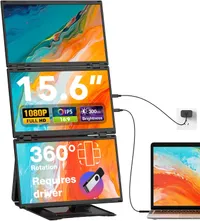
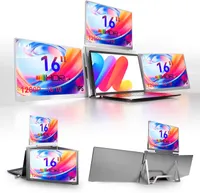
If you feel constrained by your laptop's single display, especially when working on complex or data-heavy tasks, this triple portable monitor setup is a great solution.
Priced at $599.99 on Amazon, the KYY Triple Screen Laptop Monitor Extender turns a compatible notebook into a four-screen workstation using a single USB-C connection, avoiding the clutter and setup confusion often associated with such devices.
Each of the three external panels measures 15.6 inches and runs at 1080p with a standard 16:9 aspect ratio. Combined with a laptop’s built-in screen, the total usable desktop space can reach an effective 4K-class resolution across four displays.
Today's top Triple Screen Laptop Monitor Extender deal
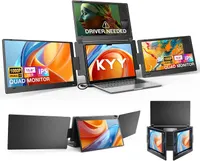
The extra space makes it easier to keep code, spreadsheets, dashboards, charts, and communication tools visible at the same time, rather than constantly having to switch between windows.
The extender can be used with Windows, macOS, Linux, and Android, although some platforms may require you to install the relevant drivers before you can use it.
One of the main selling points for me is the product's simplicity. A single USB-C cable powers and drives all four screens, cutting down on adapters and extra cables.
This will make it a practical choice for mobile professionals who want a consistent multi-screen setup at home, in the office, or while traveling.
Extended and mirrored display modes are supported, allowing layouts to be adjusted depending on the task.
Instead of hanging additional screens directly from the laptop lid, the integrated aluminum alloy stand supports the displays independently, reducing potential strain on the laptop’s hinges and screen and providing a more stable base.
The top panel can automatically rotate when folded backward, and the adjustable arms allow up to 360-degree positioning for collaboration or face-to-face viewing.
In terms of panel quality, the IPS displays run at 60Hz with a matte surface. A rated brightness of up to 400nits and low blue light technology will help reduce eye strain during long work sessions.
For professionals who value screen real estate and portability over raw pixel density, this is a great way to expand a laptop’s workspace without turning your desk into a unruly nest of cables.
Also consider