TechRadar Verdict
A genuinely exceptional Thunderbolt 5 dock for power users and creative professionals, with the massive caveat that your laptop actually supports TB5. The built-in M.2 SSD slot, CompactFlash reader, optical audio, and programmable hotkeys give it a feature set that simply doesn't exist elsewhere. But you do pay for the privilege.
Reasons to buy
- +
80Gbps TB5 bandwidth (120Gbps with Boost)
- +
Built-in lockable PCIe 4.0 M.2 SSD slot
- +
140W power delivery over a single cable
- +
Optical (TOSLINK) audio output
- +
KonstantCharge that charges peripherals when undocked
Reasons to avoid
- -
The price is steep
- -
Needs a TB5 laptop to get the full experience
- -
30W USB-C charging cap
- -
Hotkey features (photo backup, DND) are macOS only
Why you can trust TechRadar We spend hours testing every product or service we review, so you can be sure you're buying the best. Find out more about how we test.
Kensington SD7100T5 EQ Pro: 30-second review
I still have questions about the cart-before-horse nature of Thunderbolt 5 docks, where we have so many dock choices when there are virtually no TB5 peripherals, and a tiny percentage of laptops have this port.
Ignoring those salient points, the Kensington SD7100T5 EQ Pro is yet another slice of Thunderbolt technology for those lucky enough to have a TB5-capable system and can afford a top-tier docking station to go with it.
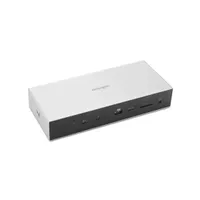
Straight up, this is easily the nicest Thunderbolt dock I’ve ever seen from Kensington, combining some elegant chamfered corners and a cool-to-the-touch metal exterior.
The front side has a great selection of ports, including card readers for three different standards. And at the back are even more connection options, including a few I’ve never seen on a dock, such as a TOSLINK optical for digital audio.
Having nineteen ports is an important selling point, but this dock can also operate as a Thunderbolt-connected SSD using a provided M.2 PCIe 4.0 slot, if you install an SSD.
However, when you combine this level of build quality with unique features, the first casualty is the budget, and this is one of the more expensive TB5 docks. And that price might easily be doubled if you want one for home and work.
Throw in some Thunderbolt-to-DisplayPort or HDMI adapters, and you might easily exceed $1500 for two docks and a 2TB NVMe drive.
If you need only one dock and have monitors that can accept Thunderbolt directly, then the outlay might be easier to justify. But with TB4 docks hovering around $200, the performance benefits of this dock might need to be documented.
Ignoring the price, this is easily one of the best laptop docking stations I’ve tested with Thunderbolt 5, even if it doesn’t have any direct HDMI or DisplayPort outputs.
Kensington SD7100T5 EQ Pro: Price & availability

- How much does it cost? $279/£223/€260
- When is it out? It’s available now
- Where can you get it? Direct from WavLink
From what I understand, there are two variants of this dock: K33611NA (standard) and K33612NA (Mac-optimised). That makes little sense, since Thunderbolt 5 is meant to be a standard, and not something that needs to be optimised for on a particular platform. Unless Apple took it on themselves, uncharacteristically, to adopt a piece of technology and then break it?
You can get either directly from Kensington in the USA, but these are oddly missing from the European Kensington websites. The cost of both models directly from the maker is $449.99, which serves as an MSRP for this hardware.
However, it's cheaper via the Kensington outlet on Amazon.com, where it's available for only $404.99. The Newegg price is $435, curiously.
UK pricing via Amazon is only £389.10, and the EU price is around €430.
That $449.99 MSRP price is the single biggest conversation point of this dock, and with good reason. That is roughly double the cost of a well-specified Thunderbolt 4 dock, and it puts the SD7100T5 firmly in the corporate IT procurement bracket rather than the individual buyer market.
The justification for the price is the unique combination of features. As no other TB5 dock at any price currently bundles a PCIe M.2 SSD slot, CompactFlash reader, optical audio, programmable hotkeys, and three Thunderbolt 5 downstream ports into a single unit.
The bottom line is that if you can afford a laptop with TB5, you probably won’t be concerned about the cost of this hardware, and it is easily one of the best docks available.
- Value: 4 / 5
Kensington SD7100T5 EQ Pro: Specs
Feature
|
Specification
|
Compatibility
|
Thunderbolt 5, Thunderbolt 4, USB4, USB-C (Windows 11 23H2+, macOS 14.5+)
|
Total Ports
|
19-in-1
|
Thunderbolt 5 (upstream)
|
1x TB5 host port (80Gbps / 120Gbps Bandwidth Boost)
|
Thunderbolt 5 (downstream)
|
3x TB5 ports — support up to 140W PD and display output
|
USB-A ports
|
4x USB-A 3.2 Gen2 (10Gbps)
|
USB-C ports
|
2x USB-C 3.2 Gen2 (10Gbps); 1x up to 30W charging
|
Video — Windows
|
Triple 4K@144Hz or Dual 8K@60Hz
|
Video — Mac
|
Dual 6K@60Hz (M-Series Pro/Max required)
|
Power Delivery
|
Up to 140W (USB PD 3.1 EPR, 28V/5A)
|
KonstantCharge
|
Yes
|
Storage Slot
|
1x PCIe 4.0 NVMe M.2 SSD slot (lockable, SSD not included)
|
Card Readers
|
CF 4.0, UHS-II SDXC, UHS-II microSDXC
|
Network
|
1x 2.5GbE Ethernet
|
Audio
|
3.5mm headphone jack, 3.5mm mic jack, 3.5mm speaker jack, TOSLINK optical
|
Hotkeys
|
2x programmable (iPhone backup + DND on Mac; custom on Windows)
|
Mounting
|
Pre-drilled holes for optional bracket (K34050WW, sold separately)
|
Security
|
Kensington lock slot (cable lock sold separately)
|
Thermal
|
Passive cooling
|
Construction
|
97% post-consumer recycled (PCR) aluminium
|
Warranty
|
3-year limited
|
Kensington SD7100T5 EQ Pro: Design

- Recycled aluminium construction
- Lockable M.2 slot
- No display outputs
The SD7100T5 represents a design departure for Kensington, moving away from the brand's more conservative corporate aesthetic towards something that looks more at home on a creative's desk.
The marketing presentation declares that the case is constructed from 97% post-consumer recycled aluminium, a genuine sustainability credential if true.
The metal used in this dock is critical to the heat dissipation from the Thunderbolt electronics and the SSD, if you mount one. It did get slightly warm in use, but not too hot to touch, even after several hours of activity.
Due to the SD7100T5's lateral design, it is intended exclusively for horizontal desktop use, and Kensington sells a secure mounting plate accessory that attaches to the threaded holes on the underside.
Without that accessory, which isn’t included in the box, there are two security slots on the left side that work with Kensington's own cable locks, unsurprisingly.

The top panel is removable via a single screw, revealing the M.2 SSD slot beneath. This screw is small and requires a tiny Phillips screwdriver, which Kensington doesn’t include with the dock. With the screw removed, the M.2 slot can be populated with any PCIe 3.0 or 4.0 specification NVMe drive, and made accessible from the computer.
Thermal pads inside the slot thermally connect the drive to the case, but these don’t allow for drives that have attached heatsinks to be used. The counter to that downside is that the slot supports drives of different sizes, with 2232, 2240 and 2260 being supported alongside 2280.
Getting a drive installed and running takes a relatively short amount of time, assuming you have a suitably sized screwdriver.
I’m not going to list all the ports, because it's tedious, but there are some unusual ones that need to be mentioned. I’ve already spoken about TOSLINK Optical Audio, but for those using headphones and a microphone, 3.5mm audio jack inlets are included.
The typical arrangement for Thunderbolt docks is to have a single uplink port to the laptop that carries power and data, with two downlink ports usually on the rear of the dock. That’s not the case here, because there are three downlink ports, with one conveniently on the front.
My only issue with downlink ports is that the maximum power they can deliver is 30W, which makes them less than useful for charging phones. However, this dock does have KonstantCharge, another made-up word for keeping power available to attached hardware when the host system is turned off or disconnected. I like that idea, and I wish more docks had that feature.
There are two programmable hotkeys on the top surface, which some might find useful. On macOS, one handles iPhone photo backup and the other acts as a Do Not Disturb toggle; on Windows, both are customisable via the Kensington Konnect software.
Overall, this is an extremely nice dock with plenty of useful features and a few things that are less than must-have. Of these, the M.2 slot and the three TB downlinks are the ones that customers will probably buy this hardware for.
- Design: 3.5 / 5
Kensington SD7100T5 EQ Pro: Features
- TB5 Bandwidth Boost
- Built-in M.2 SSD slot
- CompactFlash + optical audio
The SD7100T5's feature list is what separates it from every other dock on the market. Starting with the connection: Thunderbolt 5 delivers 80Gbps bidirectional bandwidth as standard, increasing to 120Gbps under Bandwidth Boost when driving video-intensive workloads.
To put that in context, a decent USB-C dock, like the WavLink WL-UG75PD1-DH2, operates on 10Gbps USB-C, which gives the SD7100T5 twelve times the bandwidth available to share across its ports.
The built-in PCIe 4.0 NVMe M.2 SSD slot is arguably the dock's most distinctive feature. It is lockable (the top panel is secured by a screw rather than friction), making it suitable for shared or office environments where physical security matters.
Often, laptops are given a modest amount of storage, like 1TB, but sometimes even less, and having another 2TB, 4TB or even 8TB of drive space when you connect to the dock could make data-intensive tasks easier to handle.
The SSD is not included and must be purchased separately, but even if it merely provides a means to back up the laptop, it's probably worth the investment.
The card reader selection goes further than any competing dock: CF 4.0 (CompactFlash), UHS-II SDXC, and UHS-II microSDXC. I’ll be honest and admit that I haven't used Compact Flash in at least 14 years, but I also know that some professional photographers still use older high-end DSLRs that require it. If you are one of those, then this might be another reason to invest in this design.

Audio connectivity is similarly comprehensive: separate 3.5mm headphone, mic, and speaker jacks plus a TOSLINK optical output. The optical connection enables lossless audio passthrough to external DACs and high-end audio systems, making it extremely helpful for anyone editing video or audio.
Features like the CF support and TOSLINK are quite unique for a TB5 dock, and while it could easily be argued that they’re somewhat niche, those that need them won’t care.
However, the lack of any direct HDMI or DisplayPort might also put off those looking for a more general-purpose device, since that requires additional budget to add adapters for monitor connectivity.
- Features: 4 / 5

Kensington SD7100T5 EQ Pro: Performance
- 80Gbps upstream bandwidth
- No DisplayLink compression
- TB5 Bandwidth Boost for video
The fundamental performance story of the SD7100T5 is the inverse of those docks that use USB-C or even Thunderbolt 4. On those devices, the issue of bandwidth management becomes critical, as they might be trying to service 55Gbps worth of ports (or more) with as little as a 10Gbps uplink.
The SD7100T5 operates on 80Gbps, rising to 120Gbps under Bandwidth Boost. The bandwidth pie is dramatically larger, which means port oversubscription is far less of a practical concern in real-world use. Bandwidth boost, in particular, enables display data not eat into the bandwidth for other devices, which it would on lesser docks.
In USB-C and Thunderbolt 4 docks, this is often mitigated using DisplayLink, which uses CPU-side video compression to minimise the amount of bandwidth required to support displays.
Critically, the SD7100T5 does not use DisplayLink. All video output goes through native Thunderbolt 5 signalling, meaning there is no CPU-side video compression, no software driver requirement for display output, and no compression artefacts or lag on moving content. Triple 4K@144Hz on Windows is native and uncompressed, a capability that is fundamentally impossible on DisplayLink-based solutions.
The proof in this pudding is that it is possible to connect a monitor via a Thunderbolt-to-HDMI or Thunderbolt-to-DisplayPort adapter, have that running, transfer a large file to an NVMe drive installed in the M.2 slot, and still achieve full speed. And critically, there is no impact on the image quality on the display.
The caveat to all this functionality is that the host system must have a Thunderbolt 5 port. Running this dock from a Thunderbolt 4 host rather than TB5 will still work, but the connection will be capped at TB4's 40Gbps, which means the Bandwidth Boost is unavailable and maximum display configurations are reduced.
The dock is fully backwards-compatible; you simply won't be able to access the full specification without a TB5 laptop, and, as a good TB4 dock is half the price, the extra cost of this device was largely pointless.
- Performance: 4 / 5
Kensington SD7100T5 EQ Pro: Final verdict

The Kensington SD7100T5 EQ Pro is the most comprehensively specified docking station available today. Its combination of three TB5 downstream ports, built-in M.2 SSD slot, CompactFlash reader, optical audio, 140W power delivery, and programmable hotkeys in a single recycled aluminium chassis is, at the time of writing, without direct competition.
If you have a Thunderbolt 5 laptop and can make use of what this dock offers, it is worth the $449.99, even if that’s a significant investment.
The problem, and it’s an awkward one, is that TB5-capable laptops are like hens' teeth. Normally, this is part of the review where I say that this situation will get better when X, Y and Z happen, but I’d be lying in this instance.
Intel's 2026 Panther Lake will not natively support TB5, meaning the total addressable audience remains primarily Apple M4 Pro/Max MacBook users and a relatively small number of Intel Core Ultra 200H/HX Windows users. For everyone else, a Thunderbolt 4 dock at $200-250 will deliver 80% of the practical benefit at half the cost.
For the right user, however, this dock genuinely transforms a single-cable laptop setup into a fully featured workstation. The M.2 SSD slot alone is a workflow improvement that has proven difficult to go back from, once experienced. The three-year warranty and Kensington's established reliability record add further confidence for IT procurement decisions.
If you are lucky enough to have the right platform to attach it to, the Kensington SD7100T5 EQ Pro is probably the best dock so far, if you can afford one.
Kensington SD7100T5 EQ Pro: Report card
Value |
Expensive but no other dock matches this feature set at any price |
4 / 5 |
Design |
Premium recycled aluminium, lockable SSD slot, thoughtful hotkeys |
4.5 / 5 |
Features |
Best-in-class: M.2 slot, CompactFlash, optical audio, 3x TB5 downstream, KonstantCharge |
4 / 5 |
Performance |
Native TB5 video, no DisplayLink, full PCIe 4.0 SSD speed, consistent throughput |
4 / 5 |
Overall |
The most capable dock available, but only for those who genuinely need what it offers |
4 / 5 |
Should I buy a Kensington SD7100T5 EQ Pro?

Buy it if...
Don't buy it if...
Also consider