





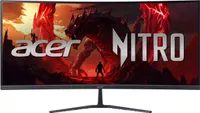
If you want to try ultrawide gaming without spending much, the Acer Nitro 34-inch curved monitor (ED340CUR) is $229.99 at Best Buy.
● Best for: Gamers on a budget who want a wider field of view, plus anyone who works with lots of windows open
● The deal: The Acer Nitro ED340CUR 34-inch curved gaming monitor is $229.99 (was $349.99) at Best Buy
● Why we like it: A 34-inch 3440 x 1440 VA panel, 200Hz refresh rate, 1500R curve, FreeSync Premium, and two HDMI 2.1 ports
Why we recommend it
Acer's Nitro range is its value gaming line, and this model gets the basics right: a sharp ultrawide resolution, a high refresh rate, and the strong contrast VA panels are known for. Best Buy buyers rate it 4.6 out of 5 from more than 350 reviews. We haven't tested it ourselves, but our sister site PC Gamer has picked a 120Hz version of this monitor as the cheapest ultrawide it would recommend, and this model raises the refresh rate to 200Hz.
Price Context & Historical Value
Best Buy had it at $269.99 earlier this year, so $229.99 is $40 lower than the last sale we found. Note that $349.99 is Best Buy's comparable value. For a 200Hz ultrawide from a major brand, that's a lot of screen for the money.
Should You Buy It?
✅ Buy the Acer Nitro ED340CUR if...
you want an ultrawide for gaming and multitasking on a budget, you like high contrast for darker games and movies, or you want two HDMI 2.1 ports for a console and a PC.
❌ Skip the Acer Nitro ED340CUR if...
you need accurate color for photo or video work, since VA panels can't match IPS there, you want a stand that adjusts for height (this one only tilts), or you'd rather pay more for an OLED with faster response times.
