
 Become a TechRadar Insider





The best mobile controllers could be the best upgrade you get for your phone if you're big into gaming on the go. No matter what kind of titles you play, a capable mobile gamepad is very likely going to improve your experience. For pad-friendly games like Arknights: Endfield or Zenless Zone Zero, a mobile controller allows for a much more console-like feel and helps you avoid those smaller touchscreen cramps.
But the best mobile controllers are great for more than just comfort. For first-person shooters like Call of Duty: Warzone Mobile, a mobile controller can massively improve your precision with accurate thumbsticks, preparing you for ranked matches once you leave those bot lobbies.
I’m an avid mobile gamer and have tested countless mobile controllers here at TechRadar Gaming, so I’ve put together this guide to help you find the best one for your needs. In addition to evaluating the individual features and performance of each model featured, I’ve also carefully considered the price to ensure that one is truly the best value option in its class.

I'm a dedicated mobile gamer with almost half a decade of experience writing about games and hundreds of hours spent in Call of Duty: Mobile and Zenless Zone Zero. I've also reviewed tens of mobile controllers for TechRadar. Before joining our gaming team, I worked at the UK's biggest PlayStation magazine and have contributed to the likes of PC Gamer, SFX, and Edge.
Best mobile controllers in 2026
Why you can trust TechRadar We spend hours testing every product or service we review, so you can be sure you're buying the best. Find out more about how we test.
Best overall
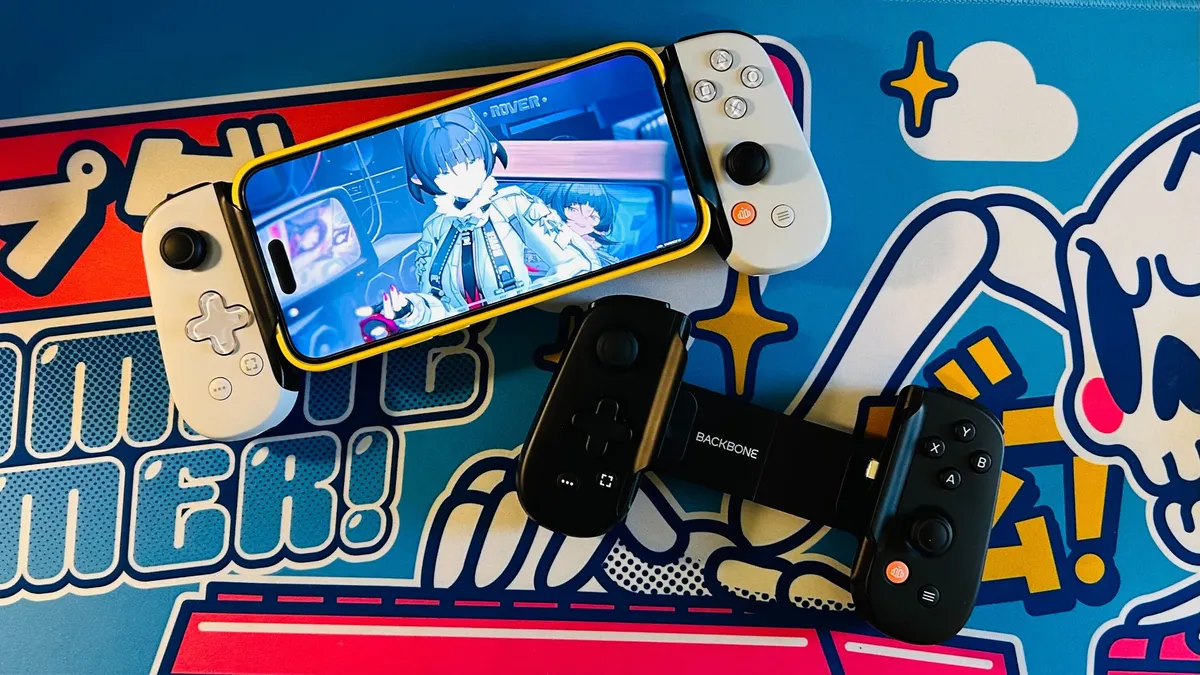


The Backbone One 2nd Gen is the overall best mobile controller at the moment and is a fantastic all-round performer. It was the peripheral to popularize the now common extending design, which can slide open to sandwich your phone.
It boasts wide compatibility with its Type-C connector, which works readily with both Android and newer iOS devices. With some small rubber adaptors included in the box, it can fit around most phone cases too. You don’t even need to worry if you own an older iPhone, as there are also Lightning connector variants available.
When it comes to performance, there are very few areas where you can fault the Backbone One 2nd Gen. It has robust face buttons with a lovely clicky feel, reliable thumbsticks, and a top-notch d-pad that’s a brilliant fit for 2D platformers. You also get a 3.5mm headphone jack, which is perfect for a wired gaming headset, and an additional Type-C port for passthrough charging - preventing your phones from running dry while you play.
While it works out of the box in a plug-and-play capacity, the compatible Backbone app boasts plenty of great features - including plenty of customization and an in-built game launcher. Just bear in mind that some app features sadly require an additional subscription to access.
For PlayStation lovers or those most interested in PS Remote Play, check out the dedicated PlayStation Edition. This variant is the same price as the regular black version but features an all-white design with PlayStation button markings to really channel that DualSense Wireless Controller goodness. The Backbone One 2nd Gen is my go-to travel companion, as it’s small enough to cram in a bag and works wonderfully with a wide range of genres.
- Read more: Backbone One 2nd Gen review
Best budget


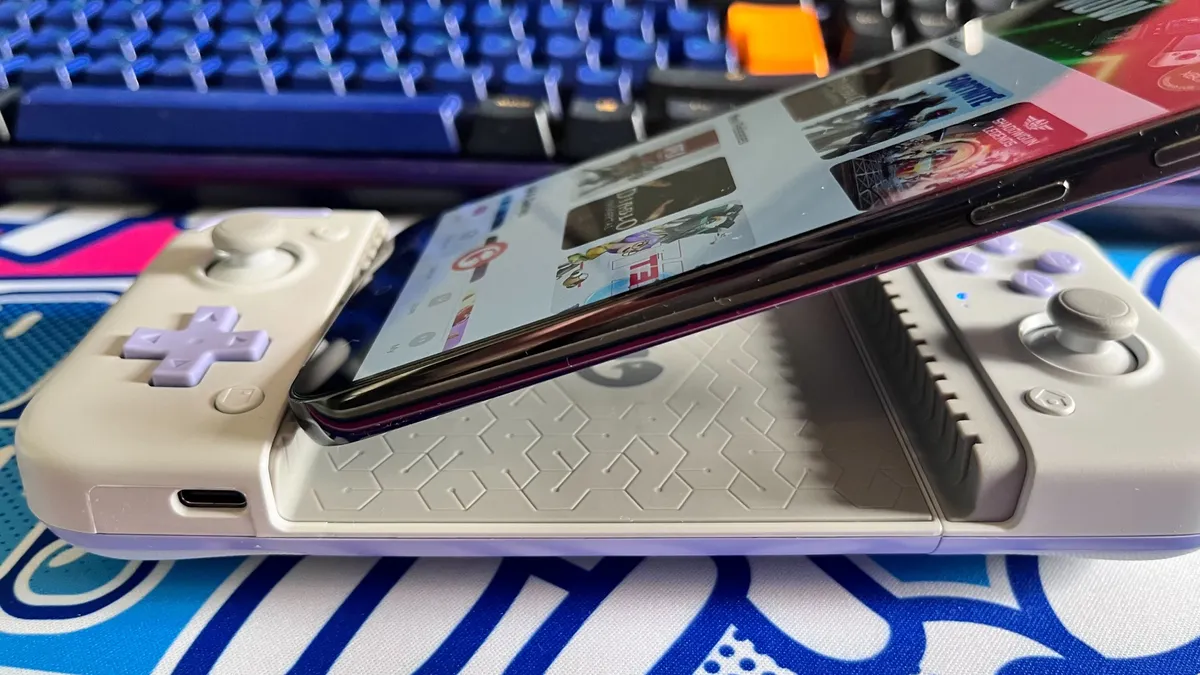


If you’re on a tighter budget, then I highly recommend the GameSir X2s Type-C. This pad has a unique design inspired by the look and feel of the Nintendo 2DS, with a soft and spongy D-pad that will be immediately familiar to anybody who has used that handheld. Like the 2DS, it’s a lot cheaper than the competition and is easy to find at less than half the cost of the Backbone One 2nd Gen.
In performance terms, the GameSir X2s Type-C definitely punches above its weight. Its large flat shape makes it very comfortable in the hands, even over long periods of play. It also features Hall effect thumbsticks and triggers, which should help this controller last a lot longer than others.
Every game I played, be that the native Android version of Vampire Survivors or Far Cry 5 via Amazon Luna cloud streaming, felt snappy and responsive throughout. This model also boasts a unique movable Type-C connector, which can twist and pivot slightly when plugged into your phone. In practical terms this makes it much easier to attach or remove your device, reducing the chance that you might accidentally damage its charging port.
The only major downside of the GameSir X2s Type-C, aside from the annoying lack of a headphone jack, is its build. This is a controller that certainly feels cheap when you take it out of the box, especially if you’re used to more premium peripherals. It’s very lightweight and seems almost hollow in the hands though this isn’t particularly surprising and is acceptable given the low asking price.
- Read more: GameSir X2s Type-C review
Best premium


The Razer Kishi V3 Pro is effectively the Razer Kishi Ultra's replacement, coming in at the same retail price as that outgoing model. And as the V3 Pro is a slightly enhanced product, you're not really missing out on anything by opting for it over the Ultra.
What made the Kishi Ultra great is also true of the Kishi V3 Pro. It's got that high-end, Razer-tier build quality and ergonomics, making longer gaming sessions wonderfully comfortable. Thumbsticks see an improvement here, feeling sublime in the hands and offering top-tier precision. You'll find the Kishi V3 Pro is a dab hand at making laborious commutes or travel into something far more enjoyable as a result.
There's tons of great quality-of-life here, too. Four remappable multi-function buttons offer plenty of button layout customizability. Pass-through charging makes a return, too, letting you charge up your phone while you play. And if you like a bit of tactile feedback during gameplay, Razer's Sensa HD haptics offers immersive vibration with compatible games. Not for everyone, perhaps, but the feature can be toggled to your preference.
And then there's the excellent Razer Nexus app, which offers a dedicated launcher on the device. Nexus is an incredibly powerful bit of software that lets you fine-tune your controller experience (from trigger depth to stick sensitivity), download new games, or even stream games from other devices to your phone.
The virtual controller mode that I loved with the Razer Kishi Ultra returns here, too. It effectively lets you map touch controls to the Kishi V3 Pro's buttons, d-pad, stick modules, and triggers. Ultimately, this allows you to play mobile games that otherwise don't have native controller support, like League of Legends: Wild Rift, or various retro gaming platforms and emulators.
- Read more: Razer Kishi V3 Pro review
Best for Call of Duty: Mobile

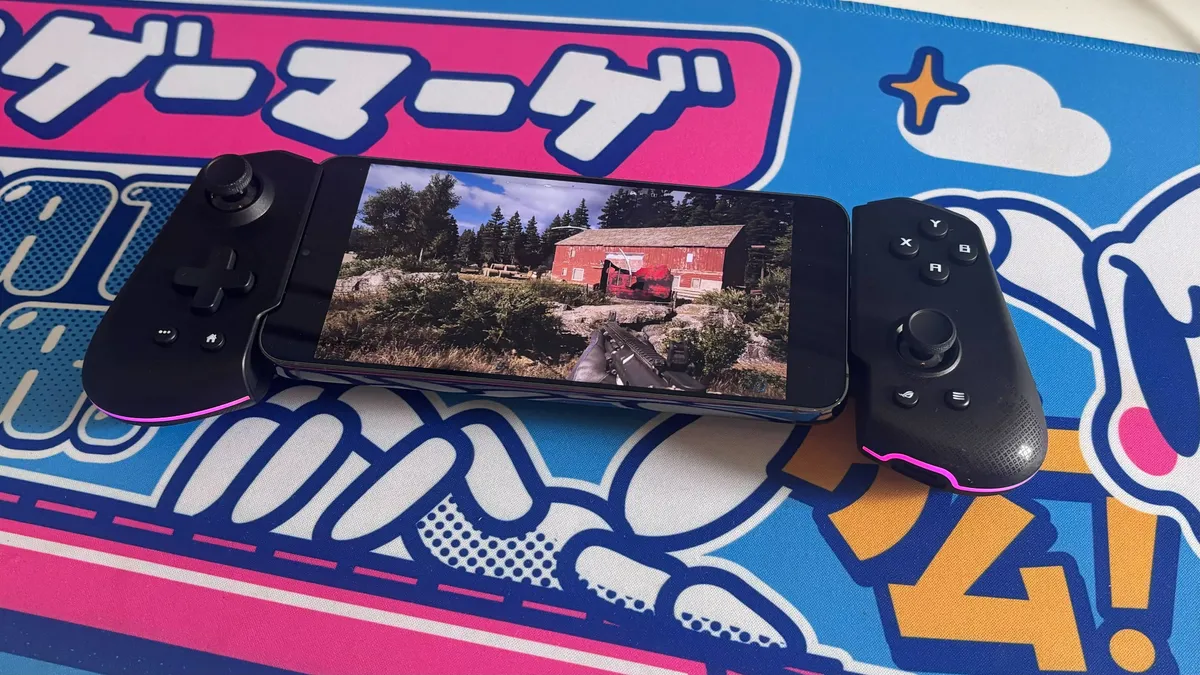


If you’re a dedicated Call of Duty: Mobile or Call of Duty: Warzone Mobile player, then you’re going to need a controller that’s a particularly good fit for first-person shooters. That’s exactly where the Asus ROG Tessen comes in, with quick thumbsticks and shallow triggers that ensure you won’t be let down by your controller when you’re required to react quickly in a match. You also get two durable metal rear paddles, which can be mapped to functions like throwing grenades, reloading, or sliding so you don’t ever have to take your fingers off the trigger.
Like the Razer Kishi Ultra, the Asus ROG Tessen also features some strong RGB lighting that really adds to its aesthetic. It’s also one of the most portable entries on this list thanks to its overall light weight and a unique folding mechanism which allows you to fold the controller in half for easier storage.
One thing I did notice, however, was that the controller could become uncomfortable after playing for a few hours. It has quite angular grips, which I found could dig into my palms over time, though this shouldn’t be a concern if you’re playing games that rely on short, fast-paced matches.
With that in mind, the biggest downside of the Asus ROG Tessen is by far its limited compatibility. This is a controller that is exclusively compatible with Android phones, leaving iOS users with alternatives like the Backbone One 2nd Gen.
- Read more: Asus ROG Tessen review
Best Bluetooth


Those after a Bluetooth mobile controller should look no further than the Turtle Beach Atom, which is available in both iOS and Android variants.
Unlike the other entries on this list, this gamepad relies on wireless Bluetooth rather than a physical connector. This means you don’t have to worry about whether your phone has a Type-C or Lightning connector which makes it a good choice if you’re currently on an older device that you intend to upgrade soon and don’t want to lose access to your peripherals.
It’s also super portable, as it comprises two interlocking pieces that can combine together to slip in the included carrying case. Unfortunately, as a Bluetooth device you will have to charge this up separately to your phone - so make sure that you’ve plugged it in for a while before your next big trip. Luckily, its battery life is strong, with roughly 20 hours of juice which should be enough for even the longest of journeys.
While I think the buttons and thumbsticks are good, the D-pad leaves a lot to be desired in my eyes. It’s very flat, which makes it easy to quickly hit inputs if your fingers are on the thumbsticks but makes it a bit uncomfortable to hold down for any period of time. Your mileage with it is really going to come down to what games you play: if it’s something that requires frequent D-pad inputs, then you’re better off with an alternative like the GameSir X2s Type-C.
Otherwise, with a price roughly on par with the Backbone One 2nd Gen, this is a good Bluetooth alternative.
- Read more: Turtle Beach Atom review
FAQs
What is the best controller for mobile?
The best controller for mobile is largely going to come down to your own personal needs and budget. Having tested lots of mobile controllers, I think that the Razer Kishi V3 Pro is the best option on the market - but it is far and away the most expensive option here. The Backbone One 2nd Gen is therefore a great all-rounder, as it comes in at a more affordable price while offering great controls and a decent set of features.
What controller can I use for mobile?
You can use lots of different controllers for mobile, including standard standard Bluetooth controllers like the Xbox Wireless Controller. I prefer dedicated mobile controllers, however, as they have been designed specifically for use with a phone. Most also feature a way to hold on to the phone while it’s in use, which makes it much easier to play portably.
What controller is best for Call of Duty: Mobile?
Based on my hands-on testing, the Asus ROG Tessen is a fantastic fit for Call of Duty: Mobile. It’s fully compatible with the game and compact, making it easy to bring out and about when you’re practicing matches on the go. It also features reliable thumbsticks, quick triggers, and fast, clicky buttons on top of two remappable rear paddles made of a durable metal material. It even has a strip of RGB lighting, giving you the ability to customize its look.
How we test the best mobile controllers
I have personally evaluated each of the mobile controllers featured on this list, in addition to a wide range of others including the Scuf Nomad, original Backbone One, Turtle Beach Recon Cloud, and Mobile Controller MG-X Pro. I’m a dedicated mobile gamer, trying products with a range of different devices.
I usually play on an iPhone 15 Plus or Samsung S23 Plus, though have also tried mobile gamepads with compatible tablets such as the iPad Mini 5 and Lenovo Legion Tab 3.
In addition to writing about games and gaming products for almost half a decade, I also test a wide range of other controllers at TechRadar Gaming, so I’ve garnered plenty of knowledge on what makes a particular controller worth your time and money.