
TechRadar TechRadar the technology experts
SG EditionSingapore
DK EditionDanmark FI EditionSuomi NO EditionNorge SE EditionSverige UK EditionUK IT EditionItalia NL EditionNederland BE (NL) EditionBelgië (Nederlands) FR EditionFrance DE EditionDeutschland ES EditionEspaña
US EditionUS (English) CA EditionCanada MX EditionMéxico
AU EditionAustralia NZ EditionNew Zealand
RSS
Sign in
  • View Profile
  • Sign out
  • Phones
    • Popular Phone Brands
      • iPhone
      • Samsung Galaxy
      • Google Pixel
      • Nothing
      • Motorola
      • OnePlus
      • Xiaomi
      • Honor
      • Oppo
      • Huawei
    • Operating Systems
      • Android
      • iOS
    • More from Phones
      • Network Carriers
      • Phone Accessories
      • Phone Reviews
      • Phone Buying Guides
      • Phone Deals
      • Phone Coupons
      • Phone News
  • Computing
    • Laptops
      • Chromebooks
      • MacBooks
      • Windows Laptops
      • Gaming Laptops
    • PCs
      • Desktop PCs
      • Macs
      • Gaming PCs
    • Software & Security
      • Windows
      • macOS
      • Windows 10 End of Life
      • Antivirus
      • Cyber Security
    • Components
      • CPUs
      • GPUs
      • Storage
      • Nvidia
      • Intel
    • Internet
      • Websites & Apps
      • Wi-Fi & Broadband
      • Social Media
      • Wordle
    • Tablets
      • eReaders
      • iPad
    • VR & AR
    • Peripherals
      • Monitors
      • Keyboards
      • Webcams
      • Mice
    • Popular Computing Brands
      • Dell
      • HP
      • Lenovo
      • Acer
    • More from Computing
      • Computing Reviews
      • Computing Buying Guides
      • Computing Deals
      • Computing Coupons
      • Computing News
  • AI
    • AI Platforms & Assistants
    • OpenAI
    • ChatGPT
    • Gemini
    • Apple Intelligence
    • Claude
  • TVs
    • TV Insights
      • TV Reviews
      • TV Buying Guides
      • TV Deals
      • TV News
      • TVs & home theater coupons
    • More for your TV
      • Home Theatre
      • Soundbars
      • Streaming Devices
      • Projectors
      • Blu-ray
  • Streaming
    • Entertainment
    • Netflix
    • Prime Video
    • Disney+
    • Apple TV
    • HBO Max
    • Hulu
    • Paramount+
    • How to Watch
    • Streaming coupons
  • Fitness
    • Fitness
      • Smartwatches
      • Fitness Trackers
      • Exercise Equipment
      • Fitness Headphones
      • Fitness Apps
      • Smart Rings
    • Watch Brands
      • Apple Watch
      • Fitbit
      • Garmin
      • Google Pixel Watch
      • Samsung Galaxy Watch
    • Wellbeing
      • Sleep
      • Oral Health
    • More from Fitness
      • Fitness News
      • Fitness Reviews
      • Fitness Buying Guides
      • Fitness Deals
      • Fitness coupons
  • Audio
    • Headphones
      • Earbuds & AirPods
      • Wireless Headphones
    • Speakers
      • Wireless Speakers
      • Sonos
    • Hi-Fi
      • Turntables
      • Portable Players
      • DACs
    • Audio Streaming
      • Spotify
      • Apple Music
    • More from Audio
      • Audio News
      • Audio Reviews
      • Audio Buying Guides
      • Audio Deals
      • Audio coupons
  • VPN
    • VPN Services
    • VPN Security
    • ExpressVPN
    • NordVPN
  • Cameras
    • Camera Types
      • Mirrorless
      • DSLRs
      • Compact
      • Action
      • Video
      • Drones
      • 360 Cameras
      • Dash Cams
    • Camera Brands
      • Canon
      • DJI
      • Fujifilm
      • Nikon
      • GoPro
      • Insta360
    • More from Cameras
      • Camera Accessories
      • Camera Lenses
      • Camera Reviews
      • Camera Buying Guides
      • Camera Deals
      • Camera News
      • Photography
      • Camera coupons
  • Home
    • Smart Home
      • Home Security
      • Smart Speakers
      • Smart Lights
      • Smart Scales
      • Smart Thermostats
      • Amazon Echo
    • Small Appliances
      • Air Fryers
      • Air Quality
      • Coffee Machines
      • Hair Care
      • Vacuums
      • Robot Vacuums
    • Home Brands
      • Dyson
      • Philips Hue
      • Ring
      • Shark
      • Ninja
    • More from Home
      • Home Reviews
      • Home Buying Guides
      • Home Deals
      • Home News
      • Mattress coupons
      • Home & appliances coupons
  • EVs
  • Browse
    • By Type
      • News
      • Best
      • Reviews
      • Deals
      • Versus
      • How To
      • Opinion
      • Coupons
    • Popular Brands
      • Samsung
      • Sony
      • Microsoft
      • Apple
Tech Radar Pro Tech Radar Gaming
  • Phones
    • View Phones
      • iPhone
      • Samsung Galaxy
      • Google Pixel
      • Nothing
      • Motorola
      • OnePlus
      • Xiaomi
      • Honor
      • Oppo
      • Huawei
      • Android
      • iOS
      • Network Carriers
      • Phone Accessories
      • Phone Reviews
      • Phone Buying Guides
      • Phone Deals
      • Phone Coupons
      • Phone News
  • Computing
    • View Computing
    • Laptops
      • View Laptops
      • Chromebooks
      • MacBooks
      • Windows Laptops
      • Gaming Laptops
      • Desktop PCs
      • Macs
      • Gaming PCs
    • Software & Security
      • View Software & Security
      • Windows
      • macOS
      • Windows 10 End of Life
      • Antivirus
      • Cyber Security
    • Components
      • View Components
      • CPUs
      • GPUs
      • Storage
      • Nvidia
      • Intel
    • Internet
      • View Internet
      • Websites & Apps
      • Wi-Fi & Broadband
      • Social Media
      • Wordle
    • Tablets
      • View Tablets
      • eReaders
      • iPad
    • VR & AR
    • Peripherals
      • View Peripherals
      • Monitors
      • Keyboards
      • Webcams
      • Mice
      • Dell
      • HP
      • Lenovo
      • Acer
      • Computing Reviews
      • Computing Buying Guides
      • Computing Deals
      • Computing Coupons
      • Computing News
  • AI
    • View AI
    • AI Platforms & Assistants
    • OpenAI
    • ChatGPT
    • Gemini
    • Apple Intelligence
    • Claude
  • TVs
    • View TVs
      • TV Reviews
      • TV Buying Guides
      • TV Deals
      • TV News
      • TVs & home theater coupons
      • Home Theatre
      • Soundbars
      • Streaming Devices
      • Projectors
      • Blu-ray
  • Streaming
    • View Streaming
    • Entertainment
    • Netflix
    • Prime Video
    • Disney+
    • Apple TV
    • HBO Max
    • Hulu
    • Paramount+
    • How to Watch
    • Streaming coupons
  • Fitness
    • View Fitness
      • Smartwatches
      • Fitness Trackers
      • Exercise Equipment
      • Fitness Headphones
      • Fitness Apps
      • Smart Rings
      • Apple Watch
      • Fitbit
      • Garmin
      • Google Pixel Watch
      • Samsung Galaxy Watch
      • Sleep
      • Oral Health
      • Fitness News
      • Fitness Reviews
      • Fitness Buying Guides
      • Fitness Deals
      • Fitness coupons
  • Audio
    • View Audio
    • Headphones
      • View Headphones
      • Earbuds & AirPods
      • Wireless Headphones
    • Speakers
      • View Speakers
      • Wireless Speakers
      • Sonos
    • Hi-Fi
      • View Hi-Fi
      • Turntables
      • Portable Players
      • DACs
    • Audio Streaming
      • View Audio Streaming
      • Spotify
      • Apple Music
      • Audio News
      • Audio Reviews
      • Audio Buying Guides
      • Audio Deals
      • Audio coupons
  • VPN
    • View VPN
    • VPN Services
    • VPN Security
    • ExpressVPN
    • NordVPN
  • Cameras
    • View Cameras
      • Mirrorless
      • DSLRs
      • Compact
      • Action
      • Video
      • Drones
      • 360 Cameras
      • Dash Cams
      • Canon
      • DJI
      • Fujifilm
      • Nikon
      • GoPro
      • Insta360
      • Camera Accessories
      • Camera Lenses
      • Camera Reviews
      • Camera Buying Guides
      • Camera Deals
      • Camera News
      • Photography
      • Camera coupons
  • Home
    • View Home
    • Smart Home
      • View Smart Home
      • Home Security
      • Smart Speakers
      • Smart Lights
      • Smart Scales
      • Smart Thermostats
      • Amazon Echo
    • Small Appliances
      • View Small Appliances
      • Air Fryers
      • Air Quality
      • Coffee Machines
      • Hair Care
      • Vacuums
      • Robot Vacuums
      • Dyson
      • Philips Hue
      • Ring
      • Shark
      • Ninja
      • Home Reviews
      • Home Buying Guides
      • Home Deals
      • Home News
      • Mattress coupons
      • Home & appliances coupons
  • EVs
  • Browse
    • View Browse
      • News
      • Best
      • Reviews
      • Deals
      • Versus
      • How To
      • Opinion
      • Coupons
      • Samsung
      • Sony
      • Microsoft
      • Apple
Tech Radar Pro Tech Radar Gaming
Don't miss these
Apple iPhone 17 in Cosmic Orange showing front and back on top of purple TechRadar logo background
Phones The best phone 2026
Apple iPhone 17 Pro in Cosmic Orange color in front of a Samsung Galaxy S25 Ultra in blue titanium color, both from the back showing the camera arrays
Phones The best camera phone 2026
Apple iPad Pro back corner showing camera bump on a golden TechRadar logo background
Tablets The best tablet 2026
Best smartwatch
Smartwatches The best smartwatch 2026
Garmin Venu X1 Soft Gold
Health & Fitness Garmin's closest Apple Watch Ultra rival is getting a soft gold revamp
The OnePlus 15 on a teal TechRadar background
Phones The best Android phones 2025
Garmin watches on pedastals
Fitness Trackers The best Garmin watch 2026: Top activity watches tested
The iPhone 17 Pro Max on a blue background
iPhone Best iPhone 2026
Best Samsung Phone banner with Galaxy Z Fold 7 in dark blue on an orange TechRadar background
Samsung Galaxy Phones The best Samsung phones 2026
OnePlus Pad 3 back showing cameras and OnePlus logo on a green TechRadar logo background
Tablets The best Android tablets 2026
Runna app open on a phone, on a running track, with Get Fit for '26 logo
Fitness Apps 5 fitness apps that can help you stick to your workout goals in 2026, according to science
Seve Jobs
Macbooks Apple’s best ever ‘one more thing’ moments.
Apple iPhone 17 Pro vs Google Pixel 10 Pro vs Samsung Galaxy S25 Ultra hero
Phones Flagship phone camera clash: I compared photos from the iPhone 17 Pro, Google Pixel 10 Pro, and Samsung Galaxy S25 Ultra – here's what I discovered
The Aura Aspen with bright rhododendron blossoms on it, on a table with a lamp, reed diffuser and plant in front of a pink background.
Home The best digital photo frames for your home
Dell UltraSharp 3224KB
Pro Best monitors for the Mac mini of 2025
Trending
  • CES 2026
  • Best laptop
  • NYT Wordle today
  • Best web hosting
  • Best VPN
  • Windows 10 end of life
  1. Health & Fitness
  2. Smartwatches

Best Apple Watch faces: how to style your smartwatch home screen

News
By Cameron Faulkner published 27 December 2018

Customize the look of your Apple smartwatch

When you purchase through links on our site, we may earn an affiliate commission. Here’s how it works.

What's the best Apple Watch face?

What's the best Apple Watch face?

What's the best Apple Watch face? Well, it comes down to your particular style.

Thankfully, no matter your taste, Apple surely has one that suits you. Whether you prefer a more traditional look in your watch face or one that will show off some memories in a personalized photo slideshow, you're covered.

Initially Apple only released ten watch faces to choose from on the Apple Watch, but now there are many, many more plus we expect Apple to bring others in the future with further watchOS updates.

In fact, watchOS 5 brought lots of improvements for watch faces such as the ability to put third-party app complications into the Siri watch face so you can see extra information directly from the opening screen.

To get started at changing your watch face, simply use Force Touch – essentially a firm press – on the face of the watch and you'll be taken to a gallery mode where various faces are listed. From there, you'll get the option to select one, with a few of them allowing further customization choices.

You've picked the watch, you've sorted between the best Apple Watch bands, so now have a look at the best watch faces available through Apple.

Page 1 of 16
Page 1 of 16
Infograph face

Infograph face

Currently an exclusive for the Apple Watch Series 4, this is one of the most feature rich watch faces you can have running on your smartwatch. You can customize the data displayed around the main clock, and change the complications in the center as well.

We particularly like how detailed the data can be that you can just get a quick look at your fitness rings, your latest calendar notification, the time in a different time zone and the temperature outside in a just a single glance.

If you've got an Apple Watch 4, you may want to test this one out and see what you can make with the Infograph face.

Page 2 of 16
Page 2 of 16
Siri face

Siri face

The Siri watch face added with watchOS 4 is arguably one of the most useful. It will show you cards with relevant information throughout the day, such as upcoming reminders, traffic details before your commute and the current weather.

The Siri watch face can pull in details from the likes of Breathe, Maps, Wallet, Activity and Alarms as well as a variety of third-party apps if you're using the latest watchOS 5 software. Those apps include things like Pokemon Go, Citymapper and Carrot Weather.

You can tap on a card to be taken to the app it’s related to, or if you want to access Siri itself the face has a complication for that.

Page 3 of 16
Page 3 of 16
Toy Story face

Toy Story face

If you’re a Toy Story fan this is the watch face for you. It features Woody, Jessie, Buzz Lightyear and Rex, each of which will come to life in a series of animations.

You can choose your favorite character or opt for ‘Toy Box’ mode, which cycles through them at random, and even mixes in a few other characters including Hamm.

Page 4 of 16
Page 4 of 16
Kaleidoscope face

Kaleidoscope face

The Kaleidoscope face turns a static image into a kaleidoscope-like pattern. You can select a photo and a kaleidoscope style, then see it get completely transformed.

This face offers a lot of variety, since you can choose from a selection of photos to turn into a kaleidoscope pattern.

Page 5 of 16
Page 5 of 16
Activity Digital face

Activity Digital face

Keeping track of notifications and calendar commitments is important, but for some, monitoring in-depth fitness data is even moreso.

The Activity Digital face visualizes your workout progress via the three colored circles so that you can see how many steps you've tackled and how many more you need to meet your fitness goal.

Starting from the inside of the circular model, the blue color tracks the amount of times that you've stood up. The green monitors how many minutes of exercise that you've tracked and lastly, the hot pink color gives you a readout on how many calories that you've burned.
Page 6 of 16
Page 6 of 16
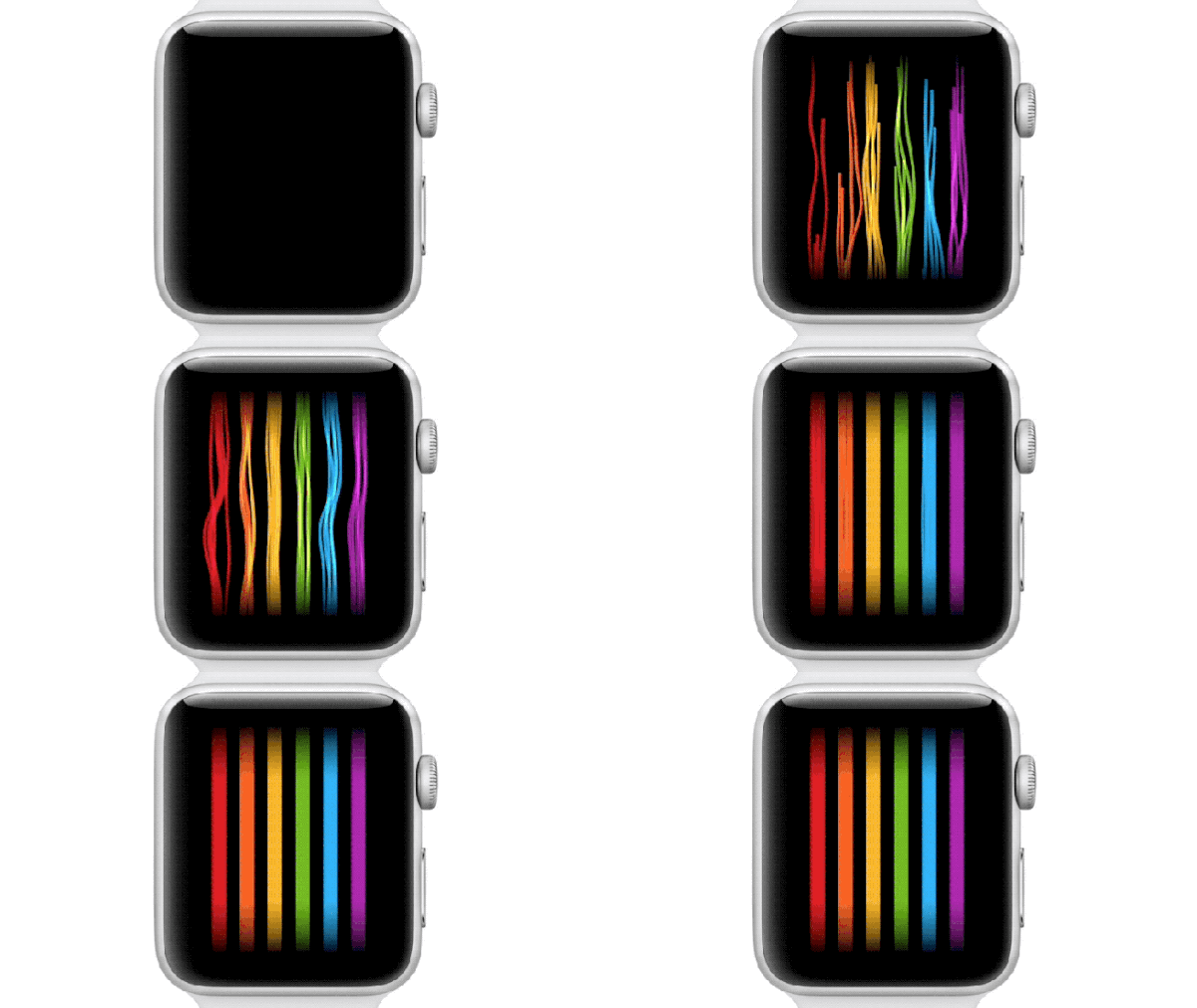
Pride watch face

Pride watch face

One of the most recent Apple Watch faces was released in June 2018 and was released to celebrate Pride. It goes paired with a new Pride watch band from the company too.

It's an interpretation of the Pride flag that moves on your home screen to look like streamers of the iconic colors. If you pair it with the Pride watch band, it'll then match up on the screen as well looking like the flag goes all the way around your wrist.

Page 7 of 16
Page 7 of 16
Utility face

Utility face

It's fair to say that the Utility face is for utilitarians who like to keep things practical. This face shows the time, obviously, but also displays your fitness progress, as well as some other complications of your choosing.

We think this one is particularly suited to those who don't want a fancy design or anything extra apart from easy access to their most used apps.

Page 8 of 16
Page 8 of 16
Modular face

Modular face

Like the Utility face, the Modular option is all about cramming as much information as possible onto the Apple Watch's tiny screen. 

This is the face you want if you want a bit of customization and a good amount of hard info, so that you won't need to fetch your phone frequently.

Page 9 of 16
Page 9 of 16
Motion face (Jellyfish)

Motion face (Jellyfish)

The Motion face comes in a few different flavors, but this jellyfish one is our favorite. It's sedated, tranquil and adds some motion to your smartwatch. 

Rather than having your smartwatch cluttered with details and complications that jump out at your face encouraging you to interact with your watch, this one will keep it simple and just give you those core details like the time and date. What's not to love?

Page 10 of 16
Page 10 of 16
Astronomy face (Moon)

Astronomy face (Moon)

Looking at the clock is a trusted method to gather the time, but adding in the moon shows how much (or little) our glorious moon is coated in sunlight. OK, the moon might just make for a fun visual, but it's a very solid choice for minimalists nevertheless.

Like the Earth version of the face, turning the Digital Crown moves time backwards or forwards causing the various planets to shift and spin. Pressing the crown resets it back to the normal time.

For even more fun, tapping the moon will show you the current lunar phase and turning the crown back and forth will show future and past phases. You'll get the same effect with the solar system where the crown will show you various planetary alignments.

Page 11 of 16
Page 11 of 16
Solar face

Solar face

Like Astronomy, Solar is another hidden gem. It keeps a low profile and doesn't let you add anything to the face but makes up by showing the various positions of the sun in addition to telling you how long it will be until sunset or how long ago sunrise was.

Simply move the Digital Crown back and forth to see what time the sun will be at a certain place, like noon or twilight. As it shifts, the face will subtly illustrate the time.

Page 12 of 16
Page 12 of 16
Chronograph face

Chronograph face

The Chronograph face is for those who yearn for a traditional style within this smartwatch. 

While the Apple Watch doesn't cut any corners on its chassis to resemble a standard wrist-based timepiece, this face mimics it in spirit.

Page 13 of 16
Page 13 of 16
Time Lapse face

Time Lapse face

This face keeps things simple, putting the flashy time lapse photography in focus. There's still room for complications, but this one makes a statement – just watch out for your battery life.

Page 14 of 16
Page 14 of 16
Motion face (Flower)

Motion face (Flower)

Like the Jellyfish variant of the face, the flower-flavored Motion face adds some zest to your Apple Watch display. The animation of a flower coming into bloom offers a moment of relaxation when you glimpse at the time or at a batch of notifications.

You won't get as much raw info here as you will with some of the other options, like the Modular face, but this one keeps things simple.

Page 15 of 16
Page 15 of 16
Astronomy face (Earth)

Astronomy face (Earth)

Though the Astronomy watch face doesn't provide extra features, it's more functional than the other similarly, minimal faces.

It shows you the solar system and the exact position of the planets, sun and moon while displaying the day, date and current time.

Turning the Digital Crown moves time backwards or forwards causing the various planets to shift and spin. Pressing the crown resets it back to the normal time.

For even more fun, tapping the moon will show you the current lunar phase and turning the crown back and forth will show future and past phases. You'll get the same effect with the solar system where the crown will show you various planetary alignments.

Page 16 of 16
Page 16 of 16
TOPICS
Apple Watch Apple
Cameron Faulkner
Cameron Faulkner
Social Links Navigation

Cameron is a writer at The Verge, focused on reviews, deals coverage, and news. He wrote for magazines and websites such as The Verge, TechRadar, Practical Photoshop, Polygon, Eater and Al Bawaba.

Share by:
  • Facebook
  • X
  • Whatsapp
  • Reddit
  • Pinterest
  • Flipboard
  • Threads
Share this article
Join the conversation
Follow us
Add us as a preferred source on Google
  • How to change your Apple Watch face 
  • Apple Watch 4 vs Apple Watch 3: which watch is for you?
Read more
Best smartwatch
The best smartwatch 2026
 
 
TechRadar background with Apple Watch
The best cheap smartwatch 2025
 
 
Apple Watch Ultra 3 and Garmin Fenix 8 on TechRadar deals banner
Garmin Fenix 8 vs Apple Watch Ultra 3 – here's which one I'd buy on Black Friday
 
 
A close up of watchOS 26's new Hints feature in the Apple Watch Control Center
I was sick of Apple Watch Live Activities until I found this simple fix
 
 
Google Pixel Watch 4 hands-on
Google Pixel Watch 4 review: Big design changes make for a great smart companion
 
 
Garmin watches on pedastals
The best Garmin watch 2026: Top activity watches tested
 
 
Latest in Smartwatches
Garmin Vivoactive 5
The older but still excellent Garmin Vivoactive 5 tumbles to a record-low price on Amazon
 
 
Pebble Index 01
Forget fitness trackers — external brains are the hot new wearables at CES this year
 
 
Garmin Venu 4
Garmin could be gearing up for an exciting but overdue Health Status upgrade – here’s what we know so far
 
 
Pebble Round 2
Pebble unveils Pebble Round 2 — and fixes all the original's major pitfalls
 
 
The Apple Watch Ultra 2 in front of a red background featuring the words 'Lowest Price'.
The Apple Watch Ultra 2 has been slashed to its lowest ever price
 
 
An image of the Apple Watch Series 11 on a wrist alongside a mechanical watch
Apple needs to make a smart ring to save me from this ridiculous situation
 
 
Latest in News
Shoresy season 5
How to watch Shoresy season 5 on SBS — it's *FREE*
 
 
Emila Clarke – how to watch Ponies online for free, 2026 Spy Thriller
How to watch Ponies on TVNZ+ (it's *FREE*)
 
 
Apple Car Concept
Airbnb may have confirmed Apple’s self-driving car
 
 
Final Fantasy 7 Remake Intergrade official artwork showing Cloud Strife reaching for his Buster Sword while Sephiroth floats in the background
Square Enix confirms a new Final Fantasy 7 Remake Intergrade update for PS5 and PC will arrive alongside the Nintendo Switch 2 and Xbox versions
 
 
Mullvad VPN app logo on screen
Connectivity issues? Mullvad’s OpenVPN shutdown is happening today – here's all you need to do to keep using the VPN
 
 
Ser Duncan the Tall looking determined while sitting on an armored horse in A Knight of the Seven Kingdoms
How to watch A Knight of the Seven Kingdoms from anywhere in the world with this VPN deal
 
 
LATEST ARTICLES
  1. 1
    I tested the Bosgame BeyondMax M6 - and this mini PC proved you can have high performance without breaking the bank
  2. 2
    What is the release date for Landman season 2 episode 10 on Paramount+?
  3. 3
    The Pitt season 2 episode 2’s new trauma is more disastrous than any medical emergency — and it’s all thanks to AI
  4. 4
    I watched The RIP on Netflix — Ben Affleck and Matt Damon's new movie commits too many crimes to be considered a genre great
  5. 5
    Airbnb seemingly confirms Apple’s self-driving car — and what it reveals about Apple’s AI shift, and Airbnb’s future

TechRadar is part of Future US Inc, an international media group and leading digital publisher. Visit our corporate site.

Add as a preferred source on Google
  • About Us
  • Contact Future's experts
  • Contact Us
  • Terms and conditions
  • Privacy policy
  • Cookies policy
  • Advertise with us
  • Web notifications
  • Accessibility Statement
  • Careers

© Future US, Inc. Full 7th Floor, 130 West 42nd Street, New York, NY 10036.

Please login or signup to comment

Please wait...