

Updated 6 hours ago

10099 products + 1395 members

How I dumped Windows for Linux - Day 1

Is open source software ready for prime-time?

May 12th | Tell us what you think [ 7 comments ]

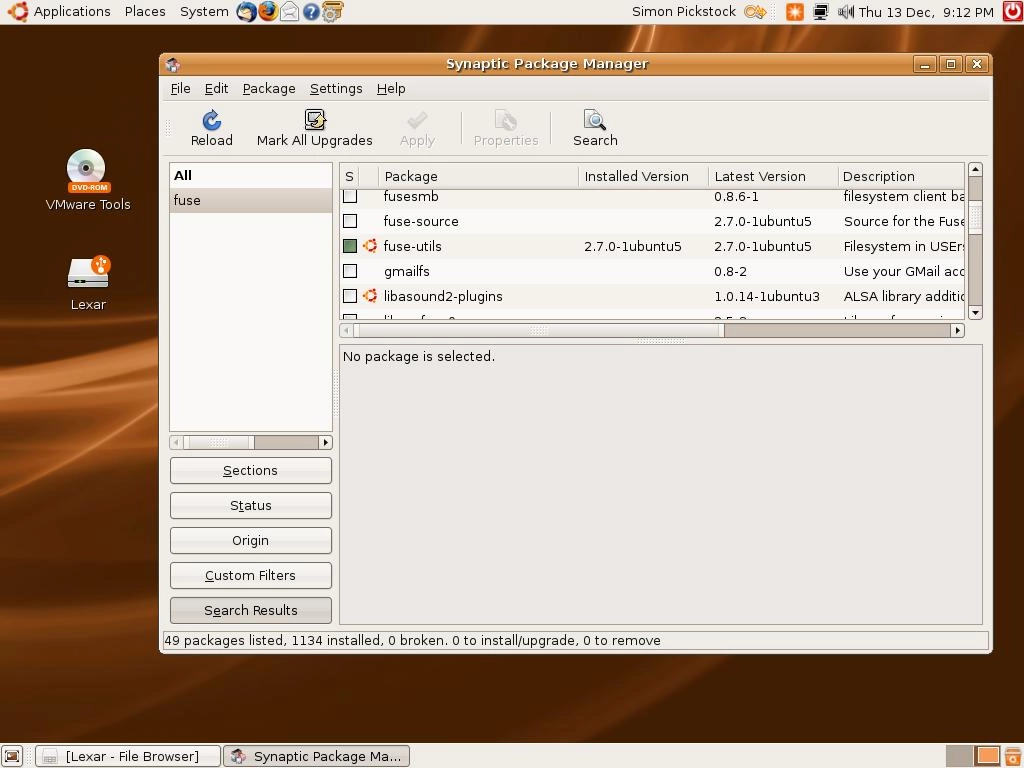
Applications and utilities are easily added to Ubuntu (and removed) with the Synaptic Package Manager

ZoomZoom

<>

Linux has been getting a lot of press over the past six months, particularly populist distributions such as Ubuntu. Dell has installed Ubuntu onto its Linux PCs and laptops, and let’s not forget the phenomenally successful Eee PC from Asus, which runs the Xandros distro.

The open source OS is also starting to make some headway on mobile phones in the form of the Google-backed Android and rival LiMo. It all shows how accessible Linux has become.

A Windows guy meets Linux

I’ve been using the Windows OS ever since version 3.0. So I’ve got some intimate knowledge of the problems and foibles you run into when trying to install hardware and software. I also own a MacBook running OS X, so I know how intuitive Apple's OS is in comparison.

I'm intrigued to see if 2008 is really the year when Linux is ready for prime-time.

Over the last few years I’ve dabbled with Linux now and then, but I’ve always found that there were too many problems for me to cope with, particularly when it came to hardware drivers. However, Linux has made great strides on this front, so I was interested to see whether a distro like Ubuntu can let me do everything that I do in Windows and OS X.

Installing Ubuntu is actually pretty easy, although if you want to preserve your Windows partition and dual-boot, you need to take a few precautions. First you need to download the CD image then burn that image to disc, using something like Nero.

Change your PC’s BIOS to boot from CD, pop the disc in the drive and boot from the newly-created Ubuntu CD. This will load up a live session. In other words, everything is running from the CD, and memory, nothing has yet been installed.

It gives you a good opportunity to have a play around and get used to how Ubuntu Linux works. To install to your hard drive, simply double-click on the install icon on the desktop and follow the wizard.

First steps with Ubuntu

One of the main problems with Microsoft's Windows OS is that virtually everything on your motherboard, and anything you want to install, requires an appropriate driver. This used to be the case with Linux, but like Apple’s OS X, a large number of drivers are now built into the Linux kernel.


Your comments (7) Click to add a new comment

mike1

May 14th

mike1

7. About the command line: Most any thing your told to do in the terminal on a forum or IRC can be accomplished within the GUI. The reason commands are posted is for ease of use. It's much easier to ask someone to open the terminal and copy/paste a few lines of commands than it is to ask them to click here and there and check this box and hit apply and.... So, while people are afraid of the command line, it is actually the easier interface.

Alert a moderator

nicolasmerritt

May 13th

nicolasmerritt

6. Linux is good but I can see its benefits on my Asus Eee PC in a way that I don't when I use it on a desktop.

On my Asus, it enables a low price and access to a bunch of quality apps that fit its profile as my 'second' (actually third) machine brilliantly. But on my desktop, I want access to standard applications and that means Windows or the Mac.

Of course, at some point in the future this may well change as the real triple AAA applications move into the cloud and the choice of OS becomes subsequently less important. But that's still a while off.

Alert a moderator

yochaigal

May 13th

yochaigal

5. temporary, a few things...

Driver support in both XP and Vista is completely awful; I've been a PC tech for 10 years now and 99% of the time I have to download and install new drivers. Recently linux has made leaps and bounds with driver/kernel integration; rarely do you have to install drivers anymore---and when you do, it's still sometimes easier than in windows.

I agree that the majority of device drivers in linux were initially made by "hobbiests" but I reject the idea that manufacturers simply "want their products to function exactly as designed" as you implied.

The reason that they don't make linux drivers is because the pressure to comply is far less then for MS/Apple; and the reason that these drivers don't get made by the manufacturers (and are made by "hobbiests" and are sometimes "generic") is because the manufacturers often do not release their driver manual data to programmers in the open source communtiy who can then create the drivers.

Thus, it is the closed-source, MS dominated marketplace that is in control here, not

manufacturers trying to make their devices work as intended. All they care about is the bottom line.

Also, the reason that MS/Apple do not write generic drivers is because they don't have to; the market is completely (and in some ways unfairly) dominated by Microsoft; which being a top-down juggernaut of a corporation cares little about compatibility--they also assume that the manufacturers will take care of this for them.

And finally, let me just say it's great to see these articles popping up all over the place these days. Keep it coming---there's a lot in linux to criticize, too.

Alert a moderator

yochaigal

May 13th

yochaigal

4. You don't need to install any FUSE plugins to read/write NTFS; full read/write access has been integrated out-of-the-box in many linux distros over the past year; for Ubuntu it's been built-in since Gutsy Gibbon came out last October.

Alert a moderator

temporary1141

May 12th

temporary1141

3. I'll keep my OS preferences out of this and I don't disagree with what you're doing, but I think a couple of things about this article might be inaccurate:

1. Windows (let's leave Vista out of this, as it's a very new OS) actually has the vast majority of drivers already built-in, just like Mac OSX and the various consumer versions of linux. I suppose your point here is that far more were built in in Linux. As far as I am aware, this is possible because there are far more generic drivers made for Linux (like your printer driver, which is unlikely to have been coded amazingly well for your printer because it may be designed for maximum compatibility, not quality) by dedicated hobbyist coders. For Windows and Mac OSX, the companies who make the components want their devices to function exactly as they designed, so they want to make their own drivers (and thus Microsoft/Apple are unlikely to make generic ones which make most devices work out of the box).

2. Motherboards very rarely need separate drivers to be installed in Windows (i.e. drivers which do not automatically activate as part of the basic Windows install). I have installed 95, 98, 2000 and XP on around 50-60 different computers over the years and have NEVER had an issue with motherboard drivers.

It just seemed that there were some things implied about Windows (and indirectly about Mac OSX) which were a bit misleading. Otherwise, very interesting; I look forward to future updates.

Alert a moderator

gwlperl

May 12th

gwlperl

2. Wow, yet another "I'm trying Linux" article. Well, welcome. You may have some issues getting the various audio/visual players to work with "proprietary formats" such as MP3's - this isn't a technical issue so much as a political one. BTW OpenSuse 10.3 installs all the players working out of the box, so there's less hassle there.

You're probably using GNOME but don't let that stop you from running KDE apps, such as K3B which I find to be the best CD burning software on any platform. Have fun.

Alert a moderator

Tell us what you think

You need to Log in or register to post comments

By submitting this form you agree to our Terms of Use and so are legally responsible for anything you submit. DO NOT submit anything which may violate the Terms of Use or another person's rights including copyrighted or offensive materials.