


As senior printer editor, I've tested over 200 models from Epson, HP, Brother, Canon, and Xerox - and these are the best all-in-one printers that have undergone my comprehensive review process. I've included a range of 3-in-1 and 4-in-1 printers that let you print, scan, copy, and fax at home or in the office.
My top choice for most people is the Epson EcoTank ET-4950. This 4-in-1 ink tank printer consistently impressed me during testing thanks to its high print quality, speed, generous free ink in the box, and feature-set. As I noted at the time, "I can’t find another mid-price printer so loaded with features and ink." It's not just my top AIO, but the best home printer for everyone.
You can read more about it below, alongside some of the other for home, small business, and office use. What I look for when testing any all-in-one printer is fast, reliable printing - from detailed text to vibrant images - as well as accurate, high-resolution scanning and copying with features like automatic double-sided scans and prints.

Jim has been evaluating printers for more than twenty years. From pocket printers to industrial dye sublimation, Jim has been there, run the tests and printed the t-shirt. His expertise extends to consumables (paper, ink, toner) and his printer buying guides make it easy to compare these essential peripherals.
Best all-in-one printer overall


The Epson EcoTank ET-4950 is one of the best printers I've tested, whether you want an all-in-one, an ink tank
Part of my reasoning here is because, having reviewed so many printers, I can't think of another model that offers such a good balance of features and performance for the price. Especially when coupled with a generous amount of free bottled ink in the box.
On the functionality, this is a 4-in-1 that lets you print, scan, copy, and fax, making it highly suitable for both home and small business use.
Automatic double-sided printing and scanning is a serious bonus here, too - it's usually not found on mid-range printers like the EcoTank ET-4950. On top of that, the machine's 30-sheet automatic document feeder let me swiftly copy two sides of a page without manual input.
It all comes together in a printer that delivered strong, consistent results during my printing tests. Black-and-white and colored text documents were detailed, while photographs looked vivid. It's by far my number one recommendation for anyone looking for an all-in-one.
Read our full Epson EcoTank ET-4950 series review
Best all-in-one printer on a budget


For me, the HP Envy 6555e (or HP Envy 6530e in the UK) is one of the few cheap all-in-one printers worth your time. It's
Print, copy, and scan are the three functions here, ruling it out as a business printer. That's no surprise to me. It's designed for casual home use or for occasional student printing, rather than something to be used day in, day out anyway. You can fax via the mobile app, but it's not built into the machine itself.
Now, as a budget machine, I did find some issues. For starters, it's not particularly fast and I found this all-in-one goes through inkjet cartridges fast. In general, if you're looking for long-term savings, opt for a cheap ink tank printer like the Canon Pixma G3270 (see below). If you want a cheap initial outlay, HP's Envy 6555e proved a reliable option.
Despite that, there is a 35-sheet ADF for those looking for automatic single-sided scanning and double-sided copying. I found it slow, but very accurate due to the high scan resolution.
Overall, I can't argue with the print quality for the price. My test documents and colored photos looked sharp, bold, and vibrant - especially the impressive way it handled photographs, which popped off the page when I used glossy photo paper.
Read our full HP Envy 6555e (6530e) review
Best cheap all-in-one ink tank printer


The Canon Pixma G3270 (called the Canon Pixma G3570 outside the US) is a well-balanced ink tank that lets you print, copy, and scan. All three worked excellently during my tests, and I experienced no issues using any of them.
As an ink tank at the budget end, there are a few features not present here. Notably fax is missing (if you need that, the Epson EcoTank ET-4950 is the way to go). There's no automatic document feeder, duplex printing, or duplex scanning.
However, I don't really expect those on an all-in-one printer at this price. What matters here is performance, and on that score, this entry-level ink tank proved to be great. In my tests, the Pixma G3270 consistently delivered bold text and color documents and refined photographs.
Scanning is good - the resolution hits 1200 x 600 dpi, which I found allowed for relatively faithful copies that lost a small amount of color and clarity compared to my original test documents.
It's cheaper than the EcoTank ET-4950, but pricier than the HP Envy 6555e - although it's more affordable in the long-run thanks to the use of bottled ink over inkjet cartridges. For the price, it's faultless.
Editor's note: When it comes to cheap ink tanks, I've also had good experiences with the Epson EcoTank ET-2400 from Amazon. In the UK, it's known as the EcoTank ET-2860 / ET-2861. It costs around $160 / £160.
Read our full Canon Pixma G3270 / G3570 review
Best all-in-one laser printer


Of all the printers I test, laser printers are often the type that I see being print-only. A lot of businesses just need high-volume printing without scanning, copying, and faxing.
The Xerox C325 isn't one of them. This ultra-fast color laser printer is a 4-in-1 model that performed brilliantly during my review process, whether I was printing double-sided color documents or scanning and copying images. Notably, my color print-outs were much brighter than almost any other laser printer I've tried.
Another factor as to why I champion this AIO is the scanning. Simply put, it's one of the easiest I've ever used, and it replicated original documents so faithfully I found it hard to tell the two apart.
The key selling point for me is the inclusion of the duplex automatic document feeder (DADF). It's something you typically only get on large office-grade laser AIO printers, and it lets you scan two sides of a stack of documents.
As I say, speeds are quick at 33 pages per minute, and it doesn't sacrifice quality here. Everything came out looking accurate, sharp, and detailed. I found it to be a superb all-in-one printer for anyone who needs a color laser machine.
Read our full Xerox C325 review
Best all-in-one printer for the home office


Not every home office setup needs a color laser printer like the Xerox C325, and my alternative suggestion here would be the Canon Maxify GX4020 (also known as the Maxify GX4050 or GX4060 in certain regions).
This is a compact ink tank printer that, in my experience, delivered the sort of performance, accuracy, and feature-set that home office setups require. As a 4-in-1 MegaTank, it lets you print, scan, copy, and fax.
Scanning resolution is a high 1200 x 2400 dpi resolution, which performed well in my tests. However, it does lack single-pass duplex scan, meaning it's not a true replacement for a fully fledged photocopier. But, then, I don't expect a home office printer to compete on that score.
What I especially like about this AIO printer is the capacity, with a 250-sheet paper tray that makes ideal for medium-volume print runs at home and in small offices (although I wouldn't recommend it for large, busy offices full of staff).
Unlike the EcoTank ET-4950, it's not particularly good at photos on glossy paper, but for the text documents likely to be printed for work, I found results to be sharp and detailed, and color documents were particularly impressive. They came out looking brighter and more vibrant than I expected.
Read our full Canon Maxify GX4020 review
The best all-in-one photo printer for photographers
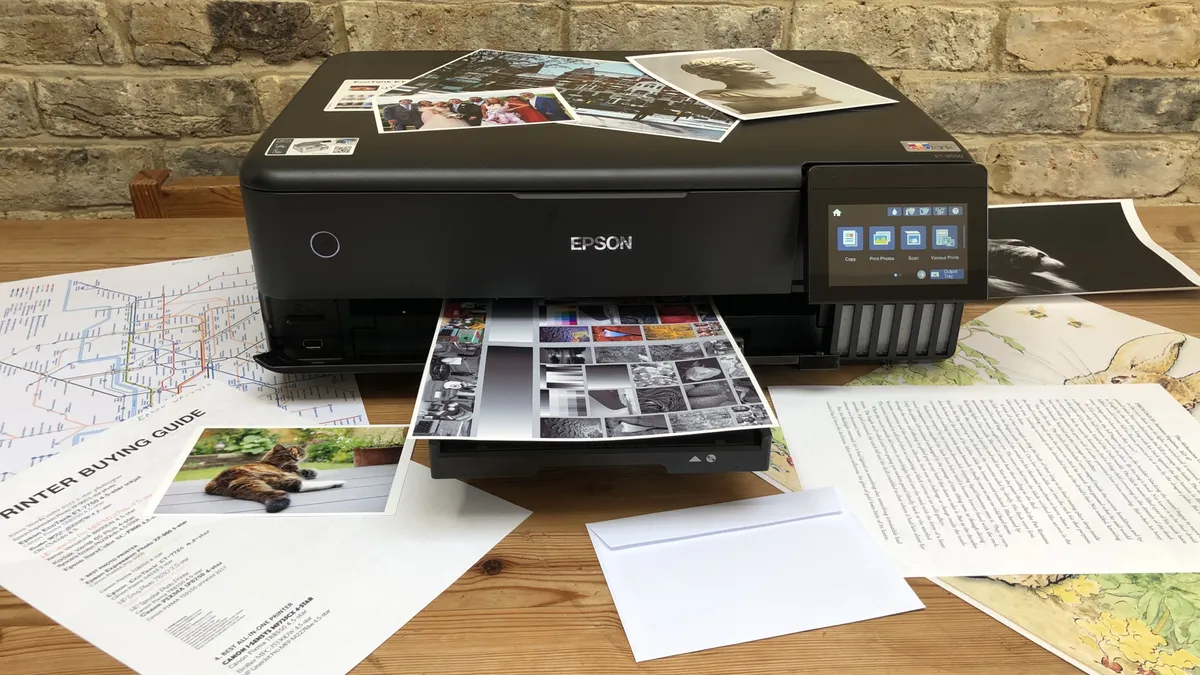


For photographers, designers, and businesses who need the strong results for photos and other visual marketing materials, the Epson EcoTank ET-8550 3-in-1 ink tank printer is my recommendation.
Image print quality is exceptional on this machine thanks to the six-color Claria ET ink system. In my testing, this produced accurate, highly detailed, and vivid photos across paper, glossy paper, cardstock up to Tabloid/A3+ sizes, with a rear tray that supports banner printing, too.
And that's the main appeal of this bulky, but surprisingly low-profile AIO photo printer. which supports automatic double-sided printing, too.
Scanning works very well, although it's limited to Legal / A4 paper. However, one feature I really appreciated was the option to enlarge smaller documents while photocopying.
Alongside that useful feature, both printing and scanning are impressively high resolution, hitting up to 5760 x 1400 dpi for prints and 1200 x 4800 dpi for scans. In other words, expect a high level of accuracy across the board here.
Read our full Epson EcoTank ET-8550 review
How to choose the best all-in-one printer for you
There are three main areas to check when choosing the right all-in-one printer for your needs.
Functionality
This is the first choice to make when selecting an AIO. These printers come in 3-in-1 and 4-in-1 variants.
For home and non-commercial use, a 3-in-1 machine that prints, scans, and copies will be fine for most people (and save you some money). The fax option is a nice added extra, but not essential.
However, a lot of businesses may want the added extra of a fax machine, which means choosing a 4-in-1 printer.
Category
Inkjet, ink tank, and laser are the three common printer categories. Ink tank and inkjet prints excel at photo printing and are generally good for casual document printing. Laser printers deliver sharper text document printing, but are typically weaker when used for images.
For home users, I recommend any of the best ink tank printers I've tested. These units use the same technology as a traditional inkjet - spraying liquid ink on to the page - but they're much cheaper to run as they use bottled ink rather than expensive inkjet cartridges. In a sign of an industry shift, most of the best inkjet printers I've reviewed are ink tank models now.
For business use, particularly those almost exclusively printing documents, a laser printer is the better choice. They're more expensive than inkjet and ink tank, but laser toners are much cheaper. They're also faster to print and often have a higher paper tray capacity suitable for high-volume print runs at work.
These printers tend to come in either mono for black-and-white printing, and color, which offers more versatility, making them good for graphs and headed paper.
However, of all the printer categories I review, laser printers (like ultra-cheap inkjets) often come as print-only models, with no scanning or copying.
Additional features
Auto-duplex printing and auto-duplex scanning are always worth looking for. This is the industry term for automatic two-sided printing and scanning, which means you don't need to manually turn each sheet of paper.
For scanning, copying, and faxing, check to see if your printer has an automatic document feeder. This is a separate tray that feeds paper into the printer without needing to lift up the lid for every copy you make.
I always like to see these features, on both home and business printers. While not a deal-breaker for home use, like fax, I see them as essential for office-based AIO printing.
Best all-in-one printers: FAQs
What is an all-in-one printer?
An all-in-one printer has additional functionalities, like scanning, photocopying, and sometimes faxing. These printers offer centralized and efficient document management solutions for business users with diverse printing requirements.
How we test the best all-in-one printers
As the senior printer editor at TechRadar Pro, I’ve tested hundreds of products, including the best photo printers and the best printers for Mac, and I’m always improving my methodology. The process starts right from the unboxing and initial set-up, which is timed. If there’s a problem with unsustainable packaging or a baffling user manual, I’ll call it. If it’s a pleasure to use, that’ll be reflected in the final score too. I always test both wired and wireless connections and explore the various remote printing companion apps offered by brands such as HP and Epson as these often enhance the user experience.
For the performance tests, I have a folder of test cards, photos and text documents designed to assess detail resolution, contrast, color accuracy and gamut. Some test images are particularly good for spotting feathering and smearing among inkjets. A ten-page text document is useful for measuring print rates because I never take manufacturer's claims at face value. Having said that, the quoted print and scan speeds are usually accurate enough that I rarely contradict them.
I print each test page on a range of standard paper stock from cheap 75gsm sheets to 600gsm card, as every printer has its limits and preferences when it comes to paper quality. And if the manual claims you can print on envelopes, labels or t-shirts, I test that too.
Features such as auto-duplex scanning or copying multi-page documents via an ADF (automatic document feed) are evaluated, and an assessment of build quality and design contributes to the overall rating. I pay particular attention to the COO (cost of ownership) because cheap printers can often give lower value for money when you calculate the ongoing consumables cost. For more on our review process, see How we test printers