Amazon is currently running a Tech Week sale on a whole range of goodies - and one particular deal caught my eye. It's for the Epson EcoTank ET-2861 that's now £150 (was £240) at Amazon.
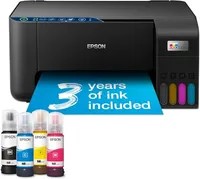
It prints, it copies, it scans. And it comes with with three years' worth of ink in the box (four coloured bottles). This budget ink tank printer is a very simple and straightforward model that's well-suited for home or home office use. And I know this because it's the one I bought my mum a few weeks ago.
It's difficult to describe how technophobic my mum is - even copy-and-paste functions are pitched somewhere between the mysterious, the magical, and the demonic. So, I think it speaks volumes that even she got this one up and running and printed a tonne of documents without needing to call me (if you're also the 'tech support guy' of your family, then hello!).
Today's top Epson EcoTank printer deal
Now, I always champion ink tank printers over inkjets - they may be slightly more expensive in the short-term, but they're far cheaper to run using bottled ink, and faster than cartridge-based printers.
The ET-2861 (sometimes labelled the ET-2860 on sites like Argos and Currys, but effectively the same) is no different. I really appreciated the amount of ink you get in the box, letting you start printing right away without spending more money.
It felt quick to print - somewhere in the middle of a fast inkjet and a slow laser printer - Epson lists print speeds on Amazon as 33 pages per minute in monochrome, 15 in colour, and although I didn't time it, that feels about right.
It's not as high-resolution as some of the EcoTank models, especially those aimed at professional photographers and designers, and only carries four tanks, rather than the six that high-end ink tanks possess. But for home printing, I don't think that's a problem at all.
It also has no Apple AirPrint support - although printing via Epson's own app on an iPhone proved no problem at all when I tried it. You can also print direct from places like the Google Drive app, which worked seamlessly.
Set-up is very simple - the longest part of the process was connecting the printer to the Epson app, and that was mostly because of slow Wi-Fi speeds. Once that's done, it's really easy. If my mum can use it, anyone can.
For more top-performers, check out my guide to the best home printers and best ink tank printers we've tested and reviewed.
More printer deals