TechRadar Verdict
While I preferred the previous Maxidok metal construction, this dock delivers three critical features that most alternatives can’t match. The combination of 17 ports, an M.2 slot, 140W charging and multi-display support at this price is impressive, even if it has a few issues.
Pros
- +
TB5 full 120Gbps specification
- +
17 ports in total
- +
140W host charging
- +
60W more power to share
- +
Silent
Cons
- -
Needs TB5 or USB4v2 ports
- -
2.5GbE Ethernet LAN port is slow
- -
M.2 slot underdelivers
- -
Huge power brick
Why you can trust TechRadar We spend hours testing every product or service we review, so you can be sure you're buying the best. Find out more about how we test.
UGREEN Maxidok 17-in-1 TB5 Dock: 30-second review
The Ugreen Revodok Maxidok 17-in-1 arrives as the brand's flagship Thunderbolt 5 dock, and it makes a strong case for that title. It sits at the top of UGREEN's new Maxidok range, above two 10-in-1 siblings, and it earns the crown through sheer specification depth rather than marketing bravado.
At its core, the dock delivers a full Thunderbolt 5 host connection rated at 120Gbps and up to 140W of laptop charging, paired with two downstream TB5 ports running at 80Gbps each. That is the kind of bandwidth that makes a real difference with high-resolution multi-display setups and fast external storage. The headline party trick is the built-in M.2 NVMe PCIe Gen4 x4 slot, which accepts drives up to 8TB. For video editors and creative professionals who burn through storage, that alone justifies a serious look.
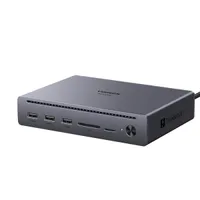
The form factor is a neat 133 x 133 x 53mm cube closely matching the Mac mini footprint, or many performance NUCs.
Finished in dark grey zinc alloy with copper-tone grill accents, making it look the part on a professional desk. Cooling is handled by a hybrid system that combines passive chassis dissipation with a temperature-triggered fan, and that’s a remarkably quiet fan.
The port count of 17 covers most professional requirements, including USB-C, USB-A, SD and microSD card readers, DisplayPort 2.1, 2.5GbE Ethernet, and no less than three audio jacks. The missing piece is HDMI, which will frustrate anyone with monitors that lack DisplayPort. Networking at 2.5GbE is functional but feels conservative at this price point.
At $390, this is not a casual purchase. The CalDigit TS5 Plus offers more ports, better networking, and higher total power, but lacks the SSD slot and costs $110 more. If that internal M.2 flexibility matters to you, the Maxidok 17-in-1 has a compelling answer.
A few wrinkles with the M.2 slot and the 2.5GbE LAN port keep this from being automatically enrolled in our guide to the best laptop docking stations we've tested. But a firmware fix might still resolve them.
UGREEN Maxidok 17-in-1 TB5 Dock: Price & availability

- How much does it cost? $390/£320/€391
- When is it out? Available now
- Where can you get it? Direct from Ugreen or via an online retailer
The Ugreen Revodok Maxidok 17-in-1 Thunderbolt 5 Docking Station carries is available from Ugreen's Amazon store where at the time of my review, it's priced at $390 in the US (was $500), and running to a cost of £315 (was £420) in the UK.
I can't say how long those prices will hold, though, so they may return to the full price. As with many products from Chinese brands, the gap between stated RRP and actual street price can be significant.
At this price, the 17-in-1 sits alongside CalDigit, OWC, and Kensington in the premium tier of Thunderbolt 5 docks. Whether that represents fair value depends heavily on whether the integrated M.2 slot is a priority for your workflow.
The alternative many will turn to is the CalDigit TS5 Plus, a dock that features a 10GbE LAN port and a 140W power profile. That 20-port option doesn’t have an M.2 slot, and it costs $499.99 / £469.99 on Amazon.com. A less expensive option from CalDigit is the CalDigit TS5, a dock with 15 ports that sells for $399.99, but it has only a 2.5GbE LAN port and no M.2 slot.
OWC hasn’t delivered a dock with nearly this many ports so far; its top-of-the-range OWC Thunderbolt 5 Dual 10GbE Network Dock has only 11 ports in total. Its strengths are dual 10GbE LAN ports and four TB5 (one uplink, three down). But, at $499.99, it’s not inexpensive.
There are only two choices that can compete on price: the Plugable TB5 Dock and the Anker Prime TB5, but both have fewer ports, no M.2 slot, and the same 2.5GbE LAN cap. The Plugable is cheaper at $350, as is the Anker at $357, but the pricing reflects their limited port selection, which more closely matches the UGREEN Maxidok 10-to-1 TB5, a $250 dock.
UGREEN also makes a Thunderbolt 5 Dock exclusively for Apple Mac Mini users, but that’s beyond my remit to assess.
In short, this is the cheapest flagship design available, though it is possible to get a TB5 dock for less.
- Value: 4 / 5
UGREEN Maxidok 17-in-1 TB5 Dock: Specs
Model |
Ugreen Revodok Maxidok 17-in-1 Thunderbolt 5 Docking Station (U716) |
|---|---|
Host Connection |
1x Thunderbolt 5 upstream (120Gbps bidirectional, 140W PD) |
TB5 Downstream |
2x Thunderbolt 5 (up to 80Gbps each) |
DisplayPort |
1x DisplayPort 2.1 (supports 8K@60Hz or dual 6K@60Hz) |
HDMI |
None |
USB-C Ports |
3x USB-C 3.2 Gen 2 (10Gbps, front panel) |
USB-A Ports |
3x USB-A 3.2 Gen 2 (10Gbps, rear) |
Storage Slot |
M.2 NVMe PCIe Gen4 x4 (up to 8TB, up to 6000MB/s rated) |
Card Readers |
1x SD 4.0 + 1x microSD/TF 4.0 (front panel) |
Ethernet |
2.5GbE |
Audio Front |
1x 3.5mm combo jack |
Audio Rear |
1x 3.5mm audio in + 1x 3.5mm audio out |
DC Power Input |
12V barrel jack |
Power Supply |
240W external brick |
Host Charging |
Up to 140W via Thunderbolt 5 host port |
Second Port Charging |
Up to 60W |
Total Power Output |
240W |
Bandwidth |
120Gbps unidirectional / 80Gbps bidirectional |
Display Config |
Single 8K@60Hz OR dual 6K@60Hz |
Cooling |
Hybrid: passive aluminium chassis + internal temperature-triggered fan |
Chassis Material |
Zinc alloy with aluminium shell, copper-tone grill accents |
Dimensions |
133 x 133 x 53mm |
Weight |
0.87kg (dock only, excluding PSU) |
Operating System |
macOS (M4 Pro/Max for full TB5), Windows 11 TB5/TB4/USB4 |
Backwards Compatibility |
Thunderbolt 4, USB4 v2, USB4 v1, USB 3.2 |
Security |
Kensington lock slot |
Warranty |
2 years |
In The Box |
Dock, 240W PSU, multi-region power cables, 0.7m TB5 cable, M.2 screwdriver, manual |
UGREEN Maxidok 17-in-1 TB5 Dock: Design

- Two colour metal construction
- Logical port layout
- M.2 slot underneath
Ugreen has made a clear decision with the Maxidok 17-in-1. This is not a dock that hides under your monitor or lurks at the back of the desk. It is a cube that demands a spot on the surface, and it has the build quality to justify that placement.
The chassis measures 133 x 133 x 53mm and weighs 0.87kg. Those are almost exactly the dimensions of an Apple Mac mini, and that resemblance is clearly intentional. The dark gun-metal grey zinc alloy and aluminium body slots naturally into any desk arrangement that includes Apple hardware.
The copper-coloured grill panels on the sides add a flash of visual character, which sets this apart from the sea of anonymous black and silver boxes that populate the docking station market.
Port layout is sensible. The front panel carries the most frequently accessed connections: a power button with LED indicator, the SD and microSD card readers, three USB-C 3.2 Gen 2 ports, and a 3.5mm combo audio jack. The rear carries the more static connections.
Three USB-A ports that are all 10Gbps, the DisplayPort 2.1 output, two Thunderbolt 5 downstream ports, the Thunderbolt 5 host port, the 2.5GbE Ethernet jack, a DC 12V barrel input, and separate 3.5mm audio in and out jacks.
The power button doubles as a master disconnect, cutting power to all connected peripherals and displays with a single press. That is a useful addition for a device intended for 24-hour desk duty.

Under the dock, a hinged trap door conceals the M.2 NVMe expansion slot. Ugreen includes an M.2 screwdriver in the box, and installing or swapping a drive is straightforward.
Where this differs from other docks that I’ve encountered with an M.2 slot. Instead of the drive being near the surface, here it is buried deep inside. The cover has a metal heatsink on it that, once the included thermal pad is used, will touch the top of the drive.
This arrangement is meant for an SSD without an integrated heatsink, obviously.
Cooling combines passive heat dissipation through the chassis with an internal fan that activates based on temperature. I’m saying this because UGREEN told me, but in all my testing, I never once heard this fan running. It’s either silent or hardly ever activated.
One practical note that I’d like to relay is that the external power supply is substantial. At 240W, it needs to be, but the brick is longer than the dock in any direction. Depending on where you place it, the PSU takes up meaningful desk real estate or cable management effort.
- Design: 4 / 5
UGREEN Maxidok 17-in-1 TB5 Dock: Features
- 120Gbps Bandwidth
- Only 2.5GbE LAN
- 140W + 60W charging
The Maxidok 17-in-1 is built around a Thunderbolt 5 host connection that delivers the full 120Gbps unidirectional bandwidth the standard allows. In practical terms, that is double the throughput of Thunderbolt 4, and the difference is not theoretical.
With multiple high-resolution displays active alongside fast external storage, TB4 docks begin rationing bandwidth between devices. The Maxidok does not have that problem, and it also doesn’t fall into another common trap about power distribution.
Laptop charging via the host port reaches 140W. That is enough to sustain even the most power-hungry professional laptops under full load. A second Thunderbolt 5 port can simultaneously fast-charge a second device at up to 60W, bringing total delivery to 240W when all outputs are in play. That doesn’t account for the dock's power consumption, so I suspect 200W is closer to the peak output.
Display support runs to either a single 8K at 60Hz or dual 6K displays at 60Hz simultaneously, both routed through the DisplayPort 2.1 output and the downstream Thunderbolt 5 ports. Reaching the 8K ceiling requires a host with a genuine Thunderbolt 5 connection.
Apple Mac owners should note that the M4 Pro and M4 Max are the earliest Apple Silicon chips to support TB5; older MacBooks top out at 6K via TB4.

The built-in M.2 NVMe slot is the feature that most clearly differentiates this dock from competing products at a similar price. Ugreen rates the slot at PCIe Gen4 x4, which should permit read speeds up to 6000MB/s on compatible drives, and capacities to 8TB are supported. In practice, this turns the dock into a workstation hub where a single cable connects everything, including a substantial pool of fast local storage.
What I like about docks with M.2 slots is that they can provide a fast snapshot of working files on a laptop, with a live backup configured. And they can be formatted, typically in ExFAT or NTFS, so they can be moved into a PC or caddie and remain accessible.
The LAN port is 2.5GbE, but as I’ll discuss later, that’s a label, not a promise. For most office and home office users, 2.5GbE is adequate, but at this price, it is reasonable to expect at least an option for 5GbE or even 10GbE. CalDigit's TS5 Plus and various other competitors in this tier provide 10GbE as standard. If network throughput matters to your workflow, this is worth noting.
Card reader performance uses the SD 4.0 standard on both the SD and microSD slots, which is a genuine upgrade over the SD 3.0 slots found on many rival docks. Faster card readers make a measurable difference to photographers and videographers working with modern high-speed memory cards.
Audio provides a front-panel combo jack for headsets alongside separate line-in and line-out 3.5 mm jacks at the rear -- a useful split that supports both monitoring and microphone inputs without adapters.
- Features: 4 / 5

UGREEN Maxidok 17-in-1 TB5 Dock: Performance
- TB5 Bandwidth Boost for video
- 240W PSU fixes power pinch
- Performance issues with M.2 and 2.5GbE LAN

The bandwidth headroom of Thunderbolt 5 is the core performance story here. While Thunderbolt 4 docks must arbitrate between competing devices when bandwidth pressure builds, the 120 Gbps ceiling of TB5 removes that constraint in most real-world configurations. For Thunderbolt devices, everything works well, with no sign of contention or throttling.
Host charging performance is also straightforward. The 140W available at the TB5 host port keeps demanding laptops stable under load. The second 60W port handles a second device simultaneously without reducing host power delivery.
Display output performs as expected when the host hardware supports it, enabling even those with a TB4 connection to get 6K output at 60Hz.
Full 8K output requires a TB5 host, which currently means a machine running an Intel Thunderbolt 5 controller or an Apple M4 Pro or M4 Max. Using the dock with older TB4 hardware remains useful and fully stable; the display ceiling is simply lower.
However, there are two aspects to this dock that didn’t live up to expectations.
The first of those is the performance of the M.2 slot, which, according to the specifications, is rated for Gen4x4. The performance I experienced on both TB5 and TB4 strongly hinted that this is a PCIe Gen3 x4 performance slot, not Gen4.
I even tried a Gen5 drive in here, and that didn’t move the needle. Using a Kioxia Exceria Plus G3, rated for 5,000MB/s reads, the fastest speeds I managed were 3900MB/s reads and 2200MB/s writes. What’s truly baffling about these results is that by inserting a Corsair EX400U external USB4 drive, I was able to achieve the same read speed and 3700MB/s writing.
I compounded this by then removing the Kioxa Exceria Plus G3 from the dock, putting it in a Ugreen 40Gbps USB4 caddie, and achieved 3671Mb/s reads and 2167MB/s writes. So the internal M.2 slot isn’t appreciably any faster than an externally connected USB4 SSD. And, depending on the drive, it can be dramatically slower.
This discrepancy between what was expected and delivered wasn’t limited to the M.2 slot, it was also apparent on the 2.5GbE LAN port.
As part of my testing, I copied some files from my Ugreen NAS, a system that is connected to my network at 10GbE, using the 2.5GbE LAN port on the dock. But instead of the standard speed of around 280MB/s these transfers capped at about 160MB/s. It was like this was a 1.5GbE LAN port, not 2.5GbE.
But, and this is where things got weird, when I plugged a UGREEN 2.5GbE USB LAN adapter into one of the 10Gbps USB 3.2 Gen 2 Type-A ports, I got the full 2.5GbE speed.
Therefore, if you want 2.5GbE LAN on this dock, spend another $25, and you're good, unless you need all those USB ports.
Both of these issues have the same source: the way a UGREEN engineer decided how bandwidth would be allocated among the different ports. Probably incorrectly, I’ve always assumed that this is a dynamic allocation on the Thunderbolt silicon, but evidently that’s not the case. In both circumstances, the only thing plugged in was the port or slot being tested, and in theory, it could have had all the bandwidth in the dock.
It might be possible to adjust these allocations with a firmware upgrade, but based on my research, I couldn’t find a single example of one for a Ugreen Thunderbolt dock. Therefore, I wouldn’t hold my breath that this hardware will get one.
I need to say that this isn’t the only Thunderbolt 5 dock I’ve experienced these issues with, so it may be a problem Intel created along with their latest chips.
- Performance: 3.5 / 5
UGREEN Maxidok 17-in-1 TB5 Dock: Final verdict

The Ugreen Revodok Maxidok 17-in-1 Thunderbolt 5 Docking Station is a well-considered product from a brand that has been building credibility in this category over several product generations. The combination of full Thunderbolt 5 bandwidth, 140W host charging, 240W total output, and a built-in PCIe Gen4 M.2 slot creates a genuinely differentiated package in an increasingly crowded market.
The design is one of the better efforts in the category. The cube form factor looks considered rather than an afterthought, and the quality of materials justifies the price tag from a tactile standpoint. The cooling system handles sustained workloads quietly, which matters for a device sitting permanently on a desk.
The omission of HDMI is a real inconvenience for anyone without a DisplayPort monitor, but then the same would be true for those with a DisplayPort monitor if it had HDMI. At this price, a single HDMI output alongside the DisplayPort would have removed a friction point entirely. The 2.5GbE networking is functional but underperforms, and rivals at this price offer 10GbE, and that gap is noticeable in network-heavy workflows.
The M.2 slot is the reason to choose this over CalDigit's TS5 Plus. If you need integrated fast storage expansion alongside all the Thunderbolt 5 benefits, the Maxidok 17-in-1 delivers it in one cable. If you do not need the SSD slot and want better networking plus more ports, the TS5 Plus is the stronger choice at a similar price.
The performance of the M.2 slot is also underwhelming, given that it is supposedly Gen4x4.
In the end, the Maxidok 17-in-1 TB5 Dock comes with more caveats than I expected, even though many alternatives have similar or the same issues.
If you have Thunderbolt 5, a dock like this opens up plenty of possibilities, but I wouldn’t recommend it for those with Thunderbolt 4 or USB4, since you can’t reasonably exploit its advantages.
UGREEN Maxidok 17-in-1 TB5 Dock: Report card
Value |
The cheapest flagship TB5 dock |
4 / 5 |
Design |
Elegant cube with plenty of ports, but a huge PSU |
4 / 5 |
Features |
M.2 slot and 240W PSU are the headline features |
4 / 5 |
Performance |
Issues with both the M.2 and 2.5GbE LAN ports in getting the full performance |
3.5 / 5 |
Overall |
A great TB5 dock, other than the LAN port and M.2 slot |
4 / 5 |
Should I buy a UGREEN Maxidok 17-in-1 TB5 Dock?

Buy it if...
Don't buy it if...
Also consider