Not all monitor deals are created equal. There are currently two very different MSI screens on sale — the MSI PRO MP272 E14C down to $100 (was $140) at Amazon and the MSI Modern MD342CQPW now $269 (was $340) at Amazon.
One is a compact, budget-friendly 27-inch FHD workhorse. The other is a wide, curved 34-inch ultrawide with USB-C 98W charging and a built-in KVM switch. Different use cases, same brand, both worth a look.
Today's top monitor deals
Why I like the MSI Pro MP272
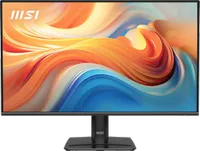
For under $100, the PRO MP272 E14C is one of the most compelling budget monitor deals you’ll find right now. The 144Hz IPS panel is the main story — it makes everyday use noticeably smoother, from scrolling web pages to dragging windows around — but the USB-C connectivity and slim four-sided bezels make it feel more premium than the price tag suggests. If you’re building a dual-monitor setup on a budget, two of these side by side for $200 is a seriously good outcome.
The TÜV Rheinland flicker-free and low blue light certifications are legitimately useful for long desk sessions, and the MSI Eye-Q Check tool — a built-in vision assessment that helps optimize your display settings — is a thoughtful touch you don’t normally see at this price. The 1ms MPRT response time and FreeSync support round out a spec sheet that punches well above its price.
Why I like the MSI Modern MD342CQPW
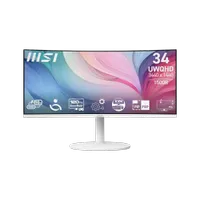
The MSI Modern MD342CQPW is a different class of monitor entirely. The 3440×1440 UWQHD resolution across 34 inches gives you a workspace that’s genuinely transformative for anyone who multitasks heavily — writers, developers, finance professionals, and designers who need multiple windows open simultaneously will immediately feel the difference. The 21:9 aspect ratio is essentially equivalent to having a 27-inch monitor and a second 14-inch screen side by side, without the bezel gap in the middle.
The 98W USB-C power delivery is the standout practical feature here. Most USB-C monitors charge at 65W or less — enough for ultrabooks but not for a MacBook Pro or a high-performance Windows laptop under load. At 98W, the MD342CQPW can genuinely keep up with a power-hungry machine while running the display, which means one cable to your laptop for video, data, and power.
The built-in KVM switch is worth calling out for anyone with two computers on one desk — a common setup for remote workers who have both a personal machine and a work laptop, or developers running a Windows desktop alongside a Mac. One keyboard, one mouse, one monitor, switchable between two machines via a button press. It’s a feature that usually adds significant cost when bought separately.
The 1800R curve and 120Hz refresh rate complete a package that’s usually found at a higher price point. VA panels typically deliver better contrast than IPS — deeper blacks and richer shadows — which shows up in both creative work and casual video watching. The white finish is a nice option in a category that skews heavily black, particularly for cleaner or brighter home office setups.
Which one is right for you?
Go for the MSI PRO MP272 E14C ($99) if: you want a sharp, smooth everyday monitor without spending a lot, you’re building a dual-monitor setup on a budget, or you just want a significant upgrade from a 60Hz panel without overthinking it.
Go for the MSI Modern MD342CQPW ($269) if: you work with multiple windows open at the same time, you want to clean up your desk by running one USB-C cable to your laptop, or you have two computers on your desk and want a KVM setup without buying extra hardware.
Also consider: More monitor deals