TechRadar Verdict
The M5 Ultra is a jack-of-all-trades but a master of none. Based on a 2023 AMD Ryzen 7 with Zen 4 architecture, this is a significant upgrade from the M5 and M5 Plus, but probably not ideal for the power user. But it’s a quiet, highly flexible option for a general-use PC.
Reasons to buy
- +
Affordable
- +
Easy internal access
- +
Second M.2 slot
- +
Dual 2.5GbE LAN ports
Reasons to avoid
- -
The plastic case isn’t especially durable
- -
Only Gen 3 M.2 slots
Why you can trust TechRadar We spend hours testing every product or service we review, so you can be sure you're buying the best. Find out more about how we test.
GMKtec NucBox M5 Ultra: 30-second review
GMKtec is an established brand that makes a wide selection of mini PCs, and the M5 Ultra is a follow-up to the previous M5 and M5 Plus models (see my M5 review and the M5 Plus review).
The original M5 used a Ryzen 7 5700U, a Zen 2 architecture chip, the M5 Plus used the Zen 3 era Ryzen 7 5825U. And, the new M5 Ultra goes Zen 4 with a Ryzen 7 7730U.
From the outside, these all look remarkably similar, but internally, the M5 Ultra is 2023 technology and not the 2022 and 2021 tech used in the previous generations.
While the number of cores remains the same, the Ryzen 7 7730U offers better CPU and GPU clock speeds and better power efficiency.
However, it still uses DDR4 memory, and the best USB it has to offer is USB 3.2 Gen 2. Those wanting USB4 need to consider the M7 Ultra that I’ll be reviewing on Tech Radar Pro shortly.
But what made the original M5, and then the M5 Plus, so popular was their competitive pricing, and the M5 Ultra is also remarkably cheap, especially if you buy it ‘barebones’ and provide your own memory and storage.
With a starting price of under $260 for a barebones machine, this is a well-specified NUC system that has enough power for general office tasks once you’ve added memory, storage and an OS.
And with dual 2.5GbE LAN ports and easy internal upgrades, this is a highly flexible system that can be repurposed if required.
While this system doesn’t offer the raw performance of Ryzen AI or Ryzen 9 systems, or the latest USB4 technology, it’s a logical replacement for older desktop systems.
The inclusion of dual LAN ports, dual M.2 slots, and easily upgradable RAM might see this system join our best mini PC round-up, purely on the basis of flexibility and great value.
GMKtec NucBox M5 Ultra: Price and availability
- How much does it cost? From $260/£210/€240
- When is it out? Available now
- Where can you get it? Direct from GMKtec and via online retailers
The M5 Ultra is available in a range of SKUs from GMKtec directly, though through online retailers, these are either ones with 16GB of RAM and 512GB of storage, or 32GB of memory and 1TB of drive space.
It's also available from Amazon.com and Amazon.co.uk, among other online retailers.
And I'm seeing a few sites selling ones with those memory capacities and storage mixed up, but the cheapest option is to buy this system directly from GMKtec as a barebones system.
If you have spare DDR4 SODIMMs and a Gen 3 NVMe module to install, that could get you this system for only $259.99 in the US, £209 in the UK and €239.99 across the EU.
The review specification costs $489.99 for US residents via GMKtec.com, £382 for UK residents, and €439.99 for Europe, direct from GMKtec in Germany.
What’s most striking here is the difference between the barebones and populated system, which can be interpreted as 1TB of storage and 32GB of DDR4 being worth almost half the cost of the system. Therefore, if you have those things, the barebones makes more sense, and if you don’t, then the intermediate SKU with 16GB of RAM and 512GB of storage is worth considering, as it could save you $90 on the whole system.
Looking for machines that use this same processor, these are thin on the ground. According to my searches, these include the AceMagic Kron Mini K1, Kamrui E3B Mini PC, GenMachine Ren7000 and FakestarPC Fanless Mini PC. Of these, I’ve only got direct experience with AceMagic, and this brand typically delivers quality construction and innovative designs.
The Kron Mini K1 bears an uncanny resemblance to the M5 Ultra, and sells for $408.49 via Amazon for a system with 32GB of RAM and 1TB of storage. Making it cheaper than the equivalent M5 Ultra. Also from Amazon, the Kamrui E3B Mini PC is $479. I couldn’t find either the FakestarPC Fanless Mini PC or GenMachine Ren7000 available.
The fact that so few designs exist for this platform suggests that not many Mini PC makers thought it was a good idea, and the few who did pitched it as a mid-range device, where a good portion of the cost is determined by how it is outfitted with memory and storage. And it's worth noting that if you go barebones with this gear, the price doesn't include the Windows 11 Pro license.
- Value: 4 / 5

GMKtec NucBox M5 Ultra: Specs
Item |
Spec |
|---|---|
CPU: |
AMD Ryzen 7 7730U ( 8C/16T, up to 4.6GHz) |
GPU: |
AMD Radeon Vega 8, up to 2.0 GHz |
NPU: |
N/A |
RAM: |
32GB DDR4-3200 (16GB x 2) expandable to 64GB |
Storage: |
1TB M.2 2280 PCIe Gen 3 |
Expansion: |
1x M.2 2280 PCIe Gen 3 |
Ports: |
1x USB 3.2 Gen 2 Type-C, 2x USB 3.2 Gen 2 Type-A, 2x USB 2.0, 1x HDMI 2.0, 1x DisplayPort 1.4, 1x 3.5mm Audio |
Networking: |
2x 2,5GbE Realtek RTL8125, WiFi 6E, Bluetooth 5.2 |
OS: |
Windows 11 Pro (pre-installed) |
Base Power: |
15W |
PSU: |
19V 3.42A 65W |
Dimensions: |
128.8 x 127 x 47.8 mm |
GMKtec NucBox M5 Ultra: Design
- Basic build quality
- VESA mountable
- Easy internal access
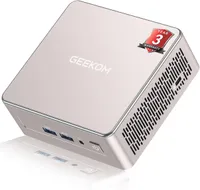
If this NUC has a significant weakness, it's that it's entirely built from plastic. And, if you look at some of my images, you might notice that the one I was sent already got a scuff along the way.
Because it might not be the most durable case, mounting it on the rear of a monitor using the VESA bracket GMKtec provides could be a strategic move to keep it out of harm's way.
I think part of the issue here is that GMKtec has used a fine paint finish on its enclosure that highlights any contact rather than ignoring it.
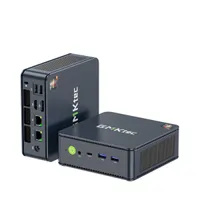
Better considered are the port positions, where the USB options are liberally distributed with both Type-A and Type-C ports on the front, and more Type-A ports on the rear. There is only one USB-C port, and all the ports with USB 3.2 Gen 2 specifications are on the front.
The rear has to USB 2.0 ports for mouse and keyboard, two video outputs (one each of HDMI and DisplayPort) and dual 2.5GbE LAN ports.
That last option makes this platform perfect for a hardware firewall, since you could buy it barebones, add some memory and install a Linux firewall distro on it extremely cheaply.
One interesting sidenote to the LAN ports is that GMKtec has taken to putting a label over the ports, suggesting that if you want to use the machine immediately, then don’t connect the network. Microsoft seems oblivious to how annoying it is for new owners to wait while Windows 11 devours the medieval feast of updates to the distribution installation. Why Microsoft hasn’t bundled these into the base install, I’ve no idea, but it probably rhymes with the word decrepitude.
Sadly, because this is Windows, eventually connecting the network will become a necessity, but at least warning people that this comes with a downside was good on GMKtec’s part.

As with all the GMKtec Nuxbox designs I’ve seen, access to the inside is remarkably straightforward.
On this model, the top of the machine can be easily pulled off, and that reveals four screws that hold a plastic fan mount, blowing air on the system, which can be removed. With this part out of the way, the memory and storage are all available to be replaced or, in the case of the storage, upgraded.
There are two SODIMM slots for DDR4, which on the review hardware were occupied with two 16GB modules. The maximum addressable memory by the AMD Ryzen 7 7730U is 64GB, so you could install two 32GB modules to achieve that. But, from an economic point of view, I’d consider choosing a system that used DDR5, rather than adding more RAM to a DDR4 system.
The M.2 situation is even better, since this machine has an unused 2280 M.2 NVMe slot. While both the M.2 slots in here are only Gen 3, and not Gen 4, for those with the modules, you could use two 8TB sticks, giving a combined storage of 16TB. That would hold a decent media collection or a significant amount of data.
Overall, within the limitations of a system that uses DDR4 and PCIe 3.0, the M5 Ultra provides the best possible options and makes what is already a flexible solution even more adaptable.
- Design: 4 / 5

GMKtec NucBox M5 Ultra: Hardware
- AMD Ryzen 7 7730U
- DDR4 Memory
- PCIe Gen 3 M.2 Slots
As I mentioned earlier, not many systems have used the AMD Ryzen 7 7730U, and maybe some of the reason is that this is a Zen 3 architecture CPU that was officially released with other 7030 series Barcelo-R chips in early 2023.
These were the tail end of AMD’s TSMC 7nm FinFET products before they shifted to 6nm on the 7025 series and then 4nm fabrication with the 7040 series. The first 7040-series chips with Zen 4 architecture appeared only three months after the Ryzen 7 7730U, so it never had much of an opportunity to develop a following.
That’s a shame, because the 7020 series it replaced only used the Zen 2 architecture, didn’t have any Ryzen 7 models, and had a maximum of four cores (eight threads). However, the 7020 series did at least support DDR5, which this processor did not, reverting to DDR4.
That’s the critical choice that erodes much of the performance benefit of having eight cores and sixteen threads.
This design also offered built-in USB ports, avoiding the need for PCIe lanes to be used for that function. This was also one of the last CPU designs to use the older Vega 8 GPU before the RDNA2 680M appeared with the 7035 series.
In short, this CPU and GPU combination where at the cusp of a major change, and the timescale between the rollover to DDR5, RDNA2 graphics and 4nm fabrication took away this silicon as an obvious choice for system builders.

It’s a guess, but a good number of these chips were probably made, and AMD might have a significant number that they are willing to sell cheaply now, which would explain their appearance here.
One downside to this architecture compared to later designs is that it only supports PCI Express 3.0 and has only 16 usable lanes, giving it the equivalent of 8 PCIe 4.0 lanes in later series.
Because it has built-in USB technology that isn’t a huge issue, but it does limit the M.2 slots here to Gen 3 mode, so buying Gen 4 drives for this machine is pointless. There are sufficient lanes for dual PCIe 3.0 M.2 slots, and for dual 2.5GbE LAN ports, since this system doesn’t have USB4 or other bandwidth-eating options.
Overall, the AMD Ryzen 7 7730U was a slightly odd choice, and its existence would suggest that in 2023, at the very least, AMD was strategically all over the place.
Releasing a new series when you intend to stomp on it within three months now looks like a severe lack of planning, and this system is one of the ripples of those rock-in-the pond choices.
- Features: 3.5 / 5
GMKtec NucBox M5 Ultra: Performance
Mini PC |
Header Cell - Column 1 | GMKtec NucBox M5 Ultra |
Alliwava U58 |
|---|---|---|---|
CPU |
Row 0 - Cell 1 | AMD Ryzen 7 7730U |
AMD Ryzen 7 5825U |
Cores/Threads |
Row 1 - Cell 1 | 8C 16T |
8C 16T |
RAM |
Row 2 - Cell 1 | 32GB DDR4 (2x16GB) |
32GB DDR4 (2x16GB) |
Storage |
Row 3 - Cell 1 | 1TB NVMe |
512GB SSD |
Graphics |
Row 4 - Cell 1 | Radeon Vega 8 |
Radeon Vega 8 |
3DMark |
WildLife |
6711 |
8218 |
| Row 6 - Cell 0 | FireStrike |
3154 |
3764 |
| Row 7 - Cell 0 | TimeSpy |
1264 |
1402 |
| Row 8 - Cell 0 | Steel Nom Lt. |
1035 |
1307 |
CineBench24 |
Single |
78 |
85 |
| Row 10 - Cell 0 | Multi |
414 |
473 |
| Row 11 - Cell 0 | Ratio |
5.29 |
5.59 |
GeekBench 6 |
Single |
1806 |
1978 |
| Row 13 - Cell 0 | Multi |
5939 |
7941 |
| Row 14 - Cell 0 | OpenCL |
12823 |
16925 |
| Row 15 - Cell 0 | Vulkan |
11472 |
15457 |
CrystalDisk |
Read MB/s |
3624 |
3650 |
| Row 17 - Cell 0 | Write MB/s |
2642 |
2717 |
PCMark 10 |
Office |
5581 |
6445 |
WEI |
Row 19 - Cell 1 | 8.1 |
8.1 |
I’ve not seen any other system with this processor, so I decided to compare it to another mini PC that also uses older AMD chip technology - the Alliwava U58 I recently reviewed.
Where the M5 Ultra uses the AMD Ryzen 7 7730U, U58 uses the AMD Ryzen 7 5825U, a 5000 series processor from exactly a year earlier, in January 2022.
On paper, these processors have the same number of cores and threads, the same DDR4 memory technology, the same base and boost clocks, and very similar Vega 8 GPUs.
It’s tempting to think that the 7730U is just a rebranded 5825U, and there is some truth in that.
However, in these tests, for reasons I can’t fathom, the Alliwava U58 performs better or the same as the GMKtec NucBox M5 Ultra across a wide range of benchmarks.
Typically, the U58 is 10% better, but in some of the graphics tests, it manages to be even more superior.
Not sure why this is the case, but due to the U58 only having a single 1GbE LAN port, and a single M.2 slot, I’m still not convinced that it’s the better option.
Perhaps a firmware upgrade of the M5 Ultra might bring it up to a similar performance level at some point. However, if you want more power, then I’d avoid systems that use DDR4 and pay the extra to have a DDR5 system.
- Performance: 3.5 / 5
GMKtec NucBox M5 Ultra: Final verdict

This is an odd system, as it ended up with a CPU that few system builders considered and even fewer made into machines.
Looking at the performance, the reason is obvious, because it didn’t deliver a dramatic improvement over previous generations, and it was overtaken by new products in three months.
That said, it works perfectly well in this context, and for someone with spare DDR4 handy, it’s an inexpensive system that is dramatically better than an Intel N300-powered NUC or a Ryzen 5 system.
What GMKtec got right with the M5 Ultra is that it supports a decent amount of memory, has dual M.2 slots and dual 2.5GbE LAN ports, which increases the number of roles that this system could occupy exponentially. There are plenty of medium-power NUCs around, but like the U58 I mentioned in the benchmarking, they don’t have the LAN ports or the storage expansion options.
Those who are interested in those features, and perhaps less concerned with raw performance, might find the GMKtec M5 Ultra an interesting proposition.
Should I buy a GMKtec NucBox M5 Ultra?
Value |
Affordable system, especially barebones |
4/5 |
Design |
Mostly plastic, but the port layout is logical |
3.5/5 |
Features |
Odd processor, but easy upgrades |
3.5/5 |
Performance |
Not the fastest Ryzen 7, but powerful enough for most jobs |
3.5/5 |
Overalls |
Flexible and easy to upgrade at a bargain price |
4/5 |
Buy it if...
Don't buy it if...
Also consider