


Today's best photo editor software comes with a host of professional-grade tools - whether you're lightly retouching photographs or using AI to revamp everything on the screen. After reviewing the top apps for photographers and content creators, these are the best-tested tools you can download right now.
For the pick of the bunch, Adobe Photoshop remains the top choice - it set the industry-standard for photo editing, has one of the broadest feature-sets around, and it's available across almost every device (you know, because creativity and inspiration isn't tied to a desk in your studio). It's worth noting that Affinity's photo editing software - which is now completely free to use - offers a substantial alternative with no subscriptions, although it lacks some of the tools you'll find in Adobe's top photo editor.
You can check out the reviews below, and I've included some of the best Photoshop alternatives and best free photo editors my team and I have tested.
Best photo editor overall


Adobe Photoshop remains the our top pick for best photo editor - and with good reason. Not only does it boast all the tools required for professional image editing, setting the industry gold-standard when it comes to photography and design work, but consistent updates have added a host of extra features including AI assistance to simplify the entire design process. Effectively, these do all the manual stuff that slows down the editing photos, so users can focus on the creative aspects.
We've reviewed the photo editor pretty much every year to see what's new and how it compares, and in our opinion it just keeps getting better. While you won't see any revolutionary changes to the interface or general user experience, you will see loads of new generative AI tools to assist with removing backgrounds, fixing pictures, and auto-selecting parts of an image you'd really rather weren't in shot. During our tests, we found each one to be remarkably simple to execute and the results were great.
Other than optional AI, the core experience is the same, with everything a photographer or designer needs to produce well-edited images for a range of purposes. Going in blind it might be tricky for newcomers to learn the ropes, but you'll find a wealth of support from Adobe and elsewhere online - and once you know what you're doing, you'll have a good grasp on the inner-workings of the entire Adobe creative suite, including InDesign and Illustrator.
The subscription costs may be its biggest downside - especially if you're not a hard-core user. But beyond that, for an all-in-one photo editor, Photoshop is still the app to beat.
Read our full Adobe Photoshop review.
Best free photo editor


Affinity Photo, owned by Canva, offers one of the best photo editor and compositor experiences, and it works great on a Mac or PC.
But what really makes this is that the three-in-one Affinity - which includes alternatives to Photoshop, InDesign, and Illustrator - is completely free to use. If you're tired of subscription services but still want pro-grade photo tools, this is hard to beat.
Our team tested the full range of features, and they rival the big competitors like Photoshop, and the software is clearly designed with the user in mind.
The interface is clean and elegant, although perhaps a little too colorful, and the use of popup windows to access some parameters is distracting, but overall, if you’re used to such software, you’ll feel right at home in Affinity Photo. And it's absolutely packed with useful tools for photographers, artists, content creators, and designers.
Read our full Affinity Photo review.
Best photo editor and organizer


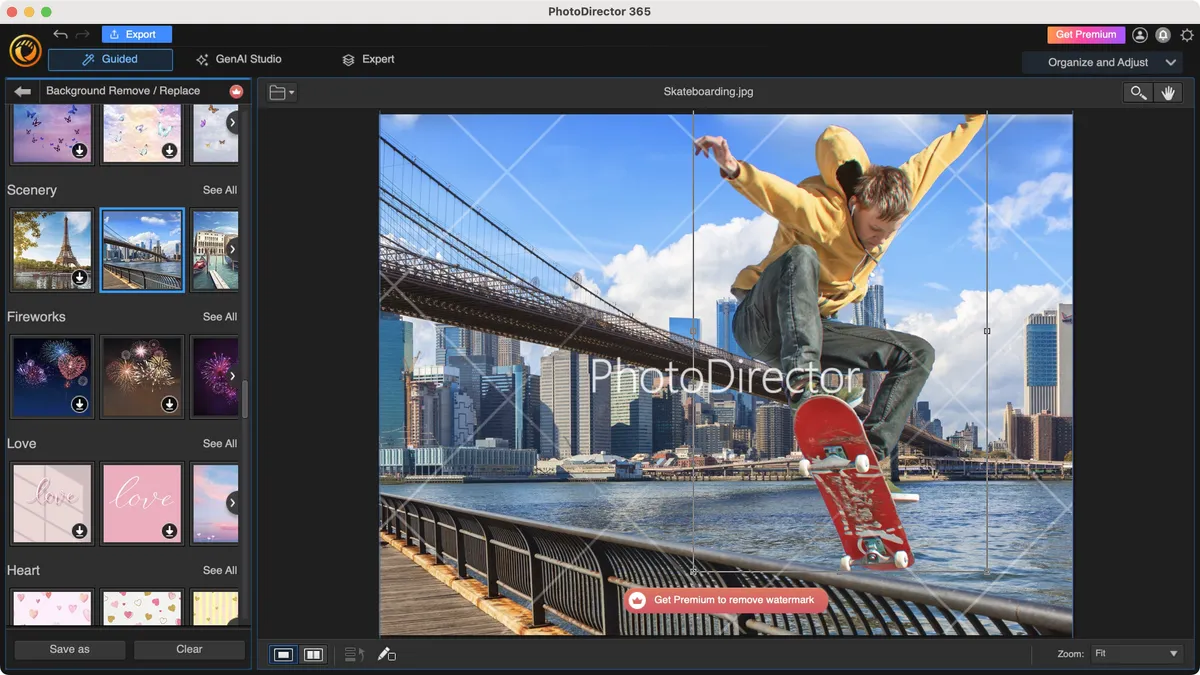
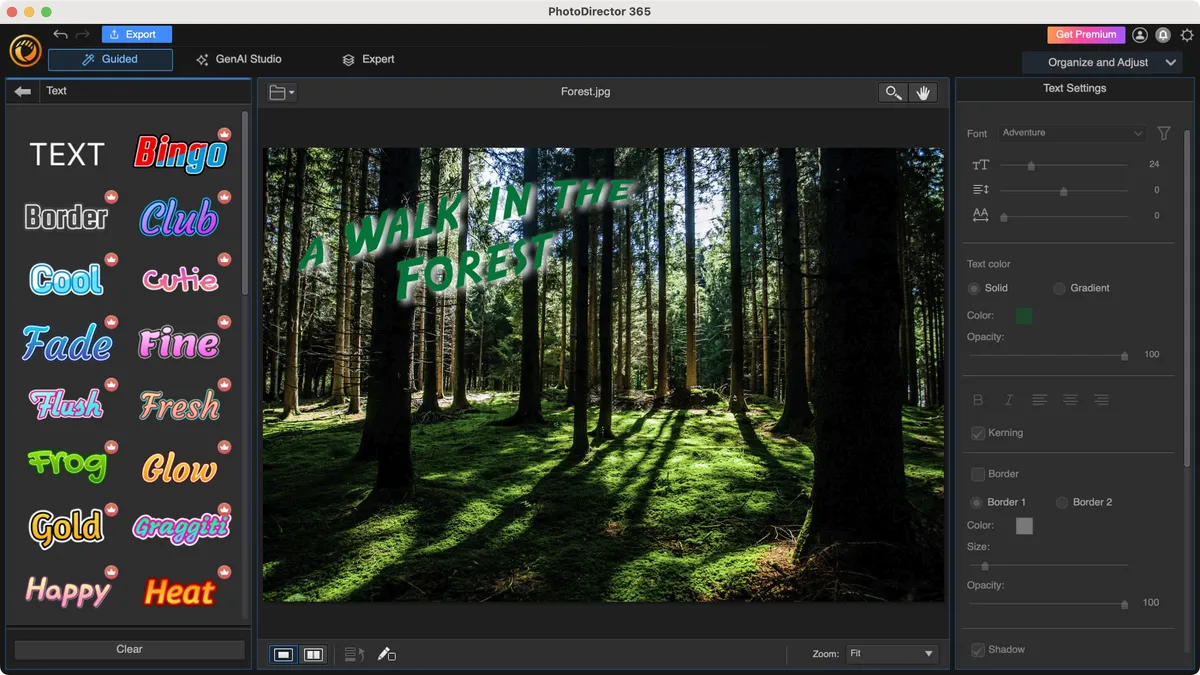


CyberLink PhotoDirector is a multi-platform photo editor for Windows and Mac, designed to not only help you organize your many digital shots, but to also perform general colour correction and other alterations. One of the most useful features is a full blown composting section, where you can remove the background of a shot, alter facial features, work with multiple layers, and more.
You can currently subscribe to it for $40 a year, or grab yourself a perpetual licence instead for $100, which is much cheaper than other professional photo editing software.
We found switching between tools to be convoluted, as you have to constantly have to go back to the launcher, and dealing with different interfaces makes for a longer learning curve, but this is more than offset by the ease of use of each tool, and the sheer power that’s at your fingertips to work with your photographs, including numerous generative AI tools.
Read our full CyberLink PhotoDirector 365 review.
Best photo editor on a budget
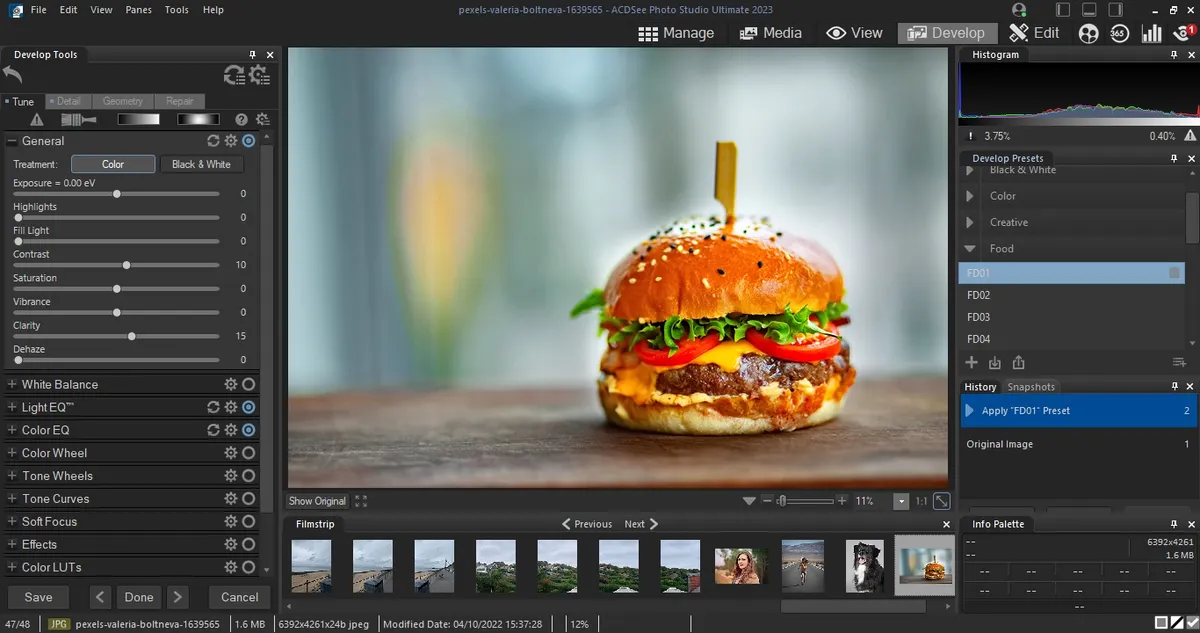


ACDSee Photo Studio Ultimate offers plenty of Photoshop-level functions at a fraction of the cost. And while it doesn’t match Adobe’s photo editing software on every feature, it’s a professional photo editor for Windows, packed with most tools that most photographers, designers, and artists need.
Our highlights include photo-stitching and non-destructive RAW editing, giving it Adobe Lightroom-style capabilities. The newest version boasts some great AI-powered ‘actions’ (as they’re called here). These effectively cut down on otherwise time-consuming tasks, like blurring backgrounds or selecting specific objects.
When we tested out these tools, we found them very easy to use, producing great results. We were particularly impressed with the AI Face Edit, letting you alter the face of your subject like you’re performing digital plastic surgery.
Photo Studio Ultimate is available to buy outright for a one-off price. This gives you a year of free updates and technical support.
You can also pick it up on a monthly or annual subscription, bundling one of the best photo editors alongside Gemstone Photo Editor, Luxea Video Editor, Video Converter Pro, and Photo Studio for Mac.
Subscribers receive free updates, 100GB cloud storage, and access to online tutorials and workshops. Ideal if you’re just starting out as a beginner, although it may initially feel daunting to those new to photo editing.
Read our full ACDSee Photo Studio Ultimate review.
Best photo editor online
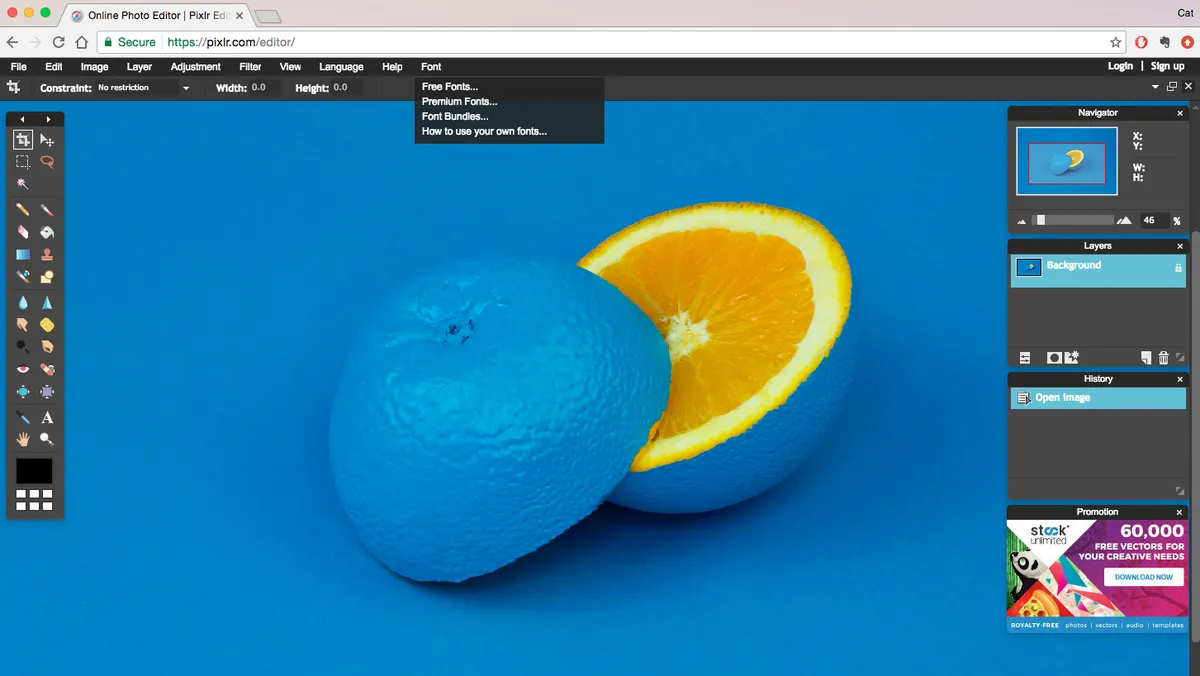


Pixlr offers a range of graphics tools for photographers, designers, and creators - with Editor being the the 'standard' app. It's an impressive online photo editor that offers the standard Photoshop-style layer-based editing tools right in your browser. Layers, masks, and AI tools are all easily accessible.
This is the top choice for several members of the TechRadar team when we need snappy, professional-grade photo editing without disrupting our workflow by opening a whole new app.
Incredibly powerful considering this is all working online, it's all very easy to use and navigating the page is all very beginner-friendly. The only real downside is that the free version limits you to three downloads per day. That's more than enough to trial its capabilities, though.
Read our full Pixlr Editor review
Best photo editor for professionals

Capture One Pro covers almost exactly the same territory as Adobe Lightroom Classic, offering cataloging tools, seamless raw processing, manual image enhancement tools alongside preset effects, and a non-destructive workflow that means you can revisit your adjustments at any time.
Its raw conversions are sharper and less noisy than Adobe’s, but it doesn’t support such a wide range of camera raw formats or as large a number of lens correction profiles. It doesn’t have Adobe’s mobile apps and online synchronization options either, but it does offer professional-grade ‘tethering’ tools for studio photographers capturing images via a computer. It’s compatible with over 450 camera models, but tethered capture only supports Canon, Sony, Nikon, and Phase One cameras.
Capture One Pro also has a better system for applying local adjustments, using adjustment layers and masks. It’s expensive but very, very good.
Read our full Capture One Pro review.
Best photo editor for beginners


Filling a gap between basic image editors and professional programs like Photoshop, Luminar AI uses artificial intelligence to make excellent edits quickly, through a clear, accessible interface. Don’t know your color correction from your curves? Point Luminar AI at a given image and it will instantly apply the appropriate fix. Or if you do know how you want the image to look, Luminar AI can help you drop in a new sky, smooth out skin blemishes or selectively sharpen key parts.
The process is all based around Templates – which offer one-click adjustments that immediately spice up your photo – and Edits, where effects are automatically applied. Try it on a series of images and you’ll probably get results that are close to what a professional would produce, without a protracted editing session. Tools are simple but fundamentally solid.
The flip side is that you won’t learn the ropes of image editing, because the complexities all take place beneath the surface. Performance can also be sluggish when navigating images, while some of the overlay effects produce repetitive results. All the same, Luminar AI is a new type of photo editor that’s perfect for hands-off photographers.
Read our full Luminar AI review.
Best photo editor for analog effects

Exposure blends old analog 'looks' with contemporary photo enhancement tools. It has a large catalog of antique and modern film effects that simulate fading, cross processing, grain, light leaks, vignetting, borders, and a whole range of traditional films and processing techniques.
These are all built using tools that can also be used for regular image enhancements, including curves, color adjustments, and more. But while it offers adjustment layers for ’stacking’ and blending corrections, you can’t combine images.
What you do get, though, is a fast and effective folder-browsing system for organizing your photos with all the power of filtering and keyword searches without the fuss of importing them into a catalog. Not to mention, Exposure has a pleasing interface, is not subscription-based, and comes with a whopping 30-day free trial (no credit card info needed).
Best open-source photo editor


We've long rated Gimp one of the best photo editors or those looking for professional tools without a premium cost. And that level of feature-set is well on display with this software.
Regularly used by members of the TechRadar team, Gimp maintains its status as the top open-source pick thanks to a comprehensive set of tools normally found in rivals like Photoshop. This line-up includes layers, masks, curves, levels, clone stamp and healing tools, among others.
If you're familiar with editing images in Photoshop, you'll have no issue. If you're new to all this, we were impressed by the sheer level of community support. In short, there's not a lot we couldn't achieve using this photo editor.
Read our full Gimp review
Best photo editor for lens correction


DxO Optics Pro, famous for its lab-derived lens correction profiles and awesome raw conversions, has evolved. DxO previously bought the Google Nik Collection and integrated the control point adjustment tools to bring out PhotoLab.
The big difference between PhotoLab and Optics Pro is that you can now apply powerful localized adjustments to your images. PhotoLab doesn’t have its own cataloging tools, though it does have a basic folder browser, and to get the full benefit of its raw tools, perspective corrections (DxO ViewPoint), and film ‘looks’ (DxO FilmPack) you need to pay extra.
It doesn’t support Fujifilm X-Trans files, either. PhotoLab’s raw conversions and lens corrections are, however, quite sublime. There is also a 'PhotoLibrary' feature with an autofill search tool, but this feature still feels fairly limited.
Read our full DxO Photolab review.
Best photo editor: FAQs
How to choose the best photo editor for you?
Why you can trust TechRadar We spend hours testing every product or service we review, so you can be sure you're buying the best. Find out more about how we test.
Make sure to consider multiple factors before choosing the best photo editor for yourself.
If you’re new to photo editing, it makes sense to opt for a simple and affordable tool. You’ll want to be mindful of your hardware compatibility too — you won’t have a smooth editing experience if your computer lags or crashes every time it runs the photo editor.
Along with hardware compatibility, check for camera compatibility. If you shoot in RAW often, you’ll want software that can convert the RAW files without lowering the image quality.
Look out for the photo editor’s pricing model too. While some apps are available at a one-time price, others are subscription-based and more expensive in the long term.
Our overall favorite image editor is still the ubiquitous Adobe Photoshop. A powerful photo editing app with a comprehensive set of tools for illustrators, designers, and photographers, it’s the most capable solution you can download today. But that doesn’t mean it’s necessarily the best option for you – particularly as it’s now available only as part of Adobe’s Creative Cloud subscription service.
If you’re looking for standalone offline software for a specific purpose, other photo editors might offer better tools – or better value – for you. Affinity Photo, for example, is a powerful Photoshop rival available for a very affordable price.
For more help, we've reviewed the best graphic design software and the best alternatives to Lightroom.
What features does my photo editor need?
We asked Chris Pierce, Senior Product Manager for Photo at Corel, the team behind Paintshop Pro, to give us a basic tour of what core features a photo editing software should have.
Cropping: The crop tool lets you re-frame the image after you’ve taken it. A simple guide to instantly give you better photos is the rule of thirds. If you didn’t shoot the photo with this in mind, try cropping to adjust the focal point of the image.
Sharpening: Sharpening lets you remove blur caused by the camera lens, emphasizing texture and making your images crisp.
Adjusting hue and saturation: Hue and saturation are powerful color correcting tools. Adjust the hue to give your image a colored tint and to change the emotional impact of the photo. If you want the colors to be more or less intense, use the saturation tool.
Contrast: The contrast tool can make an image more vivid or mute the tones for a more subdued feel. Using this in combination with hue and saturation tools will create incredible results.
Exposure: Images can suffer from lost details when a camera’s light sensor records too little or too much light. Correcting overexposure prevents your images from looking too bright and washed out, while correcting underexposure lightens a photo that is too dark. While you can achieve some basic edits by using filters and apps on your phone, they don’t offer the wealth of advanced tools to fully fine tune your photos. Here’s what you can achieve using tools only available through desktop software.
Layers and removing objects from photos: Quickly turn effects on and off using layers to make intricate edits without worrying about making mistakes. Remove unwanted objects that have sneaked into the image using intelligent masking tools.
Merging photos: Merge separate photos to make creative, artistic compositions. Any good photo editing Software will include specialized brushes like the Refine Brush that let you easily select detailed parts of an image like hair and grass. You can also create incredible surreal art by combining images using double exposure.
HDR: Give your photographs depth and vivid colors by combining different snaps to create High Dynamic Range (HDR) images. While simple apps are great for basic edits, they can only take you so far. To take complete control of your photo editing and workflow, you’ll want to invest in desktop software. Once you start working with these powerful tools, I think you’ll find it difficult to ever settle for less.
How we test the best photo editors
Our team has reviewed a range of professional photography apps and devices, including the best laptops for photo editing, the best photo editing PC, and the best monitors for photo editing. So, we know what's important to users when it comes to testing the best photo editor software.
To select the best photo editors, we assessed them across various parameters. We looked at their hardware requirements, RAW conversions, and the variety of tools they came with. We tested how swiftly the applications could process image files, how powerful their tools were, the workflow quality, and the overall performance and ease of use.
We evaluated how effective the software’s image layering and lens correction was, and the quality of the tutorials included with the apps. We also considered the pricing models (whether it was a one-time purchase or a subscription model), among other things.
Get in touch
- Want to find out about commercial or marketing opportunities? Click here
- Out of date info, errors, complaints or broken links? Give us a nudge
- Got a suggestion for a product or service provider? Message us directly
