


The Ugreen NASync DXP8800 Ultra and DXP8800 Plus are powerful eight-bay NAS devices designed for demanding storage needs. We compared the two and found one clear winner.
• Best for: Small businesses, studios, IT professionals, and creative teams needing centralized storage for large files, backups, media libraries, and multi-user access.
• The deal: The NASync DXP8800 Plus is now $1,370 (was $1,510) at Ugreen, saving you $140. The more powerful DXP8800 Ultra costs $1,780.
• Why it matters: Both NAS devices support up to 272TB of storage, dual 10GbE networking, and Thunderbolt 4. The Ultra supports up to 96GB of RAM compared with 64GB on the Plus, but both offer the same maximum storage capacity and high-speed connectivity.
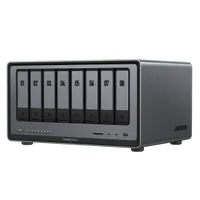
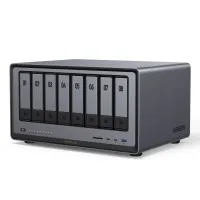
Which NAS we recommend
In his 4-star review, of the NASync DXP8800 Ultra, our expert Mark said: "Ugreen has changed the engine, not the car. The Ultra is quicker and better equipped for the long haul, but the Plus still does almost everything it does for far less money."
He went on to further explain: "Is the [Ultra] outlay worth the extra over the Plus? That entirely depends on how you intend to use this NAS. For those who just want file serving, it's probably not worth it. But for someone using virtualization and hosting AI, it might be an improvement they’ll pay for."
In summing up he said: "Where the DXP8800 Plus was a bolt from the blue, the DXP8800 Ultra’s arrival seems more measured. Ugreen kept everything that worked and refreshed the part that aged fastest, that being the processor, and with that change, it increased the memory ceiling.
"So is it worth the extra money? For most buyers, sadly it probably isn’t. The Plus still gives you eight bays, two M.2 slots, dual 10GbE, dual Thunderbolt 4 and a PCIe slot. File serving, backups, media streaming and a handful of containers run happily on either. The Ultra's extra speed will rarely be the bottleneck unless you use it in specific ways."
In his 4.5-star hands-on review for the Plus model, Mark ultimately found "a monster NAS with the potential capacity and bandwidth to drive a small business. This terrific hardware shows what can be achieved by repurposing mobile silicon for NAS."
Price context & historical value
The DXP8800 Plus normally costs $1,509.99, but Ugreen has reduced it to $1,369.99, a saving of $140, or approximately 9%. The DXP8800 Ultra costs $1,779.99, making it $410 more expensive than the Plus.
Remember that these are both diskless NAS, so you'll need to budget separately for the HDDs or SSDs required to actually store your files.
Which should you buy?
✅ Buy the Ugreen DXP8800 Ultra NAS if...
You need a powerful NAS for demanding business workloads, extensive multitasking, or applications that benefit from additional memory. Its newer Intel Core 7 150U processor and support for up to 96GB of DDR5 RAM give it a speed advantage over the Plus.
✅ Buy the Ugreen DXP8800 Plus NAS if...
You want a capable eight-bay NAS without paying extra for processing power and memory expansion you might never use. It supports the same 272TB maximum storage capacity, dual 10GbE networking, and Thunderbolt 4 connectivity as the Ultra, while costing a lot less.
