





Accessible multi-color 3D printing in 15 minutes is the pitch from Anycubic with the Kobra X 3D printer, now $300 (was $460) at Amazon.
Based on our own testing, that's accurate (technically, it was a little over 14 minutes). The other main attraction with this 3D printer is the native four-color printing, allowing you to produce multicolored models without manually swapping filament. In the UK, the Kobra X multi-colour 3D printer is now £260 (was £329) at Amazon.
August 13. I've checked prices and the Anycubic Kobra X deal is still available right now.
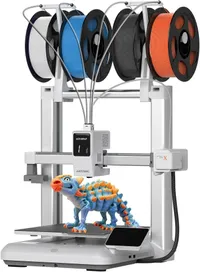
Why we recommend it
The combination of multicolor printing and speed is great. The maximum 600mm/s printing rate is backed by vibration compensation, and the hardened steel nozzle can reach 300°C and supports several popular rigid and flexible filament types.
AI monitoring can detect spaghetti failures and foreign objects, potentially catching failed prints before they waste even more time and filament.
In his glowing four-and-a-half-star review, our expert Alastair called it "exceptionally good." He said at full price it offered "outstanding value" and was "one of the cheapest 3D printers at this quality on the market." This current discount makes it even easier to recommend.
The Kobra X can reach speeds of up to 600mm/s, has a roomy 260 x 260 x 260mm build volume, and supports PLA, PETG, TPU, PVA, and ASA.
Anycubic also includes automatic bed leveling, vibration compensation, a hardened steel nozzle, and AI-assisted monitoring. The company claims you can be ready for your first print within 15 minutes.
Should you buy it?
✅ Buy the Anycubic Kobra X if...
You've wanted to experiment with multicolor 3D printing but don't want a complicated machine that requires endless setup before you can start. Native four-color capability is the headline feature, while automatic leveling and a claimed 15-minute setup should make the Kobra X approachable for newcomers as well as more experienced makers.
❌ Skip the Anycubic Kobra X if...
You only intend to make basic single-color prints. Multicolor capability is a major part of the Kobra X's appeal, so a simpler printer could make more sense if you'll never use it.
Expanding beyond the native four colors also requires additional ACE 2 Pro hardware, increasing the overall cost considerably.
Price context & historical value
Amazon's Prime deal reduces the price of the Kobra X from $459.99 to just $299.98. That's a saving of $160.01, or 35%, and crucially gets a native four-color machine under the $300 mark, which is the important part of this deal.
You're not buying a basic single-color printer and then immediately having to add separate hardware just to get the feature you wanted in the first place.
It has been cheaper in the past, but the lowest we've found it at was $283, so not massively different from now.
The picture is more or less the same in the UK, where £259 was its lowest price on Amazon, with a high of £329.
For more savings, we track the best 3D printer deals with updates every week.
The Catch: What to know before you buy
The headline 19-color capability needs some context. The Kobra X handles four colors natively, while reaching the full 19 requires four ACE 2 Pro units, which means additional hardware and expense. Anycubic also states that the ACE Pro and ACE 2 Pro aren't interchangeable, so make sure you're buying the correct expansion hardware if you decide to upgrade later.
You'll also need to keep the print surface clean with IPA and regularly clear away filament waste to prevent it getting stuck inside the printer.
