





My team and I have put over 100 chairs to the test to find the best office chairs for ergonomics, comfort, and seeing you through the whole 8-hour workday and beyond. Now, I've hand-picked the 10 most comfortable chairs we've ever sat on from the likes of Steelcase, Sihoo, FlexiSpot, and Herman Miller.
I recommend the Steelcase Series 2 for anyone who wants a premium ergonomic experience without paying ultra-premium prices - the backrest's clever Air LiveBack is truly phenomenal. But I champion the Boulies EP200 as the best value. This has been my daily driver for over a year now, and it's airy, highly adjustable, and affordable.
Check out the full line-up below, where I've chosen everything from cheap office chairs that won't break your back to high-end executive-grade seats that make you feel like you're sitting on a cloud (seriously!). Each one has been rigorously tested by me and my office furniture testing panel - from timing assembly to comparing performance over weeks, months, and in some cases years of use.
What's new? We've added a new 'expert opinion' section featuring words from professionals who work in the office chair field. If you're looking for comprehensive buying advice from someone who works in the industry, be sure to give this section a read.
Best office chair overall


Buy it if...
✅ You constantly shift your weight: One of the stand-out features we love is the geometric 'Air LiveBack' patterning in the backrest that seamlessly flexes to provide support even if you're a fidgeter.
✅ You're tired of cheap foam flattening out: The Steelcase Series 2 has a high-density foam seat that unlike cheap office chairs won't flatten or sag after too many hours of use.
Don't buy it if...
❌ You want to lock your recline angle: While you can sit back in your seat, the Steelcase Series 2 doesn’t feature a lockable recline, so the back springs back once pressure is lifted.
❌ You're over 6': With its low-profile design, it's not as comfortable for taller users as a chair like the Steelcase Gesture or Leap, and the backrest may dig into the shoulders.
Why I chose the Steelcase Series 2
Why you can trust TechRadar We spend hours testing every product or service we review, so you can be sure you're buying the best. Find out more about how we test.
The Steelcase Series 2 is the best balance of price and performance we have ever tested - especially with its 12-year warranty. Delivering consistent support, we found it incredibly comfortable to sit in, even for long hours, thanks to the specially engineered backrest that flexes with your body as you shift in your seat.
Beyond all-round comfort, the Steelcase Series 2 has a number of configurations. You can opt for the Task Chair version without armrests, which we reviewed (see gallery above). Personally, I'd recommend choosing the standard model with 4D armrests and the headrest.
I like the intuitive under-seat levers and dials for adjusting the fit. Certainly no fumbling for controls here. Seat height rests between 16.5 and 21.5in, armrests boast 3in adjustability, and there’s a 400lbs weight load. My only real complaint is that the recline doesn’t lock into place, returning to the upright position each time. Plenty of chairs offer similar specs, but I find the Steelcase Series 2 to be the complete package for a fraction of the cost of expensive gold-standard office chairs like the Steelcase Leap and Gesture.
If the Series 2 stretches your budget too far, the FlexiSpot C7 offers similar adjustability for half the price, though you sacrifice some build quality.
Read our full Steelcase Series 2 office chair review
Best value office chair


Buy it if...
✅ You want premium adjustability without the price tag: The EP200 offers excellent value, with a host of adjustable mechanisms like seat height, seat depth, headrest, 3D armrests, tilt, and recline for fitting the chair to your height.
✅ You want a reliable office chair for the 9 to 5 (and beyond): We continue to use this chair as our daily driver, remaining consistently supportive and comfortable for well over 8 hours a day.
Don't buy it if...
❌ You prefer a softer seat you can sink into: The mesh seat is tuned for support, so it's firm, won't sag, but may feel harder on your tailbone - and that's not going to be suitable if you like the feeling of sitting on a cloud that you get from plush, foam, cushioned office chairs.
❌ You want premium-style mechanical tolerances: It may be loaded with adjustability, but the mid-range mechanisms can feel hard and even clunky compared to the smooth, gliding nature of chairs like the Embody or Leap.
Why I chose the Boulies EP200
This is the office chair our chair editor uses every day. After long-term testing, with over 3000 hours in the seat (and counting), it's a great all-rounder that is used for work, rest, and play in a home office.
The design is a classic, professional style, with a breathable and contoured mesh backrest and firm seat that doesn't sag - a foam variant is also available. While the lumbar support may not be dynamic like it is on the FlexiSpot C7, it is depth-adjustable, as is the headrest, seat depth, 3D armrests, and recliner, rounding out some good precision control for extra comfort. Everything you need is included in the box (so no paying extra for a headrest).
Assembly was easy, and from initial unboxing to the final twist of the hex key, I had it up and running in about twenty minutes. In his time using it, he experienced no issues, fatigue, or discomfort. Considering the cost, it’s one of the most comfortable office chairs we’ve ever tested.
There are cheaper chairs but this is the most chair you can get for the least money.
Read our full Boulies EP200 office chair review
Best cheap office chair




Buy it if...
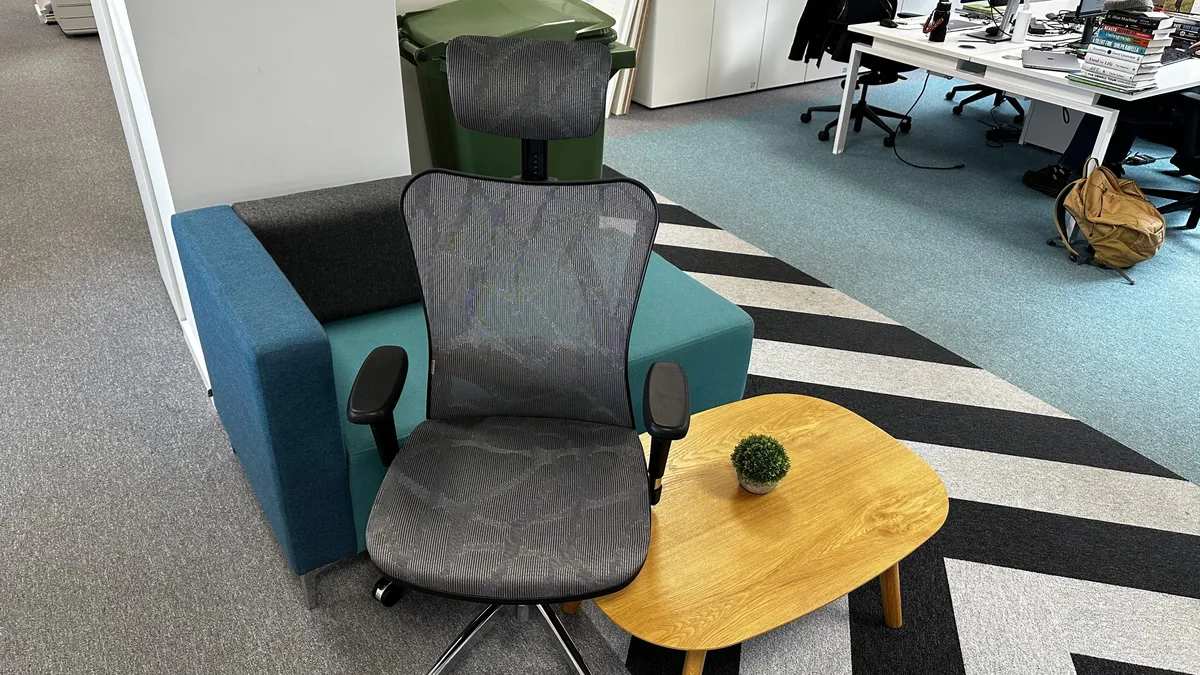
✅ You just want a chair: If you just want the cheapest chair that is not offensive to your spine then this is it.
✅ You are average in size, weight, and proportions: There is not a lot of adjustability. So, if you're average, it comes set up for you out-of-the-box.
Don't buy it if...
❌ You have a larger budget: More expensive chairs will get you more comfort, adjustability, breathability, and build quality.
❌ You need something properly supportive: This chair is not getting any awards from a chiropractor.
Why I chose the Shihoo M57
I choke at the cost of some of these chairs. That doesn't mean they're not worth it but not everyone needs to be spending that much on something you sit on. Lots of us, me included, just want something that's not going to insult my back.
I have a standing desk and sit down very rarely. I'd rather sit on a cheap chair occasionally and spend more on other office luxuries. If I sat more often I'd go for the EP200 and if I needed something for my back I'd go for the Steelcase Leap V2.
The Sihoo is unspectacular, it has wheels, it has arms, it has a back, it's adjustable, you can sit on it. If you saw it in a room you wouldn't comment on it. But it is cheap, it has good build quality, and is no less a good chair than any other chair in this guide.
It's just not designed to be a cure for back pain, a design focal point, or accommodating for every possible angle an elbow can rest on a surface. If you want a chair and don't have particular requirements, this is the chair. Our review is underwhelming and it's right - it's not the best chair. But it is the best cheap chair.
Read the full Sihoo M57 review
Best office chair for long hours



Buy it if...
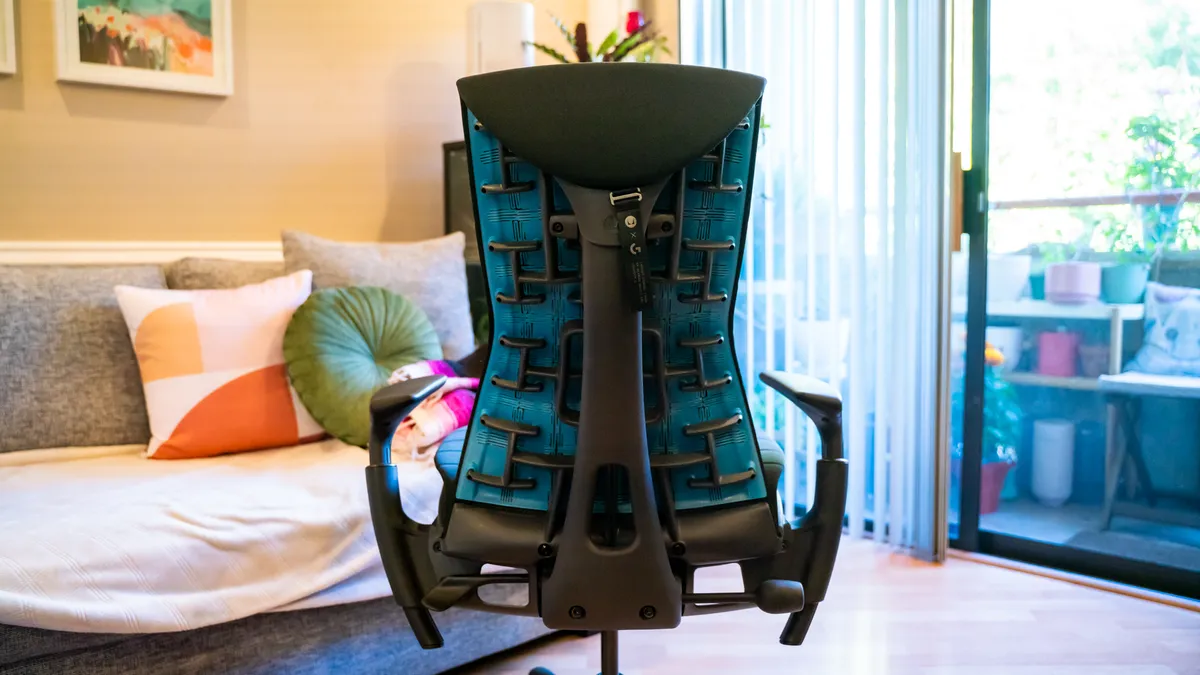
✅ You want to feel like you're floating: Thanks to the pixelated support of the dynamic backrest that distributes your weight, we found sitting in the Embody is like being suspended in your seat - it relieves pressure on the tailbone better than any cushioned seat we've ever used.
✅ You want to stretch back in your seat: With its tapered backrest, it encourages more freedom for active sitters who want to roll their shoulders and stretch their arms than a chair like the Aeron.
Don't buy it if...
❌ You need a silent workspace: Considering it's an expensive office chair designed and engineered within an inch of its life, it can be a surprisingly creaky chair when you push against that plastic exoskeleton.
❌You need a chair that lets you lounge: We love the tapering of the backrest, great for correcting posture, but not great for lounging back in your chair like the Steelcase Gesture, especially since it lacks a headrest too.
Why I chose the Herman Miller Embody
The Herman Miller Embody promotes active sitting with a distinctly freeing sensation - the backrest's Pixelated Support instantly adjusts to your micro-movements, evenly distributing weight and alleviating pressure.
Herman Miller's signature comfort and smart design are outstanding, but the magic lies in the Embody's dynamic BackFit adjustment with Pixelated Support. Paired with the layered hybrid foam-spring cushioning of the seat, it all comes together in concert to cradle your back to relieve pressure points and keep you sitting upright.
In testing, the Embody delivered on its promise of comfort for long hours. There is a slight learning curve - some of the adjustments, like correcting armrest positioning and the seat depth extender, aren't as intuitive as other models. But once you get the hang fine-tuning the seating, the experience is beyond compare.
Read our full Herman Miller Embody review
Best mid-range ergonomic office chair


Buy it if...
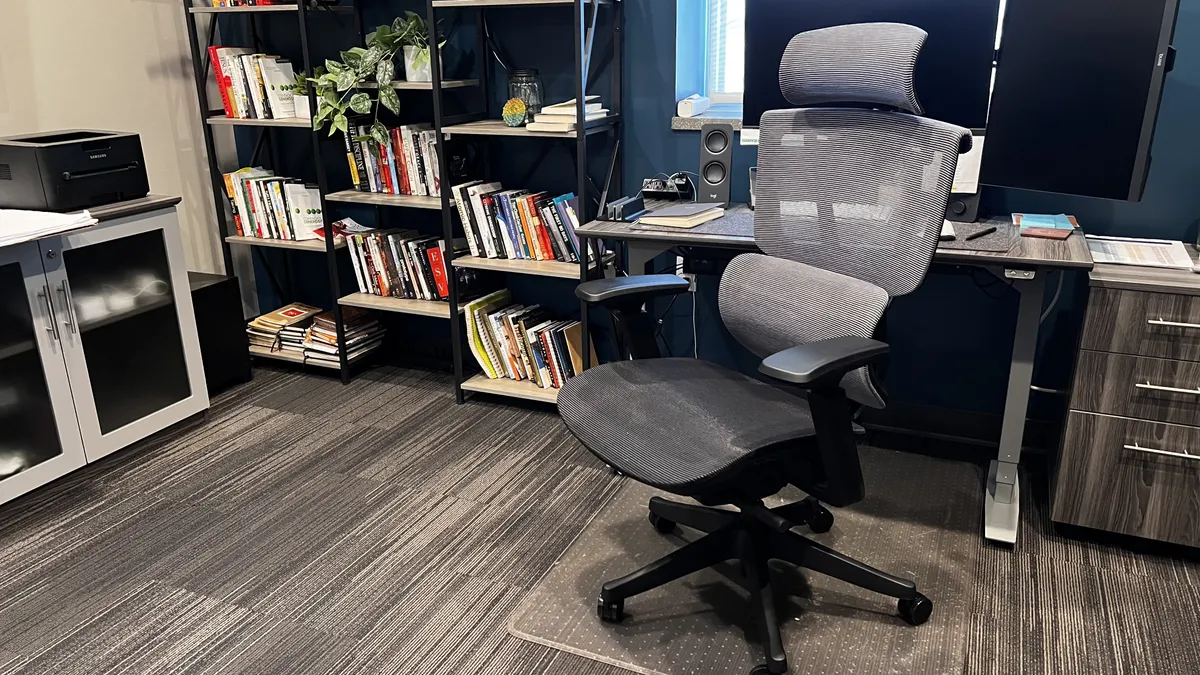
✅ You want high-end features at a mid-range price: What really impresses us is the sheer number of features, like dynamic lumbar support, adjustable seat depth, and 4D armrests. You usually only see this on more expensive chairs.
✅ You run hot at work: A big bonus of the FlexiSpot C7 is the all-mesh design, which delivers exceptional airflow for long hours sitting down.
Don't buy it if...
❌ You want top-end build quality: It might have the features of a premium office chair, but the build quality and thinner plastic has a rattle that pales compared to high-end models from Herman Miller and Steelcase that are rock-solid.
❌ You suffer chronic or serious back pain: We found the self-adaptive lumbar support to be excellent, but if your pain is more specific or serious, invest in a high-performance chair like the Steelcase Leap.
Why I chose the FlexiSpot C7
The FlexiSpot C7 is one of my favorite mesh office chairs. It's more expensive than the Boulies EP200, cheaper than the Steelcase Series 2, blending a low price and high-end ergonomic features.
I love the inclusions of dynamic lumbar support that continuously supports the lower back as you move, 4D armrests for precision positioning, and the adjustable seat depth. All of this is almost unheard of at this price point. And the all-mesh design felt cool during long hours of sitting, even helping to maintain a natural posture.
Being a budget office chair, there are evident trade-offs. It lacks the higher build quality you'll find with Steelcase and Herman Miller chairs, but it felt stable and very acceptable for the price.
Operation proved smooth, and there's a wide range of controls for fine-tuning the experience. All wrapped up in a smart, modern design that's adept at tackling moderate back aches and pains.
Read our full FlexiSpot C7 review
Best office chair for back pain


Buy it if...
✅ You suffer serious or chronic lower back pain: The dynamic 'LiveBack' backrest, tunable lumbar support, adjustable seat depth, and the dial for making lower back support firmer (rare on any office chair) we found it all worked together for precise, targeted relief.
✅ You stay active in your seat: A lot of high-back office chairs can make you feel like you're locked into place - but that's not true here. We loved the way the chair's seat and armrests almost glide as you move in your seat.
Don't buy it if...
❌ You work in a room that gets hot: One thing we noticed testing this chair is that the thick cushioning retains heat and doesn't offer as much breathability as a chair like the Herman Miller Aeron.
❌ You like to rock in your seat: If you're the type of person who rocks while they think, this isn't the chair for you. The recline has a sticky feel, so if you recline back, the chair encourages this but doesn't move as freely as other chairs.
Why I chose the Steelcase Leap
No other chair my team has tested is as good for relieving lower back pain as the Steelcase Leap. Its strength lies in a mechanically engineered backrest that naturally molds to your body, keeping your spine aligned at any angle, while its "sticky" recline keeps your feet firmly on the ground when leaning back.
Unlike most office chairs, including the Steelcase Series 2, this seat is all about precision - dialling adjustments down to the millimeter for precise back pain relief. The adjustable lumbar support system supports the middle of the back or the lower back. Firmness can also be altered, helping you achieve a better posture.
Overall, the chair boasts incredible comfort for a range of body types (and our 6'2" reviewer agrees), with smooth adjustment mechanisms, and a solid build quality that's reflected in the price. The Steelcase Leap proved exceptional for long hours at the desk.
Editor's note: If the prices for a new model seem high, the Steelcase Leap, like the Herman Miller Aeron, is one of the few office chairs I'd recommend buying refurbished as it's one that's built to last.
Read our full Steelcase Leap review
Best mesh office chair


Buy it if...
✅ You want the most accommodating office chair for big and tall frames (and everyone in between): We love the high seat height and weight load, with A, B, and C sizes, with C offering the widest seat and highest back frame.
✅ You want like to lean towards your screen: Another top feature here is the Forward Tilt that we don't see on many chairs. So, as you lean forward, the chair follows to continue providing spinal support.
Don't buy it if...
❌ You sit cross-legged or spread your legs: With its rigid plastic frame swooping around the seat, it's going to dig into your legs if you draw them up around you or spread your knees wide while sitting.
❌ You need an adjustable seat depth: One of the few non-adjustable components here is the seat depth, so it's in a fixed position - and that means you'll want to make sure you buy the correct size (A, B, C).
Why I chose the Herman Miller Aeron
The Herman Miller Aeron is an iconic mesh office chair constructed from ultra-breathable 8Z Pellicle mesh that acts as a suspension system to eliminate pressure points and encourages constant airflow to keep you cool.
Unlike a lot of other premium office chairs, seat depth is fixed. But that's because the Aeron comes in three sizes that should already offer a tailored fit without fiddling with controls. Type A for petite users, Type B for regular, and Type C, which is the widest and most accommodating, with a higher backrest and seat for taller or larger frames.
The PostureFit SL system delivers firm support while seated, effectively molding to your body for the perfect fit with a little bounce on the suspension to prevent discomfort and fatigue. And the chair's ergonomic curve and back support encourage you to sit with improved posture. Whichever Aeron you choose, for maximum comfort, we recommend getting the fully adjustable armrests and optional headrest (the Atlas headrest is a popular pick).
Editor's note: The Herman Miller Aeron is built to last - so if the prices for a new model is too high, it's one of the few chairs I'd recommend buying refurbished (or 'remanufactured').
Read our full Herman Miller Aeron office chair review
Best office chair for studying


Buy it if...
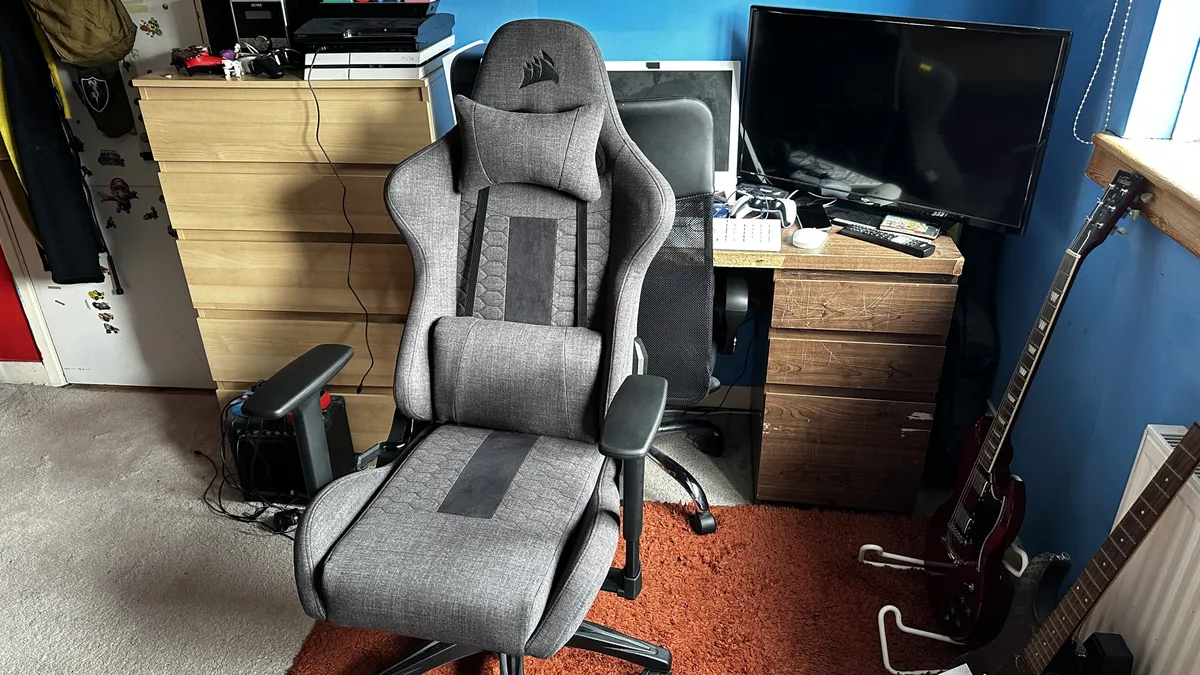
✅ You sit cross-legged: The 'Relaxed' here refers to the wider seat width, which is wide enough to sit cross-legged without the frame digging into you - that's rare on these types of chairs.
✅ You want premium feel without the price: One thing that really stood out to us is a build quality that punches above its weight, with the soft fabric covering feeling comfortable and breathable.
Don't buy it if...
❌ You hate office chair assembly: If you have absolutely no patience for assembling a chair, watch out - we found it occasionally frustrating fitting this all together, a world away from a chair like the Boulies OP180.
❌ You need extra height and support: This chair is rated for users up to 6'2" with a 264lb weight load. And while our 200lb reviewer had no issues, the strapped-on neck pillow may sit awkwardly behind the shoulder blades of taller users.
Why I chose the Corsair TC100 Relaxed
The Corsair TC100 Relaxed is a cheap padded office chair that despite price feels more durable and comfortable than anything else you'll find with this price-tag.
Yes, the TC100 Relaxed is a gaming chair, but with a professional exterior, the smart lines and subtle blacks and grays making it perfect for the dorm or home office. Corsair says the chair is built for users up to 6ft 2in, with a weight load of 264lbs - and that bore out in our tests. Build quality is impressive considering the cost. If you’re using this chair all day, I recommend opting for the fabric version over PU leather for maximum breathability.
As a budget office chair, expect some trade-offs. Those wanting a host of adjustment levers and options will also be disappointed. There aren’t even 4D armrests. However, the Corsair TC100 Relaxed proved to be an affordable office chair that’s well-priced, comfortable, and well-constructed.
Read our full Corsair TC100 Relaxed review
Most stylish office chair


Buy it if...
✅ You love the living room style: With its 3D knit fabric, the Branch Verve is a fashionable office chair that looks more like premium home furniture than your typical models.
✅ You have a narrow frame or you're a petite user: The contoured backrest hugs close to the spine, making this a comfortable fit when we used this chair for 12-hour sessions.
Don't buy it if...
❌ You work in shorts (or you have a cat): That 3D knit fabric may look great, and it is comfortable, but it can feel scratchy when brushing against bare skin, so that's something to be aware of. It's also not very scratch-proof if you own a cat.
❌ You want the perfect armrests: Sure, they're 2D, but pull the adjustment mechanism up too far and the ratchet system effectively resets, forcing you to level them again.
Why I chose the Branch Verve Chair
The Branch Verve looks more like home furniture than your standard office chair, and with its broad range of colors, it delivers style and all-day comfort.
There are some striking accents here - the swoop of its armrests, the determined V-shaped back support, the comfortably cushioned seat, the closely knitted 3D fabric of a backrest, which offered us a relaxed and natural hammock-like experience.
Adjustments are intuitive with a simple but clever paddle-steered adjustable lumbar support that glides up and down the frame for tailored lower back support. It all combines to deliver an exceptional sitting experience. The only issue is the armrest mechanism, which uses a ratchet system - pull this too high, and the armrests return to the lowest point, and you'll need try to get the perfect height again. Not a deal-breaker, but this merry dance can be irritating at times.
Even during up to 12-hour sessions for the review, there was no fatigue or pain experienced. True, it lacks dynamic lumbar support and I would've preferred 3D or 4D armrests here. but these are minor trade-offs for an office chair that blends stunning design and comfort in a way few chairs at this price can.
Read our full Branch Verve Chair review
Best office chair for adjustability


Buy it if...
✅ You want almost total control over your seating experience: There aren't many office chairs we've tested that are as adjustable as this one - it's tailored for those who like to dial into for supreme levels of personalized comfort.
✅ You run warm: This mesh office chair is perfect for those, like our reviewer, who tend to run warm and need a more airy and breathable computer seat.
Don't buy it if...
❌ You absolutely don't want to tweak the settings: In some ways, this office chair is more adjustable than it needs to be, and we can understand why some may find that overwhelming and unnecessary.
❌ You're over six foot: While it's top recommended height is six-three, our reviewer stands at 6'1" and found the back support, while good, didn't quite match up to his height.
Why I chose the Sihoo Doro C300 Pro V2
We've tested plenty of Sihoo's professional Doro series of chairs. This line-up is well-made and ideal for the home and office - and, to our mind, the Pro V2 is the pick of the bunch.
The chair features what Sihoo dubs the DynaCore system, designed for full body support, and SyncroFlex, so it reacts to and supports your movements while sitting. That alone made it a very comfortable chair to sit in all day.
But where the new upgrade really shines is the sheer number of adjustments you can make. It's almost intimidating how much you can tailor this chair, fine-tuning every element. There are so many moving parts, we were worried it would constantly be creaking and squeaking - thankfully, the chair remained silent throughout testing.
Stand-out features include the self-adaptive dynamic lumbar support for pressure relief, a broad and adjustable headrest, and armrests that move in eight directions.
Where we did pause was the size of this office chair. It's a bit of a beast that will swamp smaller workspaces compared to a lot of other chairs. "Intense", is how we described it.
Overall, we said we were "genuinely impressed by how comfortable the spaceship-like chair felt, even on long days."
Read our full Sihoo Doro C300 review
Best office chairs compared
Model |
Our rating |
Best for... |
Max weight load |
Back support type |
Key features |
Armrests |
Warranty |
|---|---|---|---|---|---|---|---|
★★★★⯪ |
A daily driver for focused work |
400lbs |
Adjustable (with dynamic backrest) |
Loads of configurations, Liveback technology, high weight load |
4D |
12 years |
|
★★★★⯪ |
A reliable daily driver in professional home office setups |
265lbs |
Adjustable |
Adjustable seat depth & height, breathable, mid-range price |
3D |
2 years |
|
★★★☆☆ |
A cheap office chair that does what it needs to |
330lbs |
Adjustable |
An exceedingly low price |
3D |
3 years |
|
★★★★⯪ |
Modern professionals investing in style and comfort at a premium price-point |
300lbs |
Fixed (with dynamic backrest) |
Clever and dynamic backrest, elegant style, long warranty |
2D |
12 years |
|
★★★★⯪ |
A chair for all-day comfort while working |
300lbs |
Dynamic |
Amazing feature-set for an office chair at this price, notably the dynamic support |
4D |
10 years |
|
★★★★☆ |
Fine-tuning your ergonomic support to relieve chronic back pain |
400lbs |
Adjustable (with dynamic backrest) |
'LiveBack' backrest mimics spine contours, high adjustability and fine-tuning, long warranty |
4D |
12 years |
|
★★★★☆ |
Professionals of all sizes who demand unmatched ergonomics and breathability |
Up to 350lbs |
Adjustable |
Near-limitless adjustability, smooth operation, long warranty |
3D |
12 years |
|
★★★⯪☆ |
Budget buyers who want to work and play in comfort |
264lbs |
Fixed |
Deep seat depth, professionally styled chair, lumbar pillow |
2D |
2 years |
|
★★★★★ |
Office and home workers balancing style and all-day comfort |
275lbs |
Adjustable |
Breathable 3D knit backrest, adjustable seat depth & height, synchronized tilt & recline, long warranty |
2D |
7 years |
|
★★★★☆ |
A seat for those who want to fine-tune and tailor every aspect of sitting |
330lbs |
Dynamic |
Astonishing number of adjustments here, including 8D bionic armrests |
8D |
3 years |
Best office chairs: expert opinion
- Evan Hargreaves - Global Product Marketing Lead for Seating at Herman Miller
What are the 3 most important things people should consider when they're thinking about buying a new office chair, especially if they're after something for their 9-to-5?
1. Ergonomic Support: "The best office chairs do more than simply promote good posture—they provide comprehensive support for the entire spine while enabling the body to move naturally throughout the day. Effective ergonomic design helps maintain healthy alignment from the pelvis through the lumbar, thoracic, and cervical regions, while supporting balanced movement as users lean, reach, recline, and change positions. Because the body is designed for movement rather than static sitting, a well-designed chair should also support dynamic and micro-movements that occur throughout the workday, helping reduce fatigue, promote circulation, and enhance overall comfort and well-being."
2. Personalized fit and adjustability: "Everyone's body is different, so a chair should adapt to the user rather than forcing the user to adapt to the chair. Look for thoughtful adjustment capabilities, including seat height, armrests, tilt, and support settings that allow individuals to create a fit tailored to their body and work style."
3. Quality and durability: "An office chair is one of the most frequently used tools in the workplace, often for many years. That's why quality should be evaluated not only by how a chair looks or feels on day one, but by how well it performs over years of daily use.
High-quality chairs are engineered with durable materials, rigorous testing standards, and precision manufacturing that help ensure the chair continues to provide the same level of support, comfort, and functionality over time. Components such as the tilt mechanism, arm adjustments, casters, suspension materials, and support systems should be designed to withstand thousands of cycles of movement without compromising performance.
Durability also plays a critical role in maintaining ergonomic benefits. A chair that loses support, cushioning, or structural integrity over time can negatively impact comfort and posture. In contrast, a well-designed chair continues to deliver consistent support year after year, helping users remain comfortable and productive throughout its lifespan.
Beyond performance, investing in quality often delivers long-term value. Products that are built to last require fewer replacements, generate less waste, and can reduce the total cost of ownership over time. In today's workplace, durability isn't just about longevity—it's about sustained performance, responsible design, and confidence that the chair will continue to support the user every day it is in service. Look for chairs which have warranties over 10 years as an indication of this quality."
These days, gaming chairs can often double as (or are marketed as) office chairs, too. Are there any key differences that set bespoke office chairs apart from gaming chairs?
"While gaming chairs and office chairs can appear similar and increasingly overlap in features, they are typically designed with different priorities in mind.
Dedicated office chairs are generally developed to support healthy posture, movement, and comfort throughout a full workday. They often provide more sophisticated ergonomic adjustments—such as seat depth, lumbar support, arm positioning, and tilt mechanisms—allowing the chair to be tailored to a wide range of body types and working styles.
Gaming chairs, by contrast, are often inspired by racing-seat aesthetics and tend to prioritize a more immersive, high-backed design. While many gaming chairs offer recline functions and cushioning that users enjoy, they may not always provide the same level of ergonomic fine-tuning or encourage the dynamic movement that ergonomists recommend during extended periods of desk work.
One of the biggest differences between gaming and office work is posture variability. Office workers often maintain a relatively consistent task-oriented posture, while gamers frequently alternate between upright focus, forward-leaning engagement, and relaxed recline. The best gaming chair isn't one that supports a single position—it's one that comfortably supports movement between many positions throughout the day.
The key question for users isn't whether a chair is labeled 'gaming' or 'office'—it's whether the chair properly supports their body and work habits. For someone spending eight or more hours at a desk, features such as adjustable lumbar support, seat fit, armrest positioning, and freedom of movement are often more important than the category in which the chair is marketed. Ultimately, the best chair is one that promotes comfort, good posture, and sustained support over time while fitting the user's specific needs, workspace, and daily routine."
There are various materials that an office chair can be made from, including leather, plush fabric, or mesh. How does someone shopping for an office chair decide which type is right for them?
"Choosing between mesh, fabric, or leather isn't really about which material is best—it's about which material best matches the user's environment, aesthetic requirements, comfort preferences, and work habits.
Mesh is often the preferred choice for people who spend long hours at their desk or work in warmer environments because it promotes airflow and helps regulate temperature throughout the day. However, not all mesh seating experiences are created equal.
Many mesh chairs on the market use standard stretched mesh primarily as a breathable substitute for foam. Materials such as 8Z Pellicle and Intercept suspension are designed to conform to the user, reduce heat buildup, and minimize pressure points that can develop during extended periods of sitting.
From an aesthetic perspective, suspension materials also contribute to a lighter visual footprint. Their transparency and minimal structure create an architectural, almost weightless appearance that complements contemporary workspaces and helps the chair integrate seamlessly into both professional offices and residential settings.
Fabric and upholstered materials tend to offer a softer, warmer seating experience. Many users appreciate the tactile comfort and variety of textures available, particularly in home office environments where aesthetics and residential comfort are important. Advances in textile technology have also improved durability and ease of maintenance.
Leather and leather-like materials are often chosen for their premium appearance and ease of cleaning. They can create a sophisticated look in executive offices or design-conscious spaces, though comfort can vary depending on the environment and the quality of the material.
Ultimately, people should consider four factors: how many hours they'll be sitting, the temperature and environment of their workspace, the level of maintenance they're comfortable with, and the overall aesthetic they want to create. A chair is often one of the most visible pieces of furniture in a workspace, so choosing a material that complements the surrounding environment can be just as important as choosing one that provides the right ergonomic support."
Best office chairs: Also tested
We've tested over 100 of the best office chairs, and while not every one can be included into the main round-up, all of these chairs deserve an honorable mention.
Model |
Our rating |
Why it didn't make the cut |
|---|---|---|
★★★★⯪ |
Our best gaming chair, and a comfortable one, but not a true office chair by any stretch. |
|
★★★★⯪ |
Lightweight and cool, but low availability outside the US and arguably more office chair than most need |
|
★★★★⯪ |
A superb office chair, but lacks lockable armrest depth |
|
★★★★⯪ |
We loved almost everything about it - but the flimsy armrests hold it back |
|
★★★★⯪ |
Stylish, adjustable, but it takes a while to get used to and the headrest feels loose |
|
★★★★☆ |
Balances affordability and ergonomics, though lacking the more advanced features |
|
★★★★⯪ |
Nice design but expensive considering you can't adjust lumbar support |
|
★★★★⯪ |
Great office chair for long hours - however, FlexiSpot C7 is similarly priced with the better build and armrests |
|
★★★★⯪ |
Ideal for big and tall users, but the C7 still hits the sweet spot for most |
|
★★★★⯪ |
Solid office workhorse, but lacks adjustable lumbar support |
|
★★★★☆ |
Possibly the best armrests on any chair, but lumbar support is limited |
|
★★★★☆ |
Compact for workspaces, but armrests slide and there's no lumbar support |
|
★★★★☆ |
Beautifully designed, but rarely available outside the US |
|
★★★★☆ |
Good pick, but US-only and the armrests aren't very mobile |
|
★★★★⯪ |
Low global availability, and assembly can feel like a two-person job |
|
★★★★⯪ |
Luxury at a premium price and takes a moment to get used to the sit and fit |
Since 2017, we've tested 94 office chairs including the Autonomous ErgoChair Ultra 2, Hon Altern Task Chair, ProtoArc EC100, and more chairs from manufacturers like Hinomi, Branch, Humanscale, Sihoo. These have been excluded from my round-up due to lack of stock, poorer test scores, discontinued models, or because other chairs deliver similar performance at a similar price.
How to choose the best office chair for you
This is the key criteria we look for in any office chair and what we recommend checking out when exploring how to choose an office chair.
Price & value
It's easy to spend anywhere between $50 to $2000 on an office chair - but when we review chairs, we're looking for those that offer the best value investment at the lowest price, rather than the cheapest possible chair you can get.
We'd recommend avoiding ultra-cheap office chairs. At $50, they'll do in a pinch, but they're rarely comfortable, poorly built (watch out for squeaking and creaking), and almost never have adjustability controls beyond seat height.
If you're looking for your first home office chair, a mid-range model - those priced at around the $200 to $300 mark - is a solid ergonomic investment. In our experience, this is where brands like FlexiSpot, Boulies, and Sihoo excel. These chairs are stable and packed with core features like adjustable lumbar support and armrests, which are essential for tailoring the fit.
Beyond cost, what's the difference between these and models from premium chair-makers like Herman Miller and Steelcase?

Build quality is the main difference. A chair like the Herman Miller Embody or Steelcase Leap has been engineered to within an inch of its life - with the BackFit Adjustment and LiveBack technology respectively. These office chairs are specifically designed for long hours of use by professionals, backed by ergonomic experts and scientists. For mid-range and budget chairs, the plastic used for the frames are noticeably thinner and the casters often plastic too, which won't roll as smoothly on denser fabrics as premium metal casters will.
Style and design is noticeably different. Lower-priced desk seats conform to a tried-and-tested design. They don't rock the boat in the style stakes, while premium office chairs make a statement.
Compare the difference between the ProtoArc EC100 and the Herman Miller Embody in the gallery below. The budget EC100 is a classic office design; the Embody is far more stylish.


The scale of adjustability is vast when comparing chairs at two very different price points. Some mid-range chairs, like the FlexiSpot C7 and Branch Verve have more adjustment controls than you might expect for fine-tuning the fit. But they pale in comparison to high-end models, where you can tweak almost every settings, and which automatically and dynamically adjust when you shift in your seat.
Materials are noticeably more durable. The Aeron, for example, is made from the company's unique 8Z Pellicle mesh, which is better for evenly distributing support. Chairs at the budget end use a nylon or polyester mesh. Real leather is also a popular material that you won't find on most cheap office chairs, which use synthetic leather (often branded as PU leather or leatherette).
Warranty length is a major point of difference. If you're investing up to $2000, you want some guarantee that it will last. Steelcase and Herman Miller both offer 12-year warranties - that's very high compared to lower-priced models. Ultimately, a 12-year warranty effectively means a $1000 chair is cheaper per year than a $200 chair that breaks in 24 months.
The outliers here are the Branch Verve, with a 7-year warranty, and the FlexiSpot C7, which offers up to a 10-year warranty. Most mid-range picks we test have a warranty lasting two to three years.
Ergonomics
The very best office chairs come with a host of ergonomic control for adapting the sitting experience, making them both comfortable and supportive for the 40-hour working week.
A good office chair will feature lots of adjustment controls - levers and knobs for changing tilt and recline, as well as moving lumbar support, armrest, and headrest positions. It’s all about customizing and fine-tuning for your unique comfort.
Key areas to look out for here are the lumbar support, armrests, backrest, and seat depth and height. Each of these lets you fine-tune the ergonomics, and a chair that offers none of these isn't worth your time or money.
First, look at the materials used.
High-density cushioned foam seats and backrests are softer and better for relieving pressure, but trap heat. Mesh seats are firmer and breathable, will contour to your body and more evenly distributing your weight.
Opt for a high-density foam or high-quality elastomeric mesh. We find some cheaper chairs will use low-density foam, which compresses over time, or low-quality mesh that eventually sags. At that point, support is practically non-existent and posture correction is thrown out of whack.

There are three types of lumbar support, each offering greater degrees of control and comfort.
Fixed lumbar support is the absolute minimum requirement we recommend for any office chair. This is set to a single position, which is good if you're of average height. However, petite users or those with a larger or taller body type may find it isn't positioned for the best lower back support and won't feel the benefit.
Adjustable lumbar support is the most popular type we see, delivering a much better experience in the chair. This type of support moves up or down (and sometimes in and out), providing greater all-day comfort and support to the lower back for a range of body types.
Dynamic lumbar support is a flexible support system, with the chair doing all the work for you, automatically moving with your body for consistent support. It's great for all-day comfort and a good option for those with serious back pain issues like sciatica. It's sometimes called 'adaptive' or 'self-adaptive' lumbar support.

Armrests need to move to accommodate, and stop you slouching awkwardly, which twists the spine (and we know this from experience) cause further back pain. We strongly recommend choosing an office chair with, at minimum, 2D armrests, but there are 6 types to choose from.
Fixed armrests remain in a single position.
1D armrests are height-adjustable (up and down).
2D armrests are height and width-adjustable (up and down, in and out).
3D armrests are height, width, and depth-adjustable (up, down, in, out, backward and forward).
4D armrests are height, width, depth, and tilt-adjustable (up, down, in, out, backward, forward, inward and outward).
5D armrests are identical to 4D armrests, but also tilt up and down at an angle.

Seat depth adjustment is often overlooked when selecting an office chair for comfort. This means, regardless of body type, your back and thighs are properly supported at all times, while the chair won't dig into the back of your legs or cut off circulation.
The premium Herman Miller Aeron is an outlier in this department. It's not adjustable, but comes in three sizes to accommodate taller and larger frames.
Size

Office chairs, like us, come in all shapes and sizes - so, you'll want to find one with the minimum specs for your height and weight, and can be further refined for continued support.
This is why the Herman Miller Aeron wins out when it comes to accommodating all frames - it's highly adjustable, and comes in three size types (A, B, and C) depending on your body type.
The best way to sit in an office chair is with both feet on the floor and your elbows at a 90 to 110 degree angle. Here are the adjustments and specifications we recommend checking before committing to any one chair.
• Users under 4’11”, choose a seat height below 16 inches
• Users under 5’3″, lowest seat height should be below 17 inches.
• Users between 5'3" and 6'5, select a chair between 17in and 21in
• Users taller than 6’5″, ensure a seat height of 21in or above
Check maximum weight load - especially if you need a more accommodating office chair. Weight load capacity generally ranges between 175 and 330lb. Some, like the Steelcase Series 2, extends to 400lb, and we've seen models from FlexiSpot that go up to 600lb.
Design


Office chairs come in two main styles - mid-back and high-back. Compare the difference between the Branch Ergonomic Chair and the Steelcase Gesture in the gallery above.
Low-back chairs, sometimes known as task stools, are no-no for anyone looking for long hours of support, and are best-suited to shorter sitting times.

Mid-back office chairs offer lower back support, and are a good choice for task-focused sitting. They promote an active posture - essentially, you're in charge of how you sit, allowing for more freedom of movement. They also have a smaller footprint, making them a popular choice for compact workspaces. However, they don't support the neck and shoulders and a less comfortable recline.
High-back office chairs deliver full spinal support including the neck and shoulders. We prefer these for all-day sitting, as they allow for natural upright and relaxed reclining positions. However, with the chair doing the work for you, they can encourage passive posture and sitting.
Some mid-back chairs and most high-back chairs often include a headrest (either bundled in or available separately). We like these for the extra support they offer, but make sure it's adjustable for the best fit.
Best office chairs: Frequently asked questions
Is a soft office chair best for back pain?
No - and that answer may surprise you. While a softer, plusher office chair feels comfortable at first, without the right support it causes your hips to sink and misaligns the spine, leading to more pain the longer you sit.
It sounds counter-intuitive, but choose a seat of firm, supportive mesh, cold-cure foam, or high-density foam found on chairs like the Steelcase Leap. The feeling of suspension is better for back pain relief than a sofa-style office chair that swallows you.
How can the best office chairs support healthy workplace routines?
TechRadar's former Senior Fitness & Wearables Writer, Stephen Warwick, explains the potential health issues related to long hours of sitting in an office chair and how to support a healthy workplace routine:
“The best way to maintain a healthy lifestyle working at home or the office is to regularly move throughout the day - it’s about creating a balance when using an ergonomic office chair. Remember, sitting for too long puts you at risk of CVD like coronary heart disease, stroke, and heart failure. Standing desks and under-desk treadmills can promote a more active workplace routine, while the best fitness trackers and smartwatches will also support activity with movement reminders and step-counts.”
We've also explored the benefits in our in-depth report Sitting vs. standing for work: we take a comprehensive look at what the science says.
How can I improve my posture while using an office chair?
The main key to maintaining and improving your posture while using an office chair is to set the adjustments to the correct positions for your body.
Most office chairs let you set the seat height, seat depth, and armrests - and many let you modify the position of the lumbar support.
Alter the seat depth so your lower back is supported against the lower half of the backrest. If you're using a high-back office chair, your shoulders should also be support in this position.
Set the seat height so your feet are flat on the ground with your legs bent at a clean 90-degree angle.
Don't sit too far from the desk that you're forced to lean forward (or too close, so your wrists and arms are bunched up or at an awkward angle).
What is the typical lifespan of an office chair and when should I consider replacing it?
How long a desk chair lasts will generally depend on the usage and the warranty offered by the company.
Expect a lifespan of 1 to 2 years for a budget chair - after this time, the seat foam can get flattened and the gas cylinder stops work.
Mid-range office chairs will have a lifespan of 3 to 7 years, with a warranty that reflects that.
For a premium office chair from the likes of Herman Miller and Steelcase, expect between 12 and 15 years of long, daily use.
Are office chairs good for gaming?
Yes, they can make excellent gaming chairs - brands like Herman Miller, Boulies, Secretlab, Corsair, and Razer all make gaming chairs suitable for workplaces. We've also tested and reviewed the best gaming chairs.
But be careful of the 'bucket' or 'racing car' or 'bucket' seat style that most gaming chairs have. They keep you snug for long playtime sessions, but the raised sides can restrict your leg movement and can feel uncomfortable for eight-day work-days. Models like the Secretlab Titan Evo and Corsair TC100 Relaxed have flattened sides more like an office chair, which is why I've included them in this round-up.
Which brand is best for office chairs?
At the budget and mid-range end, FlexiSpot, Boulies, ProtoArc, and Sihoo are all great office chair brands. In our experience, they offer a very good comfort to cost ratio.
For high-end office chairs, Branch, Herman Miller, Steelcase, Humanscale, Vari, and Autonomous produce chairs that have scored exceptionally in our reviews.
When it comes to gaming chairs, Corsair, Razer, and Secretlab make very comfortable models that are perfectly tailored to long hours of gaming (and working).
If you want the best chair for the office and gaming, Herman Miller's crossover office chairs are the best at the premium end of the market, while Boulies at the mid-range end.
What's the difference between Steelcase's LiveBack technology and Herman Miller's BackFit?
If you're looking for an office chair for back pain relief, two brands stand out - Steelcase and Herman Miller. Both have cleverly engineered backrests that help alleviate pressure and pain points. And they do this in two different ways. My team and I have used and enjoyed both, but despite sounding similar, and delivering extra comfort and support, there are big differences between how they work.
Steelcase office chairs use the 3D LiveBack technology, a series of interconnected flexors that provide stability and support to your spine. This is a physical system that alters the shape of the backrest when you lean back, encouraging the S-shape of your spine and preventing lower back gaps between your back and the chair, so you're consistently supported.
Heman Miller office chairs use the BackFit technology. Once you set the backrest to your natural, neutral sitting position, the plastic webbing within the backrest adjusts to your micro-movements to support your spine.
Effectively, Steelcase's LiveBack technology moves with you. Herman Miller's BackFit is tuned to you. For that reason, I recommend a Steelcase chair like the Leap if you're suffering from serious back pain, while Herman Miller's line-up is better suited to milder back pain and improved posture correction.
It's worth noting, too, that some Steelcase office chairs use an Air LiveBack instead. This is breathable geometric patterning within the backrest that flexes in multiple directions when you lean back. It offers similar fluid support. However, it's not as extensive as the 3D LiveBack technology for those looking for lower back pain relief.
How we test the best office chairs

Meet the review team

B2B hardware editor Steve heads up the office furniture review team. He's been working from home since 2016, using a wide range of office chairs from the likes of Boulies, FlexiSpot, and Ikea. A natural critic, he prioritizes breathability and precision adjustment controls for office chairs at mid-range prices.

Former editor at TechRadar Pro, Collin has reviewed US and global office chair models since 2022. Alongside testing budget office chairs from chair-makers like FlexiSpot and Sihoo, he specializes in high-end and high-performance office chairs from Branch, Humanscale, and OdinLake.
We subject every office chair to rigorous testing through a multi-step review process, to help you make sense of a market crowded with everything from high-performance computer chairs to budget task chairs that just get the job done.
Unboxing & assembly
After lining up every nut, bolt, screw, and caster, we use a stopwatch to accurately check assembly times, as well as ease of assembly. We consider anything that takes 45 minutes and above to be on the long side, and will note these in our reviews so you know what to expect. Once built, we begin our full evaluation of the chair's overall design, materials, and construction to see how well-suited it is for the intended workspace - from the home office to busy office environments.
In the chair
Once the chair is constructed, we subject it to real-world testing. It becomes our daily driver for the duration of the review process, enduring 40-hour work-days to see how it withstands real-world pressure - and what professionals can expect. Chairs may be tested for up to three months at a time. In cases where the chair is used after the review, we'll continue to evaluate overall performance and update the guide if anything changes.
Exploring features
In use, we trial every adjustment control, from raising armrests to cranking that lumbar support into position after position. We want to see smooth and intuitive mechanisms that glide into place and help deliver a tailored experience when using the chair for prolonged periods.
Personal fit
How an office chair fits is deeply personal. Our testing panel includes reviewers and users ranging from 5'3" to 6'5". We don't just look at spec sheets telling us height range and weight load; we want to understand how well the chair accommodates average, petite, tall, and large body types.
The cost factor
We go beyond the price-tag here - after all, anyone can pick up the cheapest office chair and call it value for money. For us, value isn't about the lowest price. It's about ergonomic features, materials used, stability and build construction, warranty length, and long-term durability. We want an office chair to be worth your investment, one that will reliably serve you over the working week for years.
You can see more about our comprehensive testing process in How we test, review and rate on TechRadar Pro: Office Chairs.
For more office furniture reviews, we've tested the best standing desks, best standing desk converters, and the best standing desk mats.
