





OLED monitors are great for creative work, but they don’t tend to be cheap. I’ve found a major deal on the 27-inch ASRock Phantom monitor (PGO27QSA) for $300 (was $465) at Newegg for Labor Day.
For your money you get a QHD OLED panel (2560 x 1440) with HDR10 support, a 0.03ms response time, a wide range of ports and a fully adjustable stand. On the content creation side, the all-important color coverage hits 99% DCI-P3 color coverage, with factory calibration of Delta E < 2 out of the box.
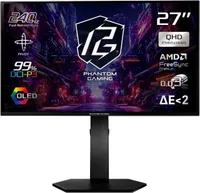
Why we recommend it
The big attraction of this monitor is the OLED panel, which can individually control its pixels rather than relying on a separate backlight. This allows it to produce genuinely deep blacks and excellent contrast that can be particularly useful when you're creating or editing visual content.
At 27 inches, QHD provides a good balance between desktop space, image detail and physical size. The 2560 x 1440 resolution provides considerably more working space than Full HD. For content creators, it boasts 99% DCI-P3 color coverage and Delta E < 2 factory calibration.
For more options, take a look at our roundups of the best gaming monitors and the best monitors for work, gaming and more.
Price context & historical value
$299.33 appears to be the lowest price so far for the ASRock Phantom monitor at Newegg. That's particularly impressive given that it only arrived at the retailer recently with a $465 price tag. The previous low was $333.33 last month.
Should you buy it?
✅ Buy the 27-inch ASRock Phantom Gaming monitor if...
You work with photography, video or other visual content and want to move from an LCD to OLED without spending a fortune. You also get HDMI 2.1 and DisplayPort 1.4 connectivity, with two of each ports providing plenty of flexibility for connecting multiple computers or other devices.
❌ Skip the 27-inch ASRock Phantom Gaming monitor if...
You need lots of pixels for large timelines, detailed layouts or several applications side by side. QHD is a useful step above Full HD, but a 4K monitor provides substantially more working space and detail for those kinds of professional creative tasks.
The Catch: What to know before you buy
The quoted 200-nit brightness is the specification I'd pay particular attention to. That's relatively modest, especially if you work in a brightly lit room or want a display primarily for high-brightness HDR content. There's also no built-in webcam or speakers, so you'll need separate hardware if either is important for your workspace.
