


August 2026: In this update, we have refreshed all of the listing to include the most up-to-date information to help you make an informed decision. As such, we double-checked the pricing, deals, server locations, and unblocking capabilities to make sure the information on this page.
Once upon a time, Macs were considered to be virtually impenetrable for malware. The operating system was considered so strong because it functioned within a sandbox preventing malware from accessing core system files.
But now that has all changed. Hackers have seen the potential in cracking the MacOS operating system and now operate malware that can capably crack into Macs with ease, prompting the antivirus market to develop solutions to protect Macs in 2026.
My team of security experts have been testing antivirus software for decades and have witnessed the transformation in the industry to counter the new threats to Macs. They pay very close attention to how each Mac antivirus performs in detecting malware without throwing up false positives, while also ensuring each service is easy to use, provides good support, and is worth the money.
Knowing that not everyone has the budget for a premium service, we've also taken a look through the best free Mac antivirus further down the page.
These are their findings on the best Mac antivirus for 2026:

The best Mac antivirus overall

Bitdefender is the top pick for MacOS for a reason. In our own testing and that of the third-party labs it is simply unrivaled. The base antivirus protection scores significantly higher for detection rates without throwing up many false positives at all.
But there is much more to Bitdefender than just protection against malware. Bitdefender for MacOS includes multi-layer protection against ransomware to stop malicious files from accessing your data, while also automatically backing up your files with Time Machine just in case anything does manage to penetrate Bitdefender's defenses. Bitdefender scans every single file that arrives in your download folder immediately, preventing those mis-clicks from turning into a full-blown virus nightmare.
In order to counter invasive cookies, targeted advertising, and browser based malware, Bitdefender for Mac adds dedicated web browser protection and an ad blocker. Not only does this protection scan for MacOS malware, it also scan's Bitdefender's databases for Windows malware.
The one main downside of Bitdefender for Mac is the VPN. While offering fast speeds and a nice interface, it is limited to just 200MB per day. It is therefore better suited for securing essential browsing than as an always-on option. But given the great affordability, you can pair Bitdefender's exceptional protection with one of the best VPNs and still pay less than some of the other options in this guide.
Not every household operates within a single operating system, which is why Bitdefender for MacOS is also included under the coverage offered by Bitdefender Total Security. This package covers up to 10 devices across Windows, Mac, Android, and iOS - so it is perfect for family protection across an household device ecosystem. If you an Apple fanatic household and have more than 3 devices, there is a case for choosing a different service that covers more MacOS devices.
Protect your devices with our Bitdefender coupon codes. Get top-notch cybersecurity at a discounted price and keep your online activities safe.
Read our full Bitdefender Antivirus review.
The best multi-device Mac antivirus

Norton has sat frequently sat high in antivirus rankings, and for good reason. Its protection scores fall just a few points behind that of Bitdefender. Norton 360 Deluxe is an excellent choice for household protection or users with more than one device in need of protection thanks to its 5 device coverage across Windows, Mac, Android and iOS.
Norton covers our favorite features between Bitdefender and Intego, offering both excellent malware protection alongside a smart firewall, while also covering all the extra features that both rival services fail to include. Norton 360 Deluxe adds a password manager, dark web monitoring, alongside a fully unlimited VPN to protect all your browsing.
However, there is one caveat. Norton 360 Deluxe can impact your system performance more than it's rivals. During deep-system scans, Nortom seems to require a significant chunks of CPU performance - far higher than that of Bitdefender and Intego.
Where Norton also might not be suitable for some users is in the renewal fees. While the introductory rate makes it very affordable for multi-device protection, it can quickly become an expensive option after the first year. In some cases, the price can increase by upwards of 200%.
So if you're looking to protect multiple devices over the short term, Norton is very affordable, offers strong protection, and includes some great features not offered by its rivals. If you're looking for long-term protection, you may want to consider some of the other entries in this guide.
Read the full Norton 360 Deluxe review.
The best Mac antivirus with firewall

Intego has been protecting MacOS for over two decades, entering the market before most people even thought their Mac needed antivirus protection.
It is built to fit seamlessly within MacOS, operating as though it were a native app that comes preinstalled making it very easy to use if you're used to the Apple ecosystem. While past third-party testing comes few and far between, it has performed very well in recent testing in both AV-Test and AV-Comparatives testing. We've also found it to offer consistent performance in detecting simulated viruses in our own testing.
There are two main features that Intego offers. The antivirus offers great detection rates for all forms of malware, stopping ransomware, spyware, and other files from taking over your device. Just like Bitdefender, it can even detect Windows malware. The two-way firewall on the other hand scans all of your incoming and outgoing traffic for anomalies or malicious files.
Outside of these core features, Intego also prevents apps on your Mac from invasive data harvesting.
Where Intego falls slightly flat is in the additional features. Each is offered as a separate app, rather than included within a single ecosystem. There is a backup service that can help protect against ransomware or serve as a handy tool for system crashes during important projects. Intego also offers SmartClean to clear up clutter and improve system speeds. For devices used by families, there is also a parental control app.
If you want a dedicated MacOS antivirus service then Intego is a great option, but if you're looking for added security features such as a VPN or ad blocking you may be better served by Bitdefender.
If you're not completely sold on Intego, there is a generous 30-day free trial so you can see if the service is right for you.
Read the full Intego Mac Internet Security X9 review.
The best of the rest

Trend Micro sits among the best of the offerings for protection on MacOS devices. The protection scores are consistently high and it is a very easy service to use. But there are a few reasons why it doesn't rank higher.
Some of the standout features outside of the base protection are the payment and financial info protection offered through Pay Guard and the browser protection against scams. Here is where it gets tricky.
If you opt for the top coverage available from Trend Micro, the service is really quite good. You can cover up to 5 Mac devices with antivirus protection, with extra features including ransomware protection, browser protection, payment protection, parental controls, social media security, system optimization, and more. This is a great level of feature coverage for a house full of Mac devices.
But the main issue with Trend Micro for Mac is that some of these features are locked behind the higher tier plans that include coverage for additional devices that you may not use. Additionally the higher plans only cover Mac devices, so unless you have 3 or 5 MacOS devices in your household you could end up paying for more coverage than you actually need just to access the extra features.
Where Trend Micro redeems itself is in affordability. You know exactly what you're paying for without the significant increases in renewal fees that you might find with Norton.
Read the full Trend Micro Antivirus review.
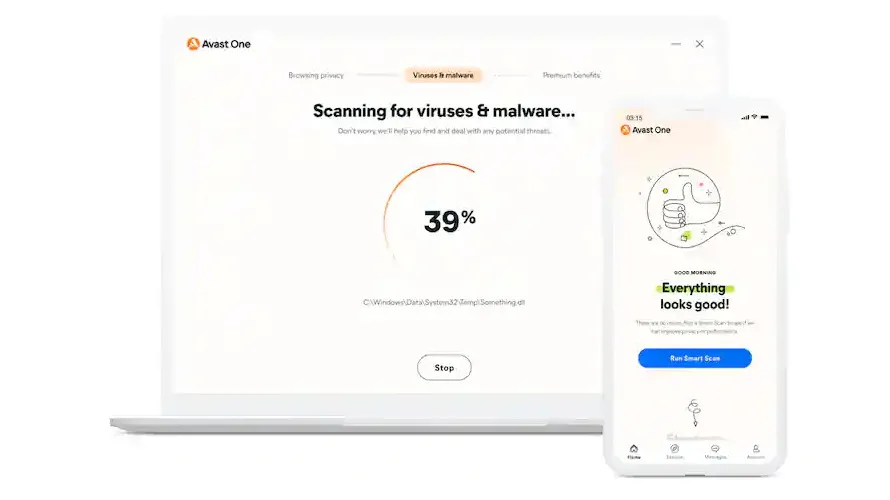
Avast One has changed significantly in recent years. The service is now free, with options to upgrade for greater coverage and extra features. If you're looking for a free Mac antivirus there is a section for that further down the page - here, we will be looking at the paid tiers of Avast One.
Overall, Avast One is a great choice for device protection across your Mac and iPhone thanks to the 1+1 protection. The testing scores are excellent and consistent and the service covers almost every way an attacker could seek to penetrate your device. Avast One Premium not only protects against viruses, ransomware, and scams on your desktop Mac, but also protects your connected iPhone against scam messages and calls.
This is where Avast One stands out from the competition. Avast One specializes in offering robust antivirus protection while also helping users defend against the rising trend of scams and fraud. To this end, Avast has included an AI assistant to detect all manner of scams and fraud across the web and your email, as well as the aforementioned iPhone protection.
If you choose to opt for Avast One Ultimate, the features also include an unlimited VPN, a Mac cleanup app, and online tracking prevention.
Between the paid plans, there is one main issue to point out. If you want to cover a single device, or 10, there is no in between - making household protection slightly tricky. If you want to make full use of the 10-device protection you may have to get some friends and extended family involved (It could be worse though, Avast One used to cover up to 30 devices).
That said, the renewal fees aren't extortionate and there is a 30-day money back guarantee so you can try before your buy without any downsides.
Read the full Avast One review.

Avira Antivirus Pro stands out as a Mac antivirus solution mainly thanks to its great affordability across multi-device protection and multi-year discounts. That does however mean that it somewhat lacks in protection scores compared to the other services on this list. From AV-Test testing, Avira had a below average detection score and let quite a few more samples slip through the net.
The upside for Avira is that there is far move protective coverage on MacOS than there is on Windows, making it a good option for the Apple fans among us. That said, it is still a base-level of protection compared to the extra features offered by other services.
There is little in terms of extra features outside of Avria's antivirus protection and VPN. There are some useful browsing-centric features such as website monitoring protection, a built-in ad blocker, infected website protection, and anti-phishing tools - but there isn't much outside of this. And if you want an unlimited VPN then it is only available as an upgrade.
Read the full Avira Antivirus Pro review.

ClamXAV is another dedicated Mac antivirus software that emerged just as MacOS malware started entering the scene. It has built its reputation as a service that offers essential antivirus protection with a few extra features at an exceptionally affordable price point.
ClamXAV barely even looks like a third-party antivirus. The user interface makes it appear as though it is a default Mac app, making it extremely easy to use if you're a Mac native user. The performance of its underlying antivirus protection is both high-scoring among the third-party labs while also having almost no impact on performance. If you want dedicated protection at an affordable price point without too many bells and whistles, ClamXAV is a great choice.
Speaking of the extra features, this is where ClamXAV fails to stand up to the competition. You get all of the expected malware, ransomware, and trojan protection with both manual and scheduled scans available - but that's it. It is basically a paid Windows Defender for MacOS.
The pricing is exceptional compared to rivals if you ignore the lack of extra features. A two year family plan that covers 9 devices will cost you far below what some competitors offer for a single device over a year. The only drawback is that it is offers antivirus and not much else.
Editor's note: Kaspersky Internet Security for Mac used to appear on this list. Considering the current climate however, we've taken the decision to remove the provider. Although much of the company's core processes are now take place in Switzerland, the fact that its headquarters remain in Moscow and there have been previous allegations around government coercion, it feels prudent to use the provider with caution. The US government has also issued a ban on the sale of Kaspersky products in the US, and when there are so many other excellent providers to choose from, it's impossible to whole-heartedly recommend Kaspersky at this time.
The best free Mac antivirus
Why you can trust TechRadar We spend hours testing every product or service we review, so you can be sure you're buying the best. Find out more about how we test.

Avast is the one of a few of the most well-known antivirus providers to provide a free service for Mac, but that doesn't mean it won't do the job. Avast's underlying malware detection architecture is the same as its premium companion, and is very highly rated across the third-party labs - with top scores in the most recent testing.
Of course, you there isn't much to say of extra features at the free tier. There is a separate browser app that provides protection for your private data and financial transactions, and it also blocks malicious downloads and provides browsing encryption (if it is supported by the website you visit). But you'll also encounter frequent pop-ups to try and encourage you to upgrade.
Overall, Avast is very user friendly and offers a treasure trove of self-help resources on the website. For a set of free apps, Avast provides a service that is comparable to some of the very basic antivirus apps listed in our premium section.

Avira's free antivirus also aims to cover the basics as best it can, but suffers from the same protection shortfalls as its premium counterparts. But it does it's best to compete with a free antivirus that offers an excellent level of configuration to keep the experience as personal as possible.
Another upside is that Avira's free antivirus for Mac includes a VPN. But it is subject to a 500MB per day usage cap, which isn't great, but it's better than nothing. The service also scans any files you're suspicious of in a cloud environment so they can be analyzed without harming your device.
The service is also regularly updated to be fully compatible with the latest Mac apps, ensuring your don't encounter any compatibility issues when using your Mac in day-to-day use. There is even a tool to check for anything that might be harming the performance of your Mac.
Unfortunately, Avira does have an impact on system performance itself. You may find your system slowed down during routine scans and deep analysis. But outside of this, Avira is a great option for a free antivirus for Mac.
Read the full Avira Antivirus solutions review.

Malwarebytes has long been the go-to solution for quickly removing malware and infections for free. But it also offers a stellar real time protection service. Malwarebytes for Mac is a highly competent service that does exactly what it is designed to do.
It is very simple, easy to use, and highly capable in detecting and removing malware - all without impacting your system performance to any substantial degree. The system scans are very fast and highly optimized, allowing you to continue using your device without facing much slowdown.
If you're looking for straightforward protection without any bells and whistles (at all), Malwarebytes free antivirus for Mac is a safe bet.
Read our full Malwarebytes Antivirus review.
Mac antivirus frequently asked questions
How to choose the best Mac antivirus
Choosing the best Mac antivirus for you is not to be taken lightly. You cannot simply go with the most convenient option because it's cheap or it's what your friend is using. The protection you need might be, after all, different from others.
The first thing you need to decide is how much you're willing to spend on a subscription or if you're willing to spend any money at all. It's worth remembering that while free antivirus products are effective at protecting against threats, they also lack certain premium features.
If you have multiple systems on your network, for example, you're at a higher risk of cyberattacks. More users means more endpoints to target. Additional management tools, typically available behind a paid subscription, let you set policies can help mitigate this risk.
Speaking of which, you do need to consider all the security features you need, from basic ones like real-time protection, parental controls and a password manager to access to secure VPN and dark web monitoring.
Finally, you need to find out just how big of an impact the antivirus software you're considering has on your system. Some of them take up considerable bandwidth, which can be taxing on your computer especially if you're regularly performing taxing tasks.
How we test Mac antivirus
While the amount of Mac malware is still considerably less than that targeting Windows, its still 100 times higher than what experts predicted just a few years ago.
The excellent AV-TEST regularly puts antivirus programs through their paces, and their most recent tests took place in December 2020 on macOS Catalina. They test three key areas: malware detection, false positives and performance.
For Mac malware, seven packages achieved 100% detection without false positives.
We combine AV-TEST's findings with our own product research and reviewing. We focus further into the usability of the products, their features and how good they are to use and live with on a day-to-day basis.
What is the best Mac antivirus?
Right now, our answer to that question is Bitdefender for Mac (also available as part of the firm's all-singing all-dancing Bitdefender Total Security plan). It combines faultless virus protection (as verified by independent test labs) with a whole host of features and a Mac antivirus client that's ridiculously easy to set up and use.
Do I really need Mac antivirus?
That really depends on you. The risk of infection remains pretty remote, and if you practice basic security measures and don’t fall for common scams then you’re very unlikely to suffer from any problems. Even ransomware can be defeated with the cunning tactic of having a backup of anything important.
That said, if you’ve ever experienced the mess malware can make on a Windows system you’ll know that just getting things back to normal can be an incredible time thief, especially if key data has been damaged. Perhaps the question shouldn’t be whether Mac antivirus is worth the money, but whether your time is more valuable than the cost of a security app.
Mac antivirus: what’s the effect on performance?
Most of us believe that virus protection software has a negative effect on performance, but chances are it’s much less negative than we think: in their tests, AV-Test found that there was no measurable performance drop when using providers like ClamXav, MacKeeper, Kaspersky or Norton.
There was a measurable difference with Sophos and Trend Micro (two per cent of additional system load), and with ESET and Bitdefender, which added around four per cent to the overall system load.
