


Sponsored by

Arduino vs Raspberry Pi: What's the difference?

You've probably heard about Arduino and Raspberry Pi. Both show up in maker forums, both get recommended for electronics projects, and both have passionate communities. So which one do you actually need?
The confusion makes sense. They're both small circuit boards that help you build gadgets. And yes, they sometimes get used for similar stuff.
But mixing them up wastes your time and money. If you choose Arduino when you need Raspberry Pi, you won't have enough computing power. But if you invest in Raspberry Pi when Arduino is up to the task, you're overpaying for features you'll never touch. Your single choice shapes the entire workflow and what you can build, so here’s how to get it right.

Arduino vs Raspberry Pi: What you need to know
- Arduino is a microcontroller designed for real-time hardware control with very low power use. Raspberry Pi is a full computer that runs operating systems and handles complex tasks.
- Arduino excels at repetitive work like reading sensors and controlling motors. Raspberry Pi handles multimedia, web servers, and AI applications.
- The power gap is huge. Raspberry Pi 5 has a 2.4 GHz quad-core processor with up to 16 GB of RAM. Arduino boards run at 16-48 MHz with kilobytes of RAM.
- Arduino doesn't need an operating system. Your code runs directly on the chip for reliable, instant control. Raspberry Pi runs full Linux with desktop software and apps.
- Raspberry Pi models cost $45-145, with more technical knowledge requirements to use properly. Arduino boards start around $25-45, great for beginners.
What is Arduino?
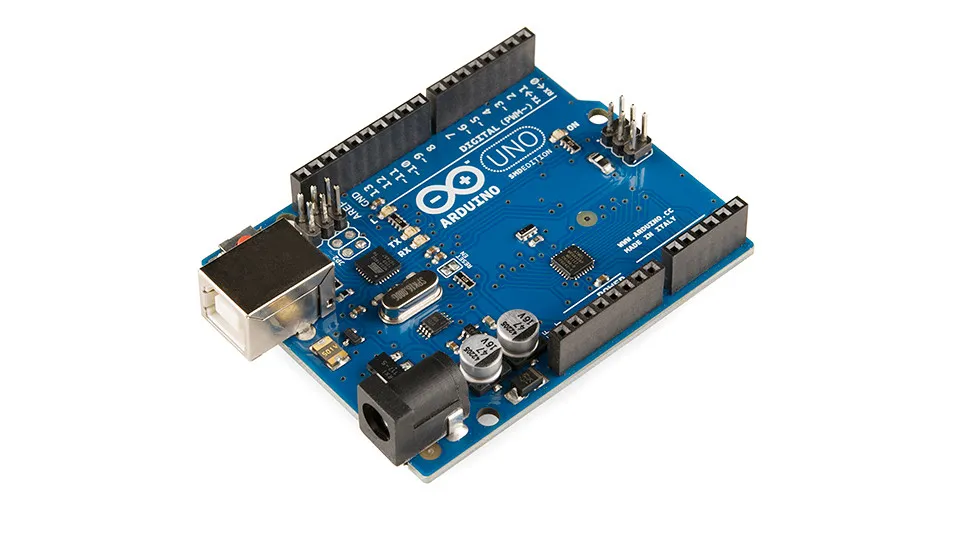
Arduino is an open-source electronics platform that helps you create interactive projects. It combines hardware and software to make microcontroller programming accessible, even if you've never written code before.
The project started in 2005 at Italy's Interaction Design Institute Ivrea because academics wanted to make electronics easier for students.
In October 2025, Qualcomm acquired Arduino. The deal still needs regulatory approval, but Qualcomm says Arduino will stay independent, keeping its open-source approach. They're combining Arduino's accessibility with Qualcomm's AI capabilities. The first result is the Arduino Uno Q, featuring both a Qualcomm processor and a traditional microcontroller.
Arduino boards have microcontrollers that accept inputs from sensors or buttons, process information, and then trigger outputs like motors or LEDs. You program them using simplified C/C++, much easier to learn than traditional languages.
What it's for
Arduino works best when you need reliable, real-time control of physical stuff. Here are five common ways people use it:
- Home automation: Control your lights, thermostat, door locks, and garage with sensors and simple logic. All while using barely any power.
- Robotics: Manage motors and servos for small robots that require instant responses to their surroundings.
- Environmental monitoring: Read temperature, humidity, and air quality continuously. Trigger alerts or log data without an internet connection.
- Wearables: Build fitness trackers or LED clothing that runs on batteries for weeks thanks to Arduino's tiny power draw.
- Interactive art: Create installations that respond to motion, sound, or touch using straightforward inputs and outputs.
How it works
Arduino uses a microcontroller, which is basically a simple computer on a single chip.
Unlike a microprocessor, a microcontroller has everything built in: CPU, memory, and input/output connections all on one piece of silicon. The Arduino Uno R3 uses an ATmega328P chip running at 16 MHz with 32 KB of flash memory and 2 KB of RAM.
Advanced models pack more punch. The Uno R4 runs at 48 MHz with better memory. The GIGA R1 WiFi has a dual-core chip, built-in WiFi and Bluetooth, and enough power for robotics work.
The Arduino IDE makes programming simple. You write your program (a "sketch"), compile it, and upload via USB.
Once uploaded, your code runs directly on the hardware with no operating system needed. Power on the board, and your program starts instantly.
The Qualcomm deal brought the Arduino Uno Q ($44-59), featuring Qualcomm's processor alongside a traditional microcontroller.
This "dual brain" setup combines normal Arduino control with Linux computing and AI capabilities. But regular Arduino boards with chips from other manufacturers are still fully supported.
When you shouldn't use it
Arduino has clear limits that rule it out for certain projects. The processing power is minimal. You can't run complex algorithms, handle high-resolution images, or juggle multiple tasks at once. Need to run machine learning models? Want to serve web pages or process video? Arduino will struggle.
It's also not built for manufacturing actual products at scale. Sure, it's perfect for testing concepts and building prototypes. But the boards cost too much for mass production.
Companies usually prototype with Arduino, then switch to custom circuit boards with the same chips for their final products. This cuts costs and lets them optimize the size and shape.
The lack of an operating system limits you too. You can't connect Arduino to monitors for graphical interfaces. Can't run multiple programs simultaneously. Can't access the huge world of desktop software. If users need to interact through a screen or your project needs complex file handling, Arduino probably isn't right.

What is Raspberry Pi?
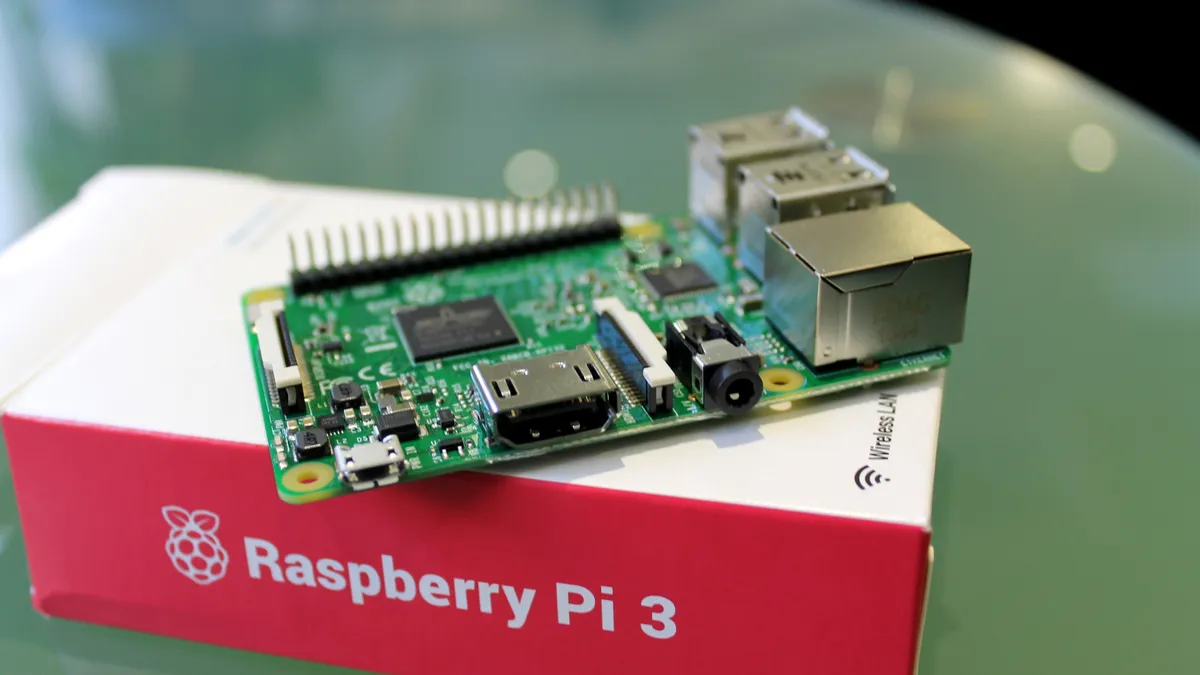
Raspberry Pi is a credit-card-sized computer developed by the Raspberry Pi Foundation in the UK. When it launched in 2012, the goal was simple: create affordable computers for students to learn programming.
The foundation thought they might sell 10,000 units to students and hobbyists. Instead, they've sold 68 million as of March 2025. That makes it the best-selling British computer ever.
What started as an educational tool became something much bigger. Professionals now use Raspberry Pi for industrial automation, media centers, and all sorts of commercial applications. It's a real computer with everything you'd expect: processor, graphics, RAM, USB ports, HDMI output, and network connections.
The latest version is Raspberry Pi 5. It now comes in five flavors based on RAM: 1GB ($45), 2GB ($55), 4GB ($70), 8GB ($95), and 16GB ($145). Those prices went up recently because memory got more expensive thanks to AI infrastructure demand. The foundation says these increases are temporary while they navigate the tight memory market through 2026.
What it’s for
Raspberry Pi handles complex tasks that need a full operating system. Here are five ways people commonly use it:
- Media centers: Run Kodi or Plex to stream high-definition video throughout your home. Supports 4K output and HDR for serious quality.
- Desktop computing: Use it as a low-cost computer for programming, browsing the web, writing documents, and teaching kids about computers.
- Network servers: Host websites, create network storage, run VPN servers, or set up Pi-hole to block ads across your entire network.
- Retro gaming: Build an emulation station with RetroPie to play classic NES, SNES, and PlayStation games on modern displays.
- AI projects: Process computer vision tasks, run machine learning models, or add AI accelerators like the Hailo chip for edge computing.
How it works
Raspberry Pi uses a fundamentally different approach. Instead of a microcontroller, it has a microprocessor.
The Raspberry Pi 5 features a Broadcom chip with a quad-core 2.4 GHz processor and graphics capabilities. But this chip can't work alone; it needs external RAM, storage (usually a microSD card), and power management circuits.
A microprocessor needs an operating system to manage everything: scheduling tasks, allocating resources, bridging software and hardware.
Raspberry Pi typically runs Raspberry Pi OS, which is Linux optimized for the Raspberry Pi hardware. You can also install Ubuntu, Debian, or Windows if you want.
It has some serious advantages. Run multiple programs at once. Use a graphical desktop. Access huge software libraries. Code in Python, Java, C++, whatever you prefer. The GPIO pins let you connect to sensors and motors, but through the operating system instead of direct hardware control.
Moreover, different models serve different needs. The Zero series offers tiny options starting at $15. The main series (now version 5) provides the most power. The Compute Module packages core components for industrial use. The 400 and 500 keyboards build everything into a keyboard for complete desktop setups.
Raspberry Pi 5 is a big leap: 2-3x faster CPU, better graphics, dual 4K displays, faster connectivity, and improved camera handling. All while being more power-efficient.
When you shouldn't use it
Raspberry Pi isn't always the answer, either. Real-time hardware control becomes tricky when an operating system sits in the middle.
The OS introduces timing uncertainty. When you tell it to turn on a motor or read a sensor, it might delay that action by milliseconds while handling other stuff.
For projects needing microsecond-level precision — like controlling stepper motors in 3D printers or reading high-frequency sensor data — this lag causes problems.
Battery-powered projects struggle with Raspberry Pi's power appetite. The Pi 5 draws 3.3-4.5W under normal use. Arduino boards often sip mere milliwatts. Building a remote sensor that needs to run on batteries for months? Raspberry Pi makes that impractical.
Cost matters for simple projects too. If you just want to turn on lights when motion is detected or log temperature every few minutes, spending $45-145 on a Raspberry Pi (plus SD card, power supply, and case) is overkill. Arduino does these jobs for less money, with simpler code, and without managing an operating system.
Arduino vs Raspberry Pi: How do they compare?
The fundamental split is simple. Arduino is a microcontroller. Raspberry Pi is a computer. Everything else flows from that distinction.
Microcontrollers like Arduino execute code directly on the hardware. Precise. Predictable. When your program says "read this sensor" or "toggle that pin," it happens instantly. No delays, no interference. This makes Arduino perfect for time-critical stuff where you need reliable, real-time responses.
But that simplicity has costs. You're working with kilobytes of memory, with processing speeds measured in megahertz, not gigahertz.
Raspberry Pi runs a full operating system that juggles multiple tasks at once. You get gigabytes of memory. Serious processing power. The ability to run complex software like web servers or AI models. But you lose those real-time guarantees Arduino provides.
The Linux-based OS might pause your program momentarily to handle other work, making precise timing harder.
Arduino offers a streamlined setup focused entirely on hardware. Write code, upload it, done.
But Raspberry Pi needs more work upfront. Installing an operating system. Configuring software. Maybe dealing with Linux commands.
Price reflects these differences, too. Basic Arduino boards like the Uno R3 cost around $25-30. The entry-level Raspberry Pi 5 starts at $45 but needs extras (power supply, SD card, case) that push the total to $75-100. For simple projects,
Arduino offers better value. For complex work needing real computing power, Raspberry Pi's higher cost delivers way more capability.
Here’s how they compare:
Feature |
Arduino |
Raspberry Pi |
Hardware type |
Microcontroller board |
Single-board computer |
Processor |
16-48 MHz (ATmega328P, ARM Cortex-M4) |
2.4 GHz quad-core (ARM Cortex-A76) |
RAM |
2-32 KB |
1-16 GB |
Storage |
32-256 KB flash |
MicroSD card or NVMe SSD (unlimited) |
Operating system |
None (bare metal) |
Linux (Raspberry Pi OS, Ubuntu, etc.) |
Power consumption |
Very low (20-500 mW) |
Moderate to high (3-5W) |
GPIO pins |
14-54 digital I/O |
40 GPIO pins |
Real-time control |
Excellent (microsecond precision) |
Limited (OS introduces latency) |
Programming language |
C/C++ via Arduino IDE |
Python, C++, Java, and more |
Best for |
Sensors, motors, simple automation |
Media servers, AI, web applications |
Typical costs |
$25-45 |
$45-145 |
Common use cases |
Prototyping and hardware control |
Production-ready computing tasks |
For a smooth experience, combine Arduino with Raspberry Pi
You know what many beginners miss? You don't have to choose. The smartest approach often uses both, taking advantage of what each does best.
You can use Arduino during development to nail down your hardware. It's instant feedback helps you prove the electronics work. Then connect a Raspberry Pi to handle complex processing, data logging, or networking when you’re ready for launch.
Picture a smart home monitoring system. Arduino boards around your house read temperature and humidity sensors. They trigger immediate responses when thresholds get crossed. These boards connect to a central Raspberry Pi that collects data, stores it, generates graphs, serves a web interface, and maybe runs predictions.
This way, your design delivers benefits neither platform manages alone. Arduino's reliable hardware control meets Raspberry Pi's powerful computing. The separation makes development easier too: debug hardware on Arduino, handle complexity on Raspberry Pi.
There’s another option, too. Arduino Uno Q combines both on one board. It pairs Qualcomm's processor (Linux, AI, complex processing) with a microcontroller (real-time hardware control). This eliminates the need to wire separate boards together.
But there are tradeoffs. You can't power just the microcontroller because you must power up the Qualcomm processor too, losing that ultra-low power consumption. The board draws 3.3-4.5W, similar to Raspberry Pi.
If battery life matters, stick with traditional Arduino. For projects needing both capabilities, the Uno Q simplifies things considerably.
Ultimately, you’ve got to match your approach to what you're building. Simple automation? Arduino works fine. Complex computing? You need a Raspberry Pi. But for most projects, you’ll need to combine them or use the new Uno Q.
