





From mobile games to instant messaging and trivia, many apps offer dopamine hits so good that people become obsessed. This issue affects adults and kids more so.
If you observe kids getting obsessed with their smartphones, it’s an issue to be handled carefully. Instead of immediate bans, first observe which apps consume their time and why they’re attached to these apps. Then, you can set healthy screen time limits to avoid excessive use. Kids deserve fun, but it should be moderated by parents.
If you’re worried about your kids getting hooked on apps, you’ve arrived at the right place to learn an effective solution. I’ve created a detailed guide explaining why kids get obsessed with certain apps, how to identify these apps, and how to set healthy screen time limits while avoiding conflict.
How to identify apps consuming your kids’ time
Your child can spend so much time on their device, but you can’t seem to figure out which apps consume the most time. Could they be playing games on Roblox or interacting with an educational app? Are they scrolling endlessly through YouTube or playing their favorite card game? You don’t need to constantly watch over kids’ shoulders to know what they’re doing. Instead, built-in tools or external parental control apps provide clear insights.
Screen Time (iOS)
iPhones and iPads have a built-in Screen Time feature that gives detailed insights into usage activity. When turned on, you’ll get a weekly report of all apps your child interacted with and the time spent on each app. This tool also lets you set daily time limits for specific apps or schedule complete screen downtime at specific hours.
To use Screen Time, simply go to Settings > Screen Time on an iOS device. Then, turn on App & Website Activity to receive weekly device usage insights.
If a child’s device is connected to your iCloud account, you can receive Screen Time insights on your own iPhone and also adjust settings remotely.
Digital Wellbeing (Android)
Android devices have a similar feature to Screen Time. Once activated, this built-in tool provides detailed reports of which apps your kids use most, how many notifications they receive, and when they unlock their devices. You can also use it to set screen time limits, pause specific apps altogether, and schedule device downtime (e.g., at night).
If your child’s device is connected to your account via Google Family Link, you can adjust settings on their device remotely. For example, if your kid spends a long time on a certain action game, you can set a 1-hour daily limit to avoid excessive playtime.
Manual observation
There’s still a place for manually observing how your kids interact with their devices. You don’t have to constantly patrol their devices and look overbearing. Rather, occasional looks help you know what your kids do and when to set restrictions.
Parental control is more of a two-way thing. Let your kids understand that it’s okay to have fun, but it can get excessive and thus needs to be managed. This avoids situations of kids hiding what they do from your eyes. When restrictions need to be set, let them understand why it’s crucial. Kids can be very cooperative when carried along, avoiding unnecessary conflict about mobile usage.
Use a designated parental control app
I’ve mentioned two built-in parental control tools: Screen Time for iOS and Digital Wellbeing for Android devices. These tools are free to use, but they have limitations. For example, they don’t let you set sophisticated content filtering rules, such as blocking whole website categories.
It also doesn’t help that Screen Time is limited to iOS devices only, and Digital Wellbeing is only for Android devices– you can’t use it to monitor your child’s smartphone and PC simultaneously. A designated parental control app like Qustodio is the best option.
For instance, Qustodio lets you monitor laptops, desktops, and smartphones. The dashboard provides a real-time view of your child's digital activity, and you can adjust settings quickly. Whether your child is currently on YouTube, Roblox, or their favorite game, you'll always know.
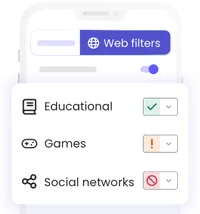
With Qustodio, you can set distinct time limits for different apps, e.g., by allocating more time to educational apps than gaming apps. Once the time limit is exceeded, your kid can’t use the app anymore. You can even pause your kid’s internet connection remotely on your own device. Likewise, you can view all incoming and outgoing calls or SMS sent to your child’s device, ensuring they’re interacting only with people you’re familiar with.
Designated parental control apps provide broader insights into device activities compared to built-in tools. They require monthly or annual subscriptions, but it’s a worthwhile investment in your child’s online privacy.

How to set healthy limits without banning everything
Above, you’ve learned how to pinpoint the apps consuming your child’s time. It’s one thing to identify the problem and another to address it effectively. Many parents resort to outright device bans, but this isn’t always ideal. You can set healthy screen time limits without banning kids from using PCs, smartphones, or tablets altogether. Setting clear boundaries and explaining why these boundaries are necessary helps avoid potential parent-child conflict.
Let’s explore practical ways to set healthy screen time limits:
1. Create screen-free zones
Agree with your kids about times and places where screen time isn’t allowed. For example, you can ban smartphones from being used at the dining table. This strategy encourages face-to-face communication during dining hours, helping your family build strong emotional bonds. Devices have their benefits, but they aren’t a replacement for face-to-face communication between siblings and parents.
You could also restrict device usage during bedtime. At night, kids would be required to keep all devices in a shared space and not take them to the bedroom. Nighttime screen use is linked to poor sleep quality, so it should be avoided. A rule of thumb is to shut down all screens 30 to 60 minutes before bedtime, and start each new day without the distraction of smartphone screens.
There’s no perfect set of screen-time rules. Instead, what matters is having precise rules and explaining to your kids why these rules are necessary. With clear regulations, children know what to do and what not to do to avoid conflict.
2. Focus on screen time quality over quantity
Healthy screen time isn’t just about advising children to reduce the time they spend on devices. It’s more of guiding them to prioritize creative and educational content over mindless scrolling. For example, you can install games that allow children to solve math and art puzzles, thereby building their mental abilities. You can install educational apps that teach coding, art, languages, history, and more.
You could join in on the fun and turn it into a bonding activity. Try playing video games with your kids or help them solve puzzles, and you’d be surprised at how much cohesion it builds. Those apps may seem below your age range, but they can be fun for adults, too.
3. Replace, rather than just remove
If your child spends too much time on an app, it means they’re getting something they like from it. You shouldn’t just place time limits or delete the app altogether and call it a day. Rather, replace the app with an engaging activity that fills up the time.
For example, if you restrict a video game that your child loves playing, try replacing it with board games and puzzles. Many times, kids just want a way to fight boredom, and video games become a channel. You can replace that channel with board games that offer similar fun and also build mental abilities.
You can use the “Screen Swap” strategy, where any amount spent on screens requires an equivalent amount of non-screen activity. For example, a 30-minute gaming session could require a 30-minute reading session on the same day. The idea is to let kids have some fun and also engage in productive activities.
4. Set a good example
You may set rules and say a lot, but children ultimately learn more from observation than listening. You’ve set healthy screen time limits, so be an example they can learn from. Avoid checking your phone at the dinner table, TV binges, or during other family time. Avoid scrolling endlessly through social media when your kids are present.
Children should see you use devices for clear purposes, like researching answers to questions they ask you, checking the weather, or browsing food recipes. This way, they’ll learn to do the same. You’d be surprised how much of your healthy screen time behavior your kids would pick up, without you even saying much.
Screen time guideline recommendations
I’ve mentioned that there’s no perfect set of screen time rules, but there are some recommendations to follow based on your child’s age range. I’ve written these recommendations based on personal observations and extensive research into screen time effects, but it isn’t a gold standard. Rather, it’s just a guideline that I think parents can follow.
Under 18 months
In my opinion, kids under 18 months don’t need screen time at all, or maybe just in rare cases like video chatting with family members. At this age, human interaction takes clear priority, as kids under 18 months are still learning how to communicate in non-verbal ways and navigate the world around them.
18 to 24 months
At 18 to 24 months, children can get some minutes of screen time, but you should always be present. You’re there to manage what they watch, and you can turn it into some bonding time. How about singing some “Baby Shark doo-doo” with your kid?
2 to 5 years
Children in this age group can get significant screen time, maybe up to 1 hour daily. However, the screen time should focus more on educational content. Limit non-educational content and focus on creative stuff that helps build mental capacity.
6 years and above
Children aged 6 and above can enjoy more screen time, with no strict hour cap, but supervision remains important. Focus on setting limits that prevent screen time from interfering with sleep, exercise, and human interaction.
