





TechRadar Verdict
With machines getting more expensive, we’re likely to see more systems like the P4 Ultra that rehash older technology. I’m not entirely convinced by the specification or the price, but in six months, this price might be a bargain.
Pros
- +
Solid Ryzen 7 7730U performance
- +
Dual 2.5GbE LAN
- +
Linux option
- +
Reasonable value
Cons
- -
Zen 3 chip shows its age
- -
Awkward internal access
- -
DDR4 memory bandwidth
- -
M.2 slots are PCIe 3.0
Why you can trust TechRadar We spend hours testing every product or service we review, so you can be sure you're buying the best. Find out more about how we test.
BOSGAME P4 Ultra: 30-second review
Mini PCs have never been more crowded. Every few months, a new batch of compact desktops arrives from Chinese brands promising big performance in a small chassis, and the Bosgame P4 Ultra is the latest to land on the desk for evaluation. It slots into the brand's Effizen series, which targets productivity and everyday computing rather than serious gaming.
The headline here is the AMD Ryzen 7 7730U. It is an 8-core, 16-thread processor based on Zen 3 architecture, clocked up to 4.5GHz, and paired with Radeon Vega 8 integrated graphics. That combination is capable, but it is worth being honest from the start: the 7730U is a Barcelo Refresh part, which means it is architecturally identical to the 5825U from 2021. Bosgame has dressed it in a new product number, but the silicon is not new.
What is new, or at least appealing, is the package. The P4 Ultra ships either with Windows 11 or Ubuntu 24.04 LTS pre-installed, making it one of the more accessible Linux mini PCs on the market. It also brings dual 2.5GbE LAN ports, Wi-Fi 6E, and triple 4K display output, all wrapped in a compact chassis with a VESA mount in the box.
The asking price is around $420 from online retailers, which puts it up against stiff competition from Beelink, GMKtec, and even other BOSGAME models.
This isn’t an expensive mini PC system, but it's also not the cheapest given the modest specifications.
As with most of the hardware this brand makes, the P4 Ultra is a well-executed solution that would work for general office computing, but it lacks the performance required by creatives and developers.
And, due mostly to the age of its platform, this isn’t a system we’ll be including as one of our best mini PC entries.

BOSGAME P4 Ultra: Price and availability
- How much does it cost? From $420/£440/€510
- When is it out? Available now
- Where can you get it? Direct from online retailers
At the time of writing, the P4 Ultra doesn’t appear to be listed on the Bosgame website in the Effizen Series mini PCs collection. Hopefully, this will change.
However, if you search for the “P4 Ultra”, you can find a landing page for a Linux version of this machine with Ubuntu installed on it.
The UK asking price for that machine is £379, which seems most reasonable.
Those wanting Windows 11 preinstalled on the same hardware, as there is only one 16GB/1 TB SKU, need to look for this machine from online retailers.
On Amazon.com, it can be found for $419.98, in the UK it is £439, and across Europe it's €509. Given the spec, that looks like an attractive proposition.
One problem for Bosgame is that for almost exactly the same price, GMKtec is selling the M6 Ultra, and that has a better Ryzen 7640HS processor and 16GB of DDR5 RAM.
And another is the Beelink SER 5 MAX, which, for $458.99, offers the AMD Ryzen 7 7735HS CPU, 24GB of DDR5 memory, and a 500GB SSD.
But even Bosgame undercut itself with the P3 Mix, a system they sell for less than $400, that uses the Ryzen 7640HS (up to 5.0 GHz), has 16GB DDR5, and a 512GB PCIe SSD, all in an identical case to the P4 Ultra.
Based on these alternatives, the P4 Ultra should have been closer to $375.
- Value: 3 / 5

BOSGAME P4 Ultra: Specs
Item |
Spec |
CPU |
AMD Ryzen 7 7730U (8C/16T, up to 4.5GHz) |
GPU |
AMD Radeon Graphics Vega 8 (8 cores, up to 2000MHz) |
NPU |
None |
RAM |
16GB DDR4 3200MHz dual-channel (2x SODIMM slots, up to 64GB) |
Storage |
1TB M.2 NVMe PCIe 3.0 x4 |
M.2 Expansion |
1x additional M.2 2280 PCIe 3.0 x4 (up to 8 TB per slot; 16 TB total) |
Display Outputs |
1x HDMI 2.0, 1x DisplayPort 1.4, 1x USBC |
Front Ports |
2x USB 3.2 Gen 2 Type-A, 1x USB 3.2 Gen 2 Type-C, 3.5mm audio, power button |
Rear Ports |
2x USB 2.0 Type-A, 1x HDMI, 1x DisplayPort, 2x 2.5 GbE RJ-45, DC power |
Networking |
Wi-Fi 6E, Bluetooth 5.2, 2xl 2.5GbE LAN |
OS |
Windows 11 Pro (pre-installed); Linux supported |
Dimensions |
107 x 111 x 56 mm |
Weight |
Approx. 0.65 kg |
Included Accessories |
30W USB-C PD adaptor, VESA mount bracket, HDMI cable, power brick, manual |
BOSGAME P4 Ultra: Design
- Familiar chassis
- Limited port selection
- Complicated internal access
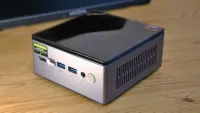
The P4 Ultra follows the now-familiar NUC-inspired layout: a rectangular aluminium-and-plastic chassis small enough to sit beside a monitor, mount behind one via VESA, or tuck out of sight entirely. The case features precision laser-faceted metal vents along the sides and rounded corners, giving it a reasonably contemporary appearance.
The front panel carries the power button, two USB 3.2 Gen 2 ports, a USB-C port, and a 3.5mm audio jack. There are no ports on the sides, on the back, you will find the two 2.5GbE RJ45 ports, a further two USB 2.0 ports, a single HDMI 2.0 and DisplayPort 1.4, and the DC power input. The layout is logical and functional, though the USB 2.0 ports feel like a cost-cutting measure on an otherwise reasonably specified machine.
That all the better USB ports are on the front is somewhat annoying, and I’ve noticed a few resellers claiming that the USB-C port is USB4, when it isn’t. It is USB 3.2 Gen 2, as are the other USB ports on the front. But it does support video mode, which increases the potential monitor count to three with the HDMI and DP.
Cooling is handled by an active fan system. BOSGAME describes the design as quiet, and at the 15W default TDP, that is credible, though sustained loads will prompt audible fan activity. However, my review machine was delivered in 35W performance mode, which made it slightly noisier. Selection of the Quiet (15W), Balanced (25W) and Performance (35W is via the BIOS. It would be nice if this were changeable in Windows.

One especially useful feature is that the two M.2 NVMe slots are both 2280-sized, enabling this machine to take the least expensive storage in the most common form factor. By default, one of these slots is already occupied with a 512GB module, and that is connected thermally to the metal case with a silicon thermal pad.
On the rear are four USB-A ports, with three being USB 3.2 Gen 2 and one being USB 2.0.
What I wasn’t keen on was access to the internal memory and storage, which seemed initially easy, and then got progressively more complicated.
Removing the underside is straightforward enough, four screws, and it comes away easily.
However, once inside, there is an additional fan bracket layer, with three screws of two different sizes. The two longer screws aren’t easy to see or access, and they’re even more fun to put back if you don’t have a magnetic screwdriver.
When you do get this layer out, and there is a ribbon cable carrying power to its fan that you need to be careful of, you can then access the memory and storage.
The good news here is that everything is upgradable, and there is a second M.2 2280 slot, and the bad news is that both M.2 slots are only PCIe 3.0. The M.2 slots do at least have a thermal pad to pull heat away from them, although as they’re not PCIe 4.0 spec they are unlikely to overheat.
The chassis in this design is almost identical to that used in a number of other Bosgame products, and it doesn’t stray far from the original NUC concept. I just wish the designers hadn’t put so many hurdles in the way of anyone wanting to add more memory or storage.

- Design: 3.5 / 5
BOSGAME P4 Ultra: Features
- AMD Ryzen 7 7730U
- Vega 8 GPU
- 16 GB DDR4
- Lacks an NPU
The Ryzen 7 7730U is the centrepiece, and it deserves some context. AMD launched it in late 2022 as part of the Barcelo Refresh line-up. Zen 3 is a proven architecture that delivered a genuine generational leap when it debuted in 2020, and it remains a competent foundation for office and productivity work in 2025. But it sits behind Zen 4 (the 7040 series) and the newer Zen 5 parts in both IPC and integrated graphics performance.
That graphics point matters here. The Vega 8 GPU inside the 7730U has 512 shaders running at up to 2000MHz. It is adequate for 4K video playback, light photo editing, and casual games, but it trails the RDNA 3 graphics in Zen 4 mobile processors by a meaningful margin. For comparison, the Ryzen 7 7840HS found in the higher-spec BOSGAME P3 carries RDNA 3 with considerably better graphics performance.
Memory is 16GB of DDR4 at 3200MHz in a dual-channel configuration, which is the right setup for integrated graphics. Single-channel DDR4 cuts available graphics bandwidth roughly in half, so the dual-channel arrangement here is a sensible default. The SODIMM slots support up to 64GB of memory.
The issue is that many similarly priced systems use DDR5, and its bandwidth boost improves both CPU and GPU performance; in particular, graphics performance is enhanced because the integrated GPU shares the main memory.

Storage is a 1TB M.2 NVMe drive running on a PCIe 3.0 x4 interface. This is not Gen 4, and sequential read speeds will be capped accordingly, but for day-to-day computing, it is more than fast enough. A second M.2 2280 slot sits unoccupied, which makes life remarkably simple when you wish to clone the original drive to one with a larger capacity.
Connectivity is a genuine highlight of this design, making it potentially useful as a hardware firewall. Dual 2.5GbE ports open up small office routing, NAS aggregation, and network isolation use cases that single-port machines cannot touch. Wi-Fi 6E covers all three bands, including the congestion-free 6GHz spectrum, and Bluetooth 5.2 handles peripherals cleanly.
How you feel about the hardware in this machine comes down to two aspects. And those are how much you use graphics and what types of processing you intend to do.
The CPU and GPU are both outdated, overtaken by new DDR5 designs that offer more performance and greater power efficiency. There is no dedicated NPU for AI work, so this machine is only suitable for general office tasks and not for software development.
It might have a use as an embedded signage system, but it will need ventilation.
- Features: 4 / 5
BOSGAME P4 Ultra: Performance
Mini PC |
Row 0 - Cell 1 | Bosgame P4 Ultra |
GMKtec NucBox K16 |
CPU |
Row 1 - Cell 1 | AMD Ryzen 7 7730U |
AMD Ryzen 7 7735HS |
Cores/Threads |
Row 2 - Cell 1 | 8C 16T |
8C 16T |
RAM |
Row 3 - Cell 1 | 16GB DDR4 (2x8GB) |
32GB LPDDR5 (2x16GB) |
SSD |
Row 4 - Cell 1 | 1TB SSD |
1TB TWSC TE3420F1TO NVMe |
Graphics |
Row 5 - Cell 1 | Radeon 680M |
Radeon 680M |
3DMark |
WildLife |
4961 |
10320 |
| Row 7 - Cell 0 | FireStrike |
2368 |
4508 |
| Row 8 - Cell 0 | TimeSpy |
1001 |
1813 |
| Row 9 - Cell 0 | S.Nomad |
843 |
1634 |
Cine24 |
Single |
86 |
84 |
| Row 11 - Cell 0 | Multi |
538 |
595 |
| Row 12 - Cell 0 | Ratio |
6.23 |
7.08 |
GeekBench 6 |
Single |
1965 |
1957 |
| Row 14 - Cell 0 | Multi |
6124 |
7170 |
| Row 15 - Cell 0 | OpenCL |
13511 |
24105 |
| Row 16 - Cell 0 | Vulkan |
11940 |
22401 |
CrystalDisk |
Read MB/s |
3735 |
3549 |
| Row 18 - Cell 0 | Write MB/s |
3285 |
2649 |
PCMark 10 |
Office |
6257 |
6785 |
WEI |
Score |
6.7 |
8.1 |
Some readers will probably think I’m being unfair for comparing the $420 Bosgame P4 Ultra to the $590 GMKtec K16. Yes, the K16 is $170 more, but then look at what a Zen 3+ processor, DDR5 memory, and the Radeon 680 GPU deliver. Almost across the board, the K16 is twice as fast, for only 40% more money. And, if they had the same amount of memory, the cost difference would be less significant.
There are two takeaways from these benchmark results, the first being that anyone who wants to complete their demanding tasks more quickly should invest in a better mini PC that uses DDR5. The other is that for office work, the P4 Ultra is fine.
My view is that systems like this are always being repurposed, because they’re easy to move and reconfigure. What makes one mini PC better than another can often come down to flexibility. The performance envelope of the K16 is much greater than that of the P4 Ultra, making it inherently more flexible and suitable for a wider range of jobs.
If you are convinced that the system you want will only ever do a job for which it is suited, then buying the P4 Ultra might make sense. But if you think that a year from now you might be forced to buy something better, then perhaps it's worth considering that now.
The Bosgame P4 Ultra isn’t a great performer, but what it achieves might be good enough for some customers.
- Performance: 3 / 5
BOSGAME P4 Ultra: Final verdict

The Bosgame P4 Ultra is a competent compact mini PC that does most things adequately and two things rather well. The dual 2.5GbE networking and the option for a ready-to-run Ubuntu installation are genuine differentiators in a market where most machines ship with Windows and a single Gigabit port.
The honest caveat is the processor. The Ryzen 7 7730U is Zen 3 under a new badge. It is not slow, but it is not modern either. Anyone comparing it against Zen 4 machines at a similar price point will find those alternatives offer better integrated graphics and more up-to-date architecture. The PCIe 3.0 SSD is a similar observation: functional, but not state-of-the-art.
At the right price, those trade-offs are acceptable. The P4 Ultra earns its keep as a quiet, power-efficient desktop for document work, browsing, media playback, and lightweight server duties. Push it harder than that, and you will want to consider the Bosgame P3 Mix or one of the Beelink alternatives with a Hawk Point processor.
Should you buy a BOSGAME P4 Ultra?
Value |
Premium price for a Zen 3+ platform |
3 / 5 |
Design |
Awkward internals and limited USB ports |
3.5 / 5 |
Features |
Dual 2.5 GbE, but an old platform rebranded |
3.5 / 5 |
Performance |
Outclassed by DDR5 systems |
3 / 5 |
Overall |
A limited use mini PC |
3.5 / 5 |
Buy it if...
Don't buy it if...
Also Consider
For more professional hardware, we've reviewed the best business computers.
