





For anyone spending long hours at a computer, standing desks are unquestionably one of the best purchases you can make. A lot of people focus on desktop finishes, colors, and dimensions before clicking the Buy button, but that's only part of the story.
Two standing desks can look almost identical online while delivering completely different experiences once they're supporting multiple monitors, lifting heavy equipment, or adjusting height several times a day.
Don't be fooled into thinking you need to spend a fortune to get a good desk either. An inexpensive one can offer excellent value if it includes the right engineering. Instead of focusing on cost alone, it's worth digging into the specifications that determine how well a desk will perform over years of daily use.
These ten features consistently separate the models I'd happily recommend from those I'd leave behind.
1. Height adjustment range
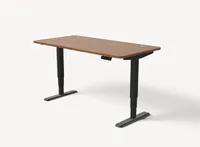
Before buying, check that the desk's adjustment range comfortably accommodates your height, particularly if the desk will be shared with someone taller or shorter than you.
If you're around 5ft 4in, your ideal standing desk height is likely to fall between 104 and 109cm. For someone measuring 5ft 8in, that rises to around 110-115cm, while a person who is 6ft tall will typically need 116-122cm.
If you're 6ft 3in, expect to work most comfortably with a standing height of around 121-127cm.
Your monitor is also an important factor. The top of the screen should sit at, or just below, eye level, which is why many monitor arms offer a wide range of height adjustments.
Check a standing desk will best suit you using Desktronic's desk height calculator. This will let you work out the perfect heights for both sitting and standing.
2. Memory presets

Memory presets on a sit-stand desk are one of those features you don't appreciate until you've used them a few times. Rather than holding the up or down button every time you want to change position, you simply save your preferred heights (sitting and standing) and switch between them with a single tap.
It only takes a few minutes to set up, but it makes changing posture throughout the day much quicker and helps maintain a consistent, comfortable position.
Two presets are usually enough if you're the only person using the desk, but three or four provide extra flexibility for different tasks or multiple users. It's a small feature that can make using a standing desk feel far easier every single day.
3. Storage and cable management

Storage is another feature that's often overlooked when buying a standing desk, and one that can make a big difference to your daily experience.
Most electric desks keep the area beneath the desktop clear because adding drawers or shelving increases weight, reduces legroom, and complicates the lifting mechanism.
That said, some desks include slim drawers or monitor shelves that provide space for notebooks, documents, tablets, and other everyday essentials without cluttering the work surface.
It's also worth checking for integrated cable management or at least a cable tray beneath the desktop. Keeping power cables, monitor leads, and chargers neatly tucked away not only creates a tidier workspace but also helps prevent cables from snagging as the desk moves between sitting and standing positions.
4. Anti-collision detection
Anti-collision detection is one of those features you'll hopefully never need, but will be glad of if you do. Built-in sensors detect when the desk encounters an obstacle — including a chair, cabinet, children, pets, or another object — while moving.
The desk stops immediately and, on many models, reverses direction to help prevent damage to both the furniture and whatever it has collided with.
Most mid-range and premium standing desks include this technology as standard, but definitely check the one you're interested in does before buying it. Anti-collision detection provides valuable peace of mind and I wouldn't buy a standing desk without it.
5. Charging ports

Having charging ports built into the desk means you can keep your smartphone, tablet, wireless headphones, or smartwatch topped up without cluttering your workspace with extra adapters.
Budget standing desks often don't include any charging options, while mid-range models typically add one or two USB-A or USB-C ports alongside the control panel.
Premium desks may go a step further with integrated wireless charging built into the desktop, allowing compatible phones to recharge simply by placing them on a designated area.
It's a convenience rather than a necessity, but fewer cables, easier access to power, and less desktop clutter all help create a cleaner, more practical workspace.
6. Lifting capacity

Lifting capacity determines how much weight a standing desk can raise safely and reliably. If you're only using a laptop and monitor, a 100kg capacity is usually more than enough.
Add dual or triple monitors, heavy speakers, desktop PCs, or other equipment, and a higher capacity becomes increasingly important. Desks rated for 120kg or 160kg provide greater flexibility and often maintain smoother, steadier movement under heavier loads.
Remember that a higher lifting capacity isn't just about carrying more weight. It can also indicate a stronger frame and motor system, helping the desk remain stable and dependable through years of daily height adjustments.
7. Desktop size
Desktop size has a bigger impact on comfort than many people realize and it's usually better to have extra space than regret buying a desk that's too small.
Before splashing your cash, think about everything you plan to keep on the desk, not just your keyboard and monitor. A single-screen setup can fit comfortably on a smaller desktop, but if you use two monitors you'll want much more room.
A desk measuring at least 180 x 80cm provides space for dual displays, a keyboard, mouse, speakers, and everyday accessories without feeling cramped. If you're adding a desktop PC, microphone, or other equipment, consider an even larger surface.
8. Noise level
Noise is one of those specifications that's easy to give no thought to until you start using a standing desk every day. A quieter motor creates fewer distractions when you're on video calls, sharing an office, or working early in the morning while others are nearby.
Most quality electric standing desks operate below 50dB, while premium models can be even quieter at under 40dB, making the height adjustment barely noticeable.
Although the desk only moves for a short period at a time, smoother, quieter operation often reflects better engineering and higher-quality components. If you value a peaceful workspace, don't overlook the motor's published noise rating.
9. Assembly and support

Assembly is something many buyers overlook, but it can have a big impact on your first impression of a standing desk. Clear instructions, well-labelled components, and all the necessary tools help make the process straightforward, with most desks taking around 30 minutes to assemble.
Before buying, it's also worth checking whether replacement parts are readily available if something is damaged or wears out over time.
Good customer support can make resolving issues much quicker, whether you need assembly advice or a replacement component. A desk that's easy to build and backed by reliable after-sales support is far more enjoyable to own than one that isn't.
10. Build quality and warranty
Standing desks are designed to move thousands of times over their lifetime, so it's reassuring to know you're covered if a motor, control panel, or other component develops a fault.
A generous warranty is often a good indicator of how much confidence a manufacturer has in its product. Budget models often include warranties of just one to three years, while premium desks can offer coverage ranging from five to 15 years.
Keep in mind that warranties frequently vary by component. The frame and motors are typically covered for longer than the desktop or electronic accessories, so it's worth reading the small print before buying.
A long warranty won't guarantee a trouble-free experience, but it does provide extra peace of mind and can save money if something eventually needs repairing or replacing.
