





Presented by

From Assistants to Agents: How autonomous AI could reshape your daily work

For a while, workplace AI has mostly acted like a polished assistant: You asked a question, it summarized a meeting, drafted an email, or pulled out a few key points from a document. Useful, yes, but still reactive.
Microsoft’s next push is more ambitious. With Copilot, Copilot Chat, and a growing set of agents across Microsoft 365, the aim is to move from helping with tasks to taking on chunks of work on your behalf.
These updates could change the shape of the working day.
Instead of jumping between Outlook, Teams, Word, Excel, and a dozen half-finished tabs, users are starting to get tools that can follow context, handle multi-step jobs, and keep projects moving.
To help you make sense of where workplace AI is heading next in 2026, and how much of it is starting to show up in tools people already use, we're taking a look at Microsoft's AI agent push.
From assistants to agents
Most workplace AI tools still behave like smart assistants. You ask for something and they give you an answer, like a rewritten paragraph or a meeting summary. Effectively, the interaction starts and ends with the prompt.
Agentic AI pushes beyond that model: Instead of handling one request in isolation, it can keep track of context, work through several steps, and aim for an outcome rather than a single response.
In practice, that means software that does more than draft, pulling together information from different places, spotting the next action, and helping move a piece of work forward.
Microsoft is betting on this shift with Copilot and its wider set of agents.
The company's pitch is tools that can sit across Outlook, Teams, Word, Excel, and other Microsoft 365 apps and take on more of the connective tissue of office work, alongside faster writing or better summaries.
For workers, the appeal is simple: less time spent chasing updates, piecing together context, and nudging tasks along by hand.
Taming the inbox and the task list
For many people, email still eats a huge part of the working day. A quick check of the inbox turns into ten open threads, two meeting invites, three documents to read, and a handful of loose ends that were meant to be dealt with yesterday.
Microsoft is aiming Copilot squarely at that mess.
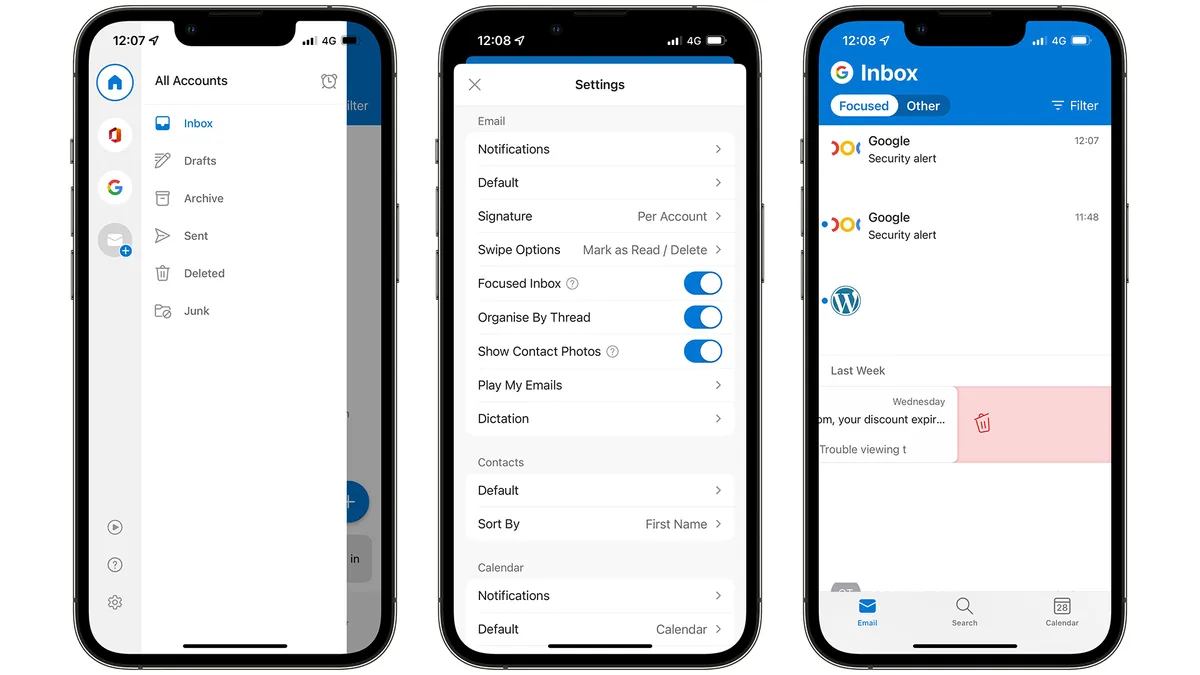
In Outlook, it can already summarize long email chains, help draft replies, and use natural language to help create rules, which gives people a faster way into the part of email that actually needs their attention.
By adding agentic AI, Microsoft is trying to extend that same logic beyond email.
Copilot Chat sits across Microsoft 365 and can draw on web information, while Microsoft 365 Copilot adds grounding in work data as well, so the same assistant can pull together context from emails, chats, files, and other 365 tools.
For users, that means less jumping between apps to reconstruct what is going on, and more chance of getting straight to the next action.

Turning meetings into action
Meetings rarely end when the call does. There are notes to tidy up, decisions to pin down, and a familiar scramble over who agreed to do what.
Microsoft is pitching Copilot as a way to shrink that follow-on work. In Teams, it can summarize the discussion, pull out action points, and answer questions about what was said during or after the meeting.
The value shows up quickly. You miss a meeting, arrive halfway through, or leave with a page of notes that does not quite capture the decision.
Copilot gives you a faster route back to the important bits, which is exactly the sort of admin-heavy follow-up Microsoft is trying to cut down.
The same idea carries over into chat and channels, where so much meeting fallout now ends up. A project decision made on a call can quickly turn into forty messages, three side questions, and one unresolved task buried near the top.
Copilot gives Microsoft a stronger answer to that problem too, helping users catch up on long threads and get back to the part that matters: what changed, what still needs doing, and who is picking it up.

When AI starts doing, not just drafting
This is where Microsoft’s pitch gets more ambitious.
The first wave of workplace AI mostly sped up familiar jobs: drafting, summarizing, rewriting, and cleaning things up. The newer push goes further into work that unfolds across several steps and several tools.
Microsoft 365 Copilot is now being pushed further into multi-step work across Word, Excel, PowerPoint, Outlook, and Copilot Chat, with newer agentic features aimed at jobs that unfold over time rather than in a single prompt.
A lot of everyday work sprawls across tools and formats. For example, a market update might pull from meeting notes, a spreadsheet, a few recent reports, and the presentation that follows.
This is the kind of work Microsoft is targeting: the routine but time-consuming jobs that sit between raw information and a finished output.
Microsoft is also leaning harder into specialist agents. Recent updates highlight Word, Excel, and PowerPoint agents that can create content and take next steps from Copilot Chat, alongside a wider push to surface task-specific agents inside Microsoft 365.
For users, that is the point where AI starts to feel less like a writing tool and more like part of the workflow itself.
Judgment still matters, as does a final check, but the shape of the day changes once software can help carry a task from scattered information to something usable, freeing up your time for other tasks.

Building your own workplace agents
The next step is more tailored. Once people get used to Copilot inside Outlook, Teams, or Word, the obvious question is whether it can be shaped around the way their own team works.
As you might imagine, Microsoft’s answer is yes.
Agent Builder, inside Microsoft 365 Copilot, is designed for quicker, simpler agents that support day-to-day use cases, while Copilot Studio is the heavier-duty option for teams that want to build more advanced agents around business processes.
The obvious use cases are narrow and practical.
A sales team might want briefing notes before a client call. HR could use an agent for common onboarding questions. Finance or operations teams might start with approvals, document handling, or other routine internal requests that already follow a set pattern. And so on.
Microsoft is pitching Agent Builder for these more contained, scenario-based jobs, while Copilot Studio sits further up the ladder for workflows that need deeper links to business data and systems.
Autonomy still needs guardrails
Microsoft’s version of agentic work comes with a clear limit: someone still needs to stay in control.
In the Microsoft 365 admin centre, admins can enable, disable, assign, block, or remove agents, while Agent Registry gives them a central place to manage, govern, and audit what is running across the organisation.
As these tools get closer to company data and routine decision-making, the admin layer starts to matter just as much as the productivity pitch.
For most people, the first real impact will be fairly ordinary. Fewer lost threads, fewer missed actions, and less time spent piecing together what happened across emails, meetings, chats, and documents.