





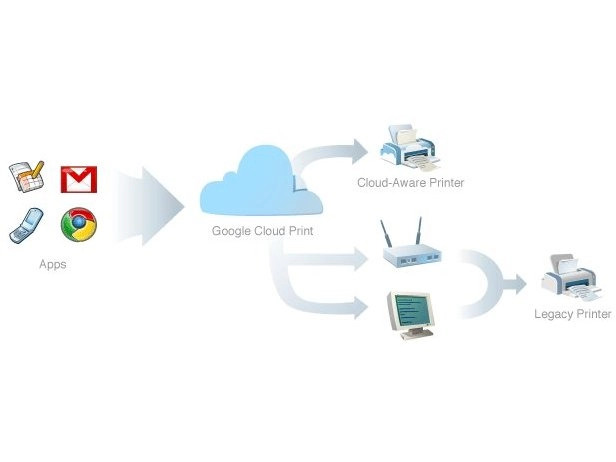
The developers behind Google Chrome OS, the forthcoming cloud-enabled operating system from the internet giant, have explained how they are dealing with a key need for any computer - how well it plays with the printer.
With Chrome OS on course for arrival at the end of 2010, the details of how the operating system, which is all about cloud computing, will do familiar computing tasks are an increasingly important factor.
The Chrome OS developers are mindful of the interest and the latest blog post from Mike Jazayeri, group product manager for Chrome OS, explains the detail.
Cloud computing
"While the emergence of cloud and mobile computing has provided users with access to information and personal documents from virtually any device, today's printers still require installing drivers which makes printing impossible from most of these new devices," says Jazayeri.
"Developing and maintaining print subsystems for every combination of hardware and operating system- from desktops to netbooks to mobile devices - simply isn't feasible.
"Since in Google Chrome OS all applications are web apps, we wanted to design a printing experience that would enable web apps to give users the full printing capabilities that native apps have today."
Google Cloud Print
Google is creating a whole new project called Google Cloud Print which should enable users to print.
"Using the one component all major devices and operating systems have in common - access to the cloud - today we're introducing some preliminary designs for a project called Google Cloud Print, a service that enables any application (web, desktop, or mobile) on any device to print to any printer," adds the post
"Rather than rely on the local operating system (or drivers) to print, apps can use Google Cloud Print to submit and manage print jobs.
"Google Cloud Print will then be responsible for sending the print job to the appropriate printer with the particular options the user selected, and returning the job status to the app."
Details can be found at http://code.google.com/apis/cloudprint/ but is this an elegant solution, or an ad hoc bolt-on?
