
 Become a TechRadar Insider





The best external hard drive will boost storage space, offer fast transfer speeds, and all the portability you need to take with you on the go. Our components editor, John Loeffler went hands-on with all HDDs featured in this guide, using industry-standard benchmarking tools and custom scripts to gain insights into how well each external drive performs in real-world settings.
In our experience, the WD Elements portable HDD is easily the best external hard drive for most people - this one offers value for money, fast read/write speeds, and plenty of storage for general users. Read our full review below, with some top-rated alternatives for every kind of use.
The quick list

The WD Elements external hard drive is highly recommended despite not being the fastest, largest, or cheapest, because it ranks consistently in the top three across all categories, making it a versatile choice. While it doesn't excel in any single aspect, its balanced performance, decent capacity, and portability without significant drawbacks make it the best overall option for most users, offering a well-rounded package at a reasonable price.

The UnionSine Ultra Slim external HDD slim design, excellent read speeds, and attractive price-to-performance ratio makes it a stellar choice for those on a budget. However, its limited capacity options, with a maximum of 2TB, and a high price per terabyte are significant drawbacks. Despite these limitations, its fast read speeds, three-year warranty, and portability make it an excellent choice for those requiring no more than 2TB.

The WD My Passport Ultra for Mac is a reliable option for macOS users, offering a USB-C interface ideal for Time Machine backups and mobile storage. Though not the fastest, its convenience for Mac users—requiring no additional connectors—partially offsets its lower overall performance and higher cost among tested drives. With performance comparable to the WD Elements, it's a suitable choice for those prioritizing ease of use with Mac out of the box, despite its passable transfer speeds.

The FireCuda external game drive remains relevant for gamers with large libraries, offering up to 5TB capacity, high sequential read speeds, and quick copy-to-drive times, enhanced by RGB lighting with Razer Chroma support. Despite its higher price per terabyte, limited capacity options, and a 1-year warranty, its performance loading and transferring games make it a compelling choice, particularly the 5TB version which often goes on sale, offering an even better value.

The Seagate Expansion desktop external hard drive outperforms other HDDs significantly, offering exceptional read and write speeds close to an external SSD, making it ideal for extensive system backups and storing large media files, thanks to its vast capacity options and low price-per-terabyte. However, its lack of portability, due to the need for an external power source, and a high purchase price are drawbacks. Nonetheless, as a desktop backup solution, it's in a class of its own.

The LaCie Rugged Mini's biggest selling point is its durability, offering drop and crush resistance suited for the rough handling typical in outdoor creative work. While its performance is solid, surpassing many non-SSD competitors in read and copy speeds, it comes at a high cost per terabyte. Despite this, its three-year warranty adds value, making it an appealing choice for those prioritizing robustness and reliability in challenging environments, albeit at a premium price.
See more

With plenty of storage capacity at a reasonable price, the WD My Passport is our top choice external hard drive for students. We found transfer speeds to be relatively quick, the design to be durable, and with storage ranging from 1TB to 6TB, it's great for documents, video and image files, and data back-up.

John (He/Him) is TechRadar's Components Editor and has been reviewing computer hardware with TechRadar for several years. As our component lead, he is responsible for testing any and all components that hit the market, including GPUs, CPUs, storage drives, and more. He has extensively tested all of the external hard drives on this list, and chose each based on these test results as the best in their category.
The best external hard drive of 2026 in full:
Why you can trust TechRadar We spend hours testing every product or service we review, so you can be sure you're buying the best. Find out more about how we test.
Below you'll find full write-ups for each of the best external hard drive picks on our list. We've tested each one extensively, so you can be sure that our recommendations can be trusted.

The best external hard drive overall


The WD Elements external hard drive isn't the fastest or the most spacious on the market. Neither does it have the lowest price per terabyte, the largest variety of capacities available, or the best warranty of all the drives I've tested. But this is my top pick for the best external hard drive overall because in every category, it is consistently in the top three.
Whereas one drive might have the lowest price per terabyte (Seagate Expansion) or the best warranty (like the LaCie Rugged Mini), they generally have steeper shortcomings that offset those advantages, like being more expensive, or being a worse overall value.
The WD Elements then is very much a jack-of-all-trades kind of drive, doing all things reasonably well, while not outperforming in one category or the other. For most people though, this is exactly the kind of drive you'll want: something that offers you a good bit of everything without having to make too many sacrifices in the process.
As far as performance goes, again, this isn't the fastest drive I tested. Far from it in fact, but its read speeds were close enough to most of the drives that this won't be noticeable, and its random write speeds, which is essential for a regularly used external HDD, are a good bit higher than its competition.
In the end, it came in with the third best overall score and the second best value score, while offering higher capacities than the UnionSine DataPocket and a portability that the Seagate Expansion can't offer, all while coming in at an acceptable price point for an external HDD with a higher capacity.
The best budget external hard drive


There are only a couple of things that hold back the UnionSine Ultra Slim external HDD from being the best external hard drive overall, and it's a shame, because this is a great drive.
Its overall scores are second only to the top-scoring Seagate Expansion, and its slim profile makes this a very easy drive to carry around, though it's slightly bigger than the WD Elements and WD My Passport Ultra.
Its lower capacity options compared to the other external HDD picks on this list cut against it, but if you don't need more than 2TB of external HDD storage, then this is definitely one of the drives you should get, thanks to its fast read speeds, three-year limited warranty, and outstanding price.
Despite its low price point, It has a rather high price per terabyte owing to its limited capacity options, with its max capacity topping out at just 2TB. While it does have several much smaller capacities starting at 250GB, the utility of such small capacities on an external HDD makes them harder to recommend, especially when you can get a faster portable SSD with the same or greater capacity for not a whole lot more money.
Performance-wise, the UnionSine Ultra Slim manages to outperform all of the drives on this list in terms of overall read speeds save for the Seagate Expansion, though it does have a much longer copy time in my 25GB file copy test, and its average write speeds are much lower than other drives.
These latter two points really hurt since file writing and copying speeds are the two biggest factors when it comes to an external HDD's performance since you are far more likely to be writing data to the drive than reading from it on a regular basis.
Still, on balance, its performance is outstanding, and its price-to-performance value is the best on this list, and it's not even close.
The best external hard drive for Mac


There aren't a lot of external hard drives out there with a USB-C interface, so Mac users have had to make a lot of compromises over the past couple of years but with the WD My Passport Ultra for Mac, macOS users have a solid option for Time Machine backups and other long-term storage on the go.
Like the WD Elements, this isn't the fastest drive on the list, despite it's USB-C port, and it's speeds are largely the same as what you'll get with the WD Elements, though you'll have to spend a bit more money to get the My Passport Ultra for Mac.
This might be a harder pill to swallow for some, since this drive's overall score is the lowest of the drives we tested, and finding a USB-C to Micro B connector isn't all that hard, so any of the other drives on this page will serve just as well for your Mac, though none will work as well with your Mac out of the box.
In terms of performance, you're essentially getting the same speeds and scores as the WD Elements, with a noteable exception. Copying files internally is incredibly fast on this drive, second only to the Seagate Expansion, but copying to this drive is significantly slower in my testing.
I would argue that the latter is more important, but your mileage may vary. Ultimately, if you're a Mac user and you just want a drive that you can pull out of the box, plug in, and get going, this drive is a good bet, despite its shortcomings.
Find the best deals on Western Digital products with our Western Digital promo codes.
Read our full WD My Passport Ultra review
The best external hard drive for gaming


Modern game consoles and the best gaming PCs have all largely moved on to faster SSD storage, making gaming hard drives much less relevant than they once were, but they're not obsolete just yet, especially if you're dealing with an absolutely massive game library that is too much of a hassle to download and uninstall on a regular basis.
The FireCuda external game drive is exactly the kind of thing you need in a case like this. With up to a 5TB capacity, reasonably fast sequential read speed, and a very fast copy-to-drive speed, the RGB accent lighting with Razer Chroma support is really just an added bonus.
On the downside, this drive has a pretty high price per terabyte, only a few capacity options, and just a 1-year warranty, but it's not the end of the world for a drive like this.
On the performance end, this drive is near the top in terms of sequential read speeds, which is essential for game loading or copy operations to a faster SSD, and copy-to-drive operations, which you'll need if you want to move games on and off the drive with your console or PC's main storage.
Ultimately, it isn't the best value of all the drives tested, but it's better than most, especially if you opt for the 5TB drive, which you can usually find on sale.
The best high-capacity external hard drive


The Seagate Expansion desktop external hard drive is the best-performing HDD I tested, and it's not close.
With scores that nearly double the nearest competition and read and write speeds second only to an external SSD, the Expansion in a seriously robust external drive, perfect for regular system backups thanks to its huge capacity options.
Those capacities also come at a very low price-per-terabyte, making this ideal for housing massive video and other media files in addition to system image files. The downside is that this isn't a very portable drive, owing to it needing to be plugged into an external power source like a wall outlet or a portable battery.
If you're looking strictly for a desktop backup solution though, you won't find better unless you upgrade to an SSD. Read, write, and copy speeds are dozens of MB/s ahead of the other HDDs on this list, and understandably, this drive ends up scoring the best overall. Unfortunately, its high price does tank its value score, despite its low price per terabyte.
The best rugged external hard drive


The LaCie Rugged Mini external HDD is a solid enough performer for a non-SSD, but what you're here for is the added protection that comes with its bright orange shock absorber.
According to LaCie, the Rugged Mini features a drop resistance of four feet (1.2m) and a crush resistance that can survive being run over by a 1-ton car, so it will almost certainly survive the kind of beating that photographers and creatives out in the field might subject it to, including cramming it into bags, dropping it on trails, and other real-world scenarios.
That said, the Rugged Mini does come in pretty expensive compared to many other 5TB drives, and its price per terabyte is very high overall. It does come with a three-year warranty to help soften that blow, however.
Overall, the drive's performance is on the higher end, beating out the WD Elements and UnionSine Ultra Slim in terms of read speeds, and falling just behind the UnionSine Ultra Slim in terms of average write speeds. Its copy data rate is also second only to the Seagate Expansion, so moving files onto and around the drive will be fairly quick, on balance.
Best external hard drive for students
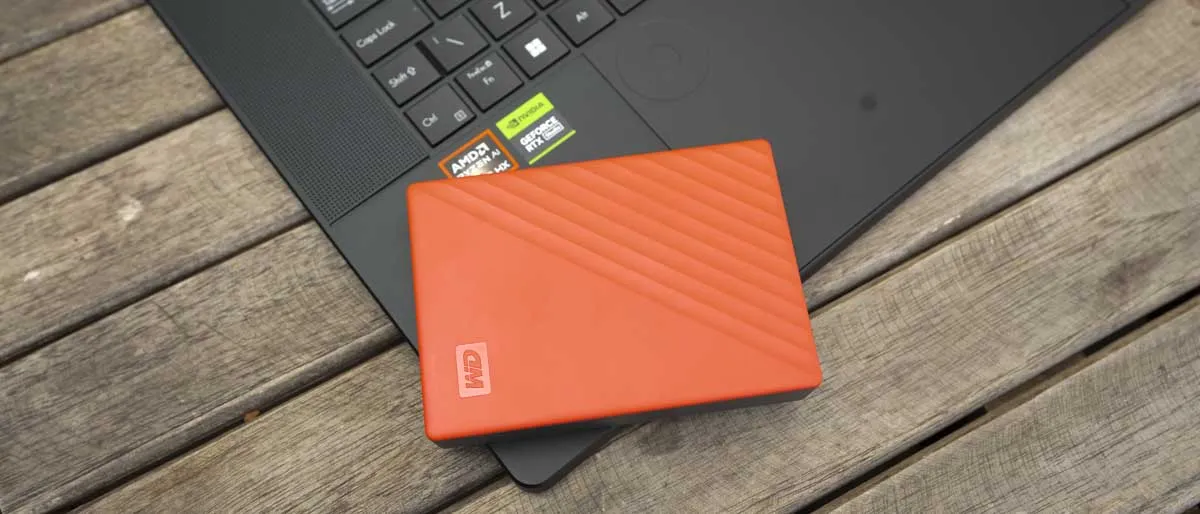


The best external hard drive for students needs to combine plenty of storage - especially if you're creating content - at a good price. For us, the WD My Passport delivers.
The device is available in a range of storage capacities, from 1TB to 6TB, which should be enough for most students. We reviewed the 6TB model and found transfer speeds were fast enough for an external HDD, although not as quick as an SSD. Set-up was straightforward enough, just plug and play on Windows - however, Mac users will need to properly set up the extra Acronis True Image software with new drivers and reformatting. This is simple enough, but may not be ideal for everyone. In any case, once we tried this ourselves, the hard drive worked seamlessly.
The WD My Passport is ideal for backing up or sending large amounts of data. Image and video files are tailor-made for this device. Simple to use, bundled with extra software, and plenty of features that set this apart from other external hard drives - all at a very reasonable price.
Read our full WD My Passport 6TB review
The best external hard drive: FAQs
Which external hard drive is best for backup?
In terms of external HDDs, the Seagate Expansion is my top pick thanks to its huge capacity options and incredibly fast read, write, and copy speeds for a hard disk drive. Only an SSD will get you faster speeds, and you won't find any that offer the Expansion's capacity for a reasonable price.
Are external hard drives still worth it?
If you're looking for long-term storage and back up drives, than external hard drives are definitely worth it, since you can get a lot of extra storage space for large backup files at a reasonable price. They aren't the best for day-to-day file storage, especially if you need to access those files regularly, since a HDD can't match the speeds of an SSD.
How to choose the best external hard drive
When selecting the ideal external hard drive, prioritizing a model that offers secure and reliable storage for your critical files is essential. Speed is another key consideration, with the best models featuring advanced connectivity options like USB-C for quick data transfers.
The drive's connection type, along with its technology—either a traditional hard drive or a solid-state drive (SSD)—significantly influences transfer speeds. Look for drives with USB 3.2 Gen 2x2 USB Type-C or Thunderbolt 3 or 4 for the fastest transfers, ensuring your computer supports these connections.
Additionally, if your work involves large files like high-definition media, opt for a drive offering ample storage, with several terabytes available at a reasonable cost.
How we test the best external hard drives
I tested all of the drives on this list using several industry-standard benchmarking tools like CrystalDiskMark, PCMark 10, and BlackMagic Speed Test.
I also used a custom script that repeatedly copies a 25GB folder with thousands of files and a deep directory structure to the drive from a PCIe 4.0 SSD to the drive, recording the times it took to complete the copy operations and using the average of those times as its final result. The script then repeatedly copies the same folder from one location on the drive being tested to another internal location and measures that time, taking the average time to complete as its result.
I then use the geometric mean of the various scores and transfer rates as the drive's final score, which I then divide by the price of the drive to come up with its value score.
Read more on how we test, rate, and review products on TechRadar.
Get in touch
- Want to find out about commercial or marketing opportunities? Click here
- Out of date info, errors, complaints or broken links? Give us a nudge
- Got a suggestion for a product or service provider? Message us directly
- You've reached the end of the page. Jump back up to the top ^